
Create a distance matrix in Excel in seconds
Calculate driving distance or travel time between dozens or hundreds of locations at once, using Google Maps data, without leaving Excel.
- ✓ No coding required
- ✓ Real driving data from Google Maps
- ✓ One-time purchase
See how it works in 2 minutes
Stop Calculating Distances One by One
A matrix does what hours of manual lookups can’t.
SAVE TIME
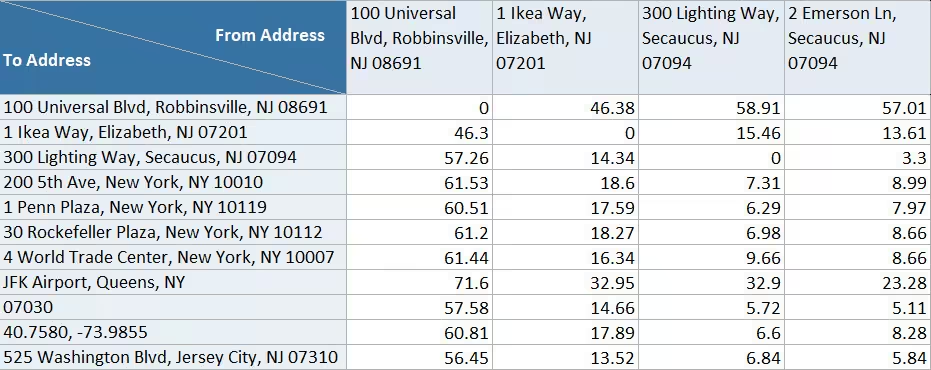
10 Locations, 100 Distances, One Click
What used to take hours of copy-pasting from Google Maps is done in seconds. The matrix calculates every combination for you.
SPOT PATTERNS
See Which Locations Are Closest at a Glance
The built-in heatmap turns your matrix into a visual map. Green for short, red for long. Make decisions faster.
ONE-TIME PRICE
One Price, Yours Forever
$69 one-time payment. No subscriptions, no monthly fees. Google includes 10,000 free calculations per month. Updates are free for life.
How it Works
Three steps from addresses to distances. No formulas, no scripting.
-
1
Enter Your Locations
Type or paste your locations into a single list. The matrix handles all pairs automatically.
-
2
Click Calculate
Choose your travel mode, hit calculate, and let Google Maps process every combination at once.
-
3
Get Your Matrix
An N x N grid of distances and travel times appears in Excel. Toggle the heatmap to spot patterns instantly.
Who Uses the Distance Calculator
From logistics to real estate, sales to research.
Manual Lookups vs. Distance Matrix Calculator
See how the numbers scale when you need every combination.
CALCULATION CONTROL
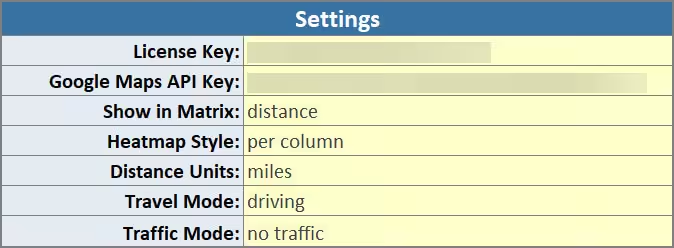
Choose how distances are calculated
Select travel mode, units, and traffic behavior before you run the calculation. Measure driving, walking, cycling, or public transport, with or without traffic, in miles or kilometers.
FLEXIBLE INPUT
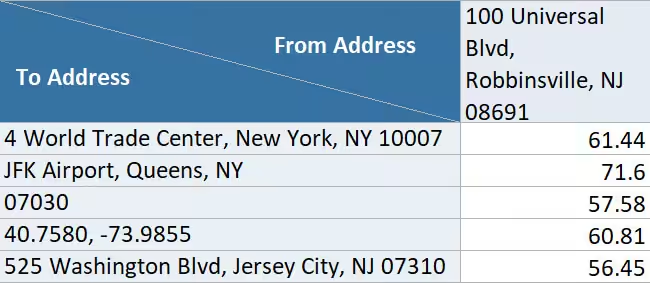
Work with the locations you already have
Use (incomplete) addresses, postal codes, landmarks, or coordinates. No reformatting needed. Paste your data and calculate.

Honest Feedback from Real Users
Responsive and open to feedback
“Impressed with both the products and the support. Very responsive to questions and open to improvement suggestions. I've purchased several tools and been happy with all of them.”
Fantastic support
“Had a question and got a helpful reply within hours. Really solid support. Highly recommend.”
An awesome program and creator
“Not only does the developer respond directly to your questions, he actually acts on them. I made a feature request and it was implemented the next day. That kind of dedication is rare.”
Simple, One-Time Pricing
One flat price in USD. No subscriptions.
one-time payment
Lifetime access
one-time payment
Lifetime access
Frequently Asked Questions
Everything you need to know before getting started.
Questions? Get in Touch.
If the FAQs missed a spot, I’m here to help. Ask away and get the answers you need, straight from the source!

Stop Looking Up Distances One at a Time
Calculate driving distance or travel time between all your locations, directly in Excel.
