
Separate Addresses in Excel into Street, City, State and ZIP
Whole addresses crammed into one cell? One click splits every row into street, city, state and ZIP, fills in missing ZIP codes, and adds the county and coordinates. No Text to Columns, no formulas.
One-time price. Windows, Mac and the web.
Reviewed by Microsoft Listed on Microsoft MarketplaceHow do you separate addresses in Excel today?
If the answer is "text to columns, then fix the rest by hand", this page will save you a few afternoons.
- Text to columns breaks the moment a row has a comma in the wrong place, or none at all.
- LEFT, MID and FIND formulas only work while every address has exactly the same layout.
- A missing ZIP code or state stays missing, and the county was never in the cell.
- Paste an address into Google Maps, copy the clean one back, split it into columns. Repeat 500 times.
- Select your address column and click Format addresses.
- Street, city, state, ZIP and county land in their own columns, spelled the way Google Maps spells them.
- Missing ZIP codes and states are filled in, and every row gets its latitude and longitude.
- New rows next week? Run it again. It can skip the rows that are already done.
See how it works
Three steps, and none of them is "learn something new".
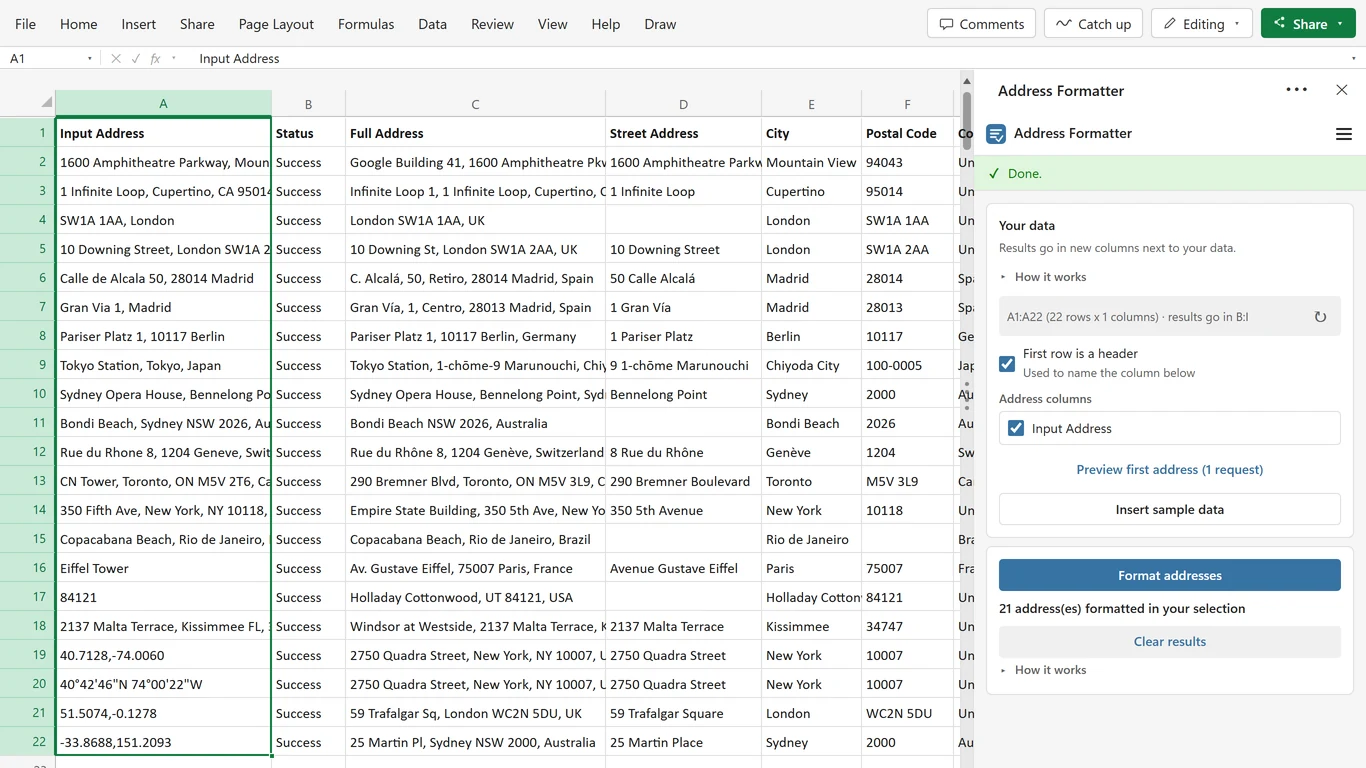
Select your addresses
One column, or several if the address is already split into street, city and zip. Clicking one cell inside your data is enough, and an Excel table works the same way.
Pick the columns you want
All 13 fields, or just city and postal code. Tick them once and the add-in remembers. Preview the first address if you want to see the shape before a big run.
Click Format addresses
Clean fields appear in new columns to the right, row by row as it runs. Interrupted halfway? Everything already written stays in the sheet.
What you put in, and what you get back
If Google Maps can find it, the add-in can clean it. Anywhere in the world, and you can mix all of these in one column.
| What you type | What it is |
|---|---|
| Addresses and places | |
| 350 Fifth Ave, New York, NY 10118 | A full address |
| gran via 1, madrid | Half an address, badly typed |
| 84121 | Only a ZIP code |
| Eiffel Tower | A landmark or place name |
| Street | City | ZIP in three columns | Joined into one address per row |
| GPS coordinates, turned back into an address | |
| 40.7128, -74.0060 | Latitude, longitude |
| 40°42'46"N 74°00'22"W | Degrees, minutes, seconds |
| 40° 42.767' N 74° 0.367' W | Straight off a GPS device |
Out the other side: full address, street, unit, building, city, county, state or province, postal code, country, country code, latitude, longitude and match precision. Plus a Status column, always.
Made for the list you already have
Your columns, your fields, your language. Every picture comes from real runs of the add-in, with real Google Maps results.
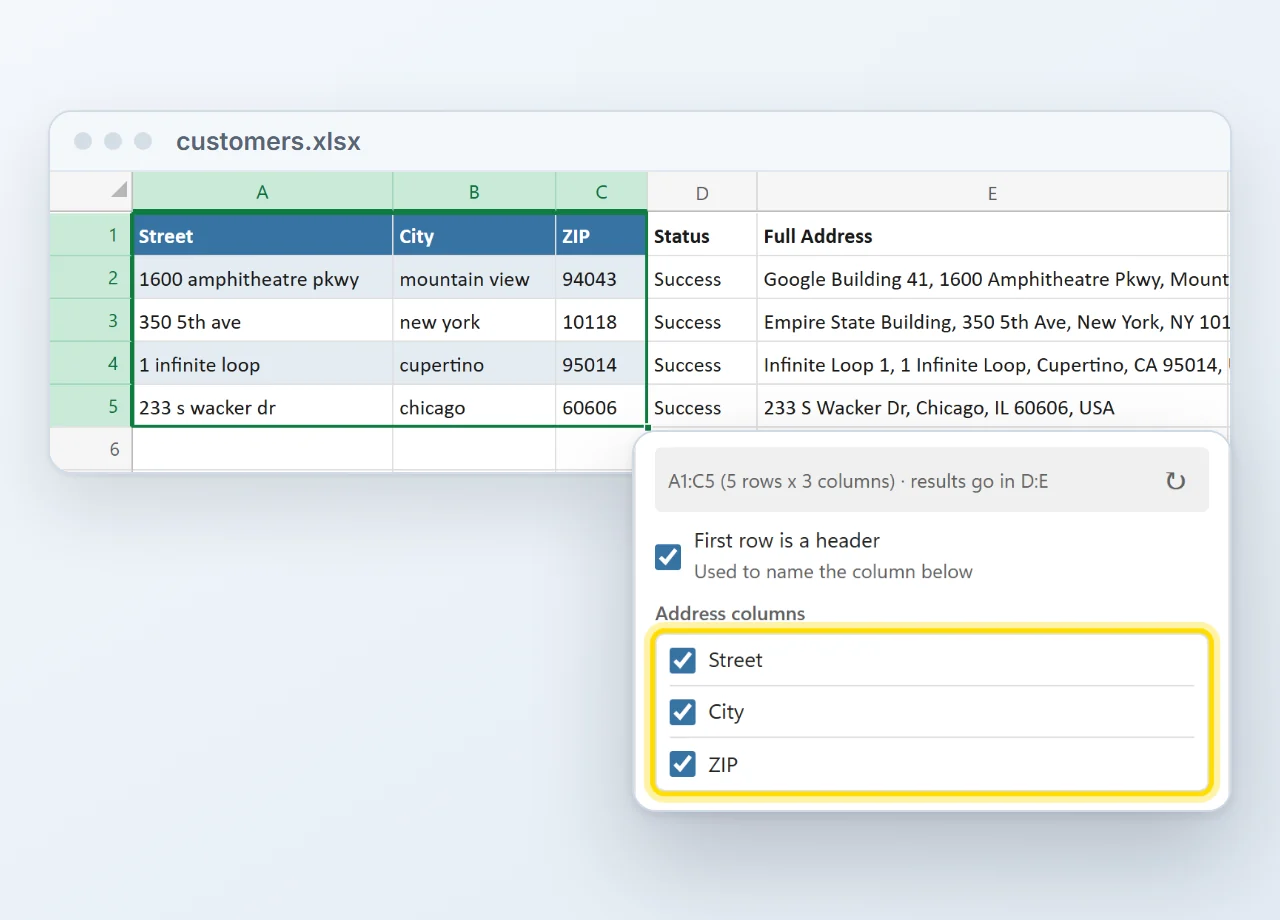
Works with your existing columns
Address split across Street, City and ZIP? Tick the columns that hold it and they are joined left to right into one address. The clean result lands in new columns right next to your data.
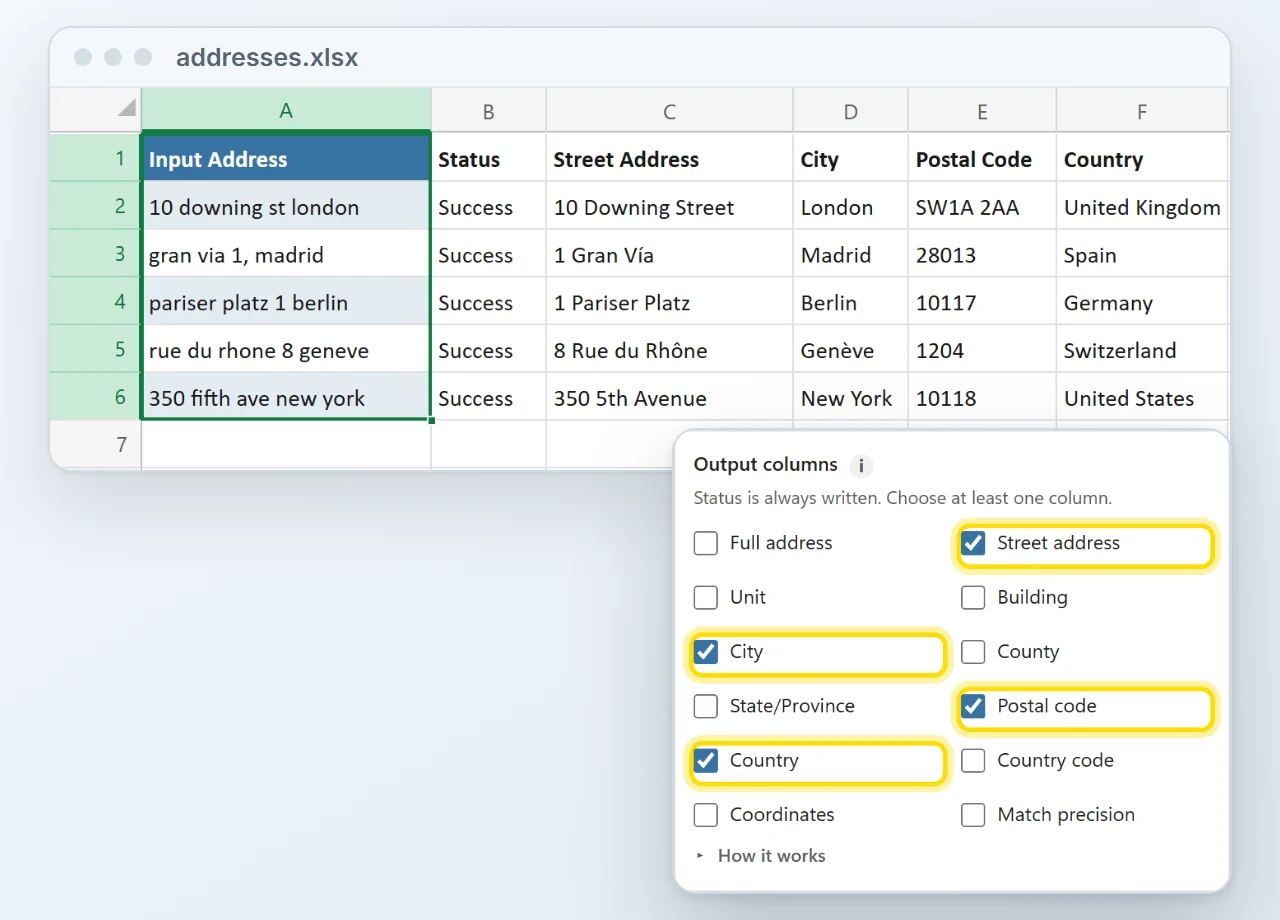
Only the fields you need
Thirteen fields to choose from: full address, street, unit, building, city, county, state or province, postal code, country, country code, latitude, longitude and match precision. Tick the ones your report needs.
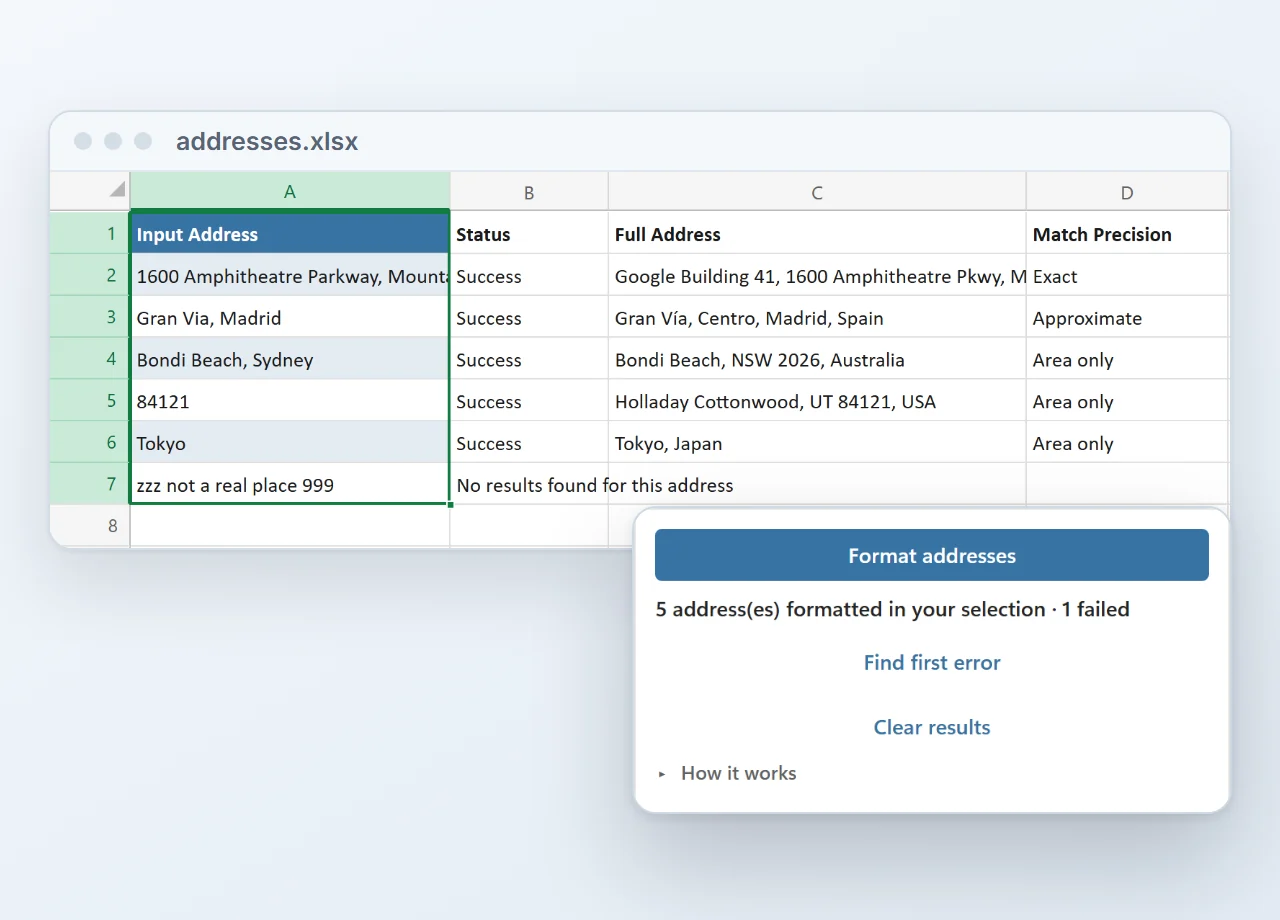
Know which results to trust
Every row gets a Status, Success or what went wrong, and an optional match precision from Exact down to Area only. You check the few rows that need a second look, not the whole list.
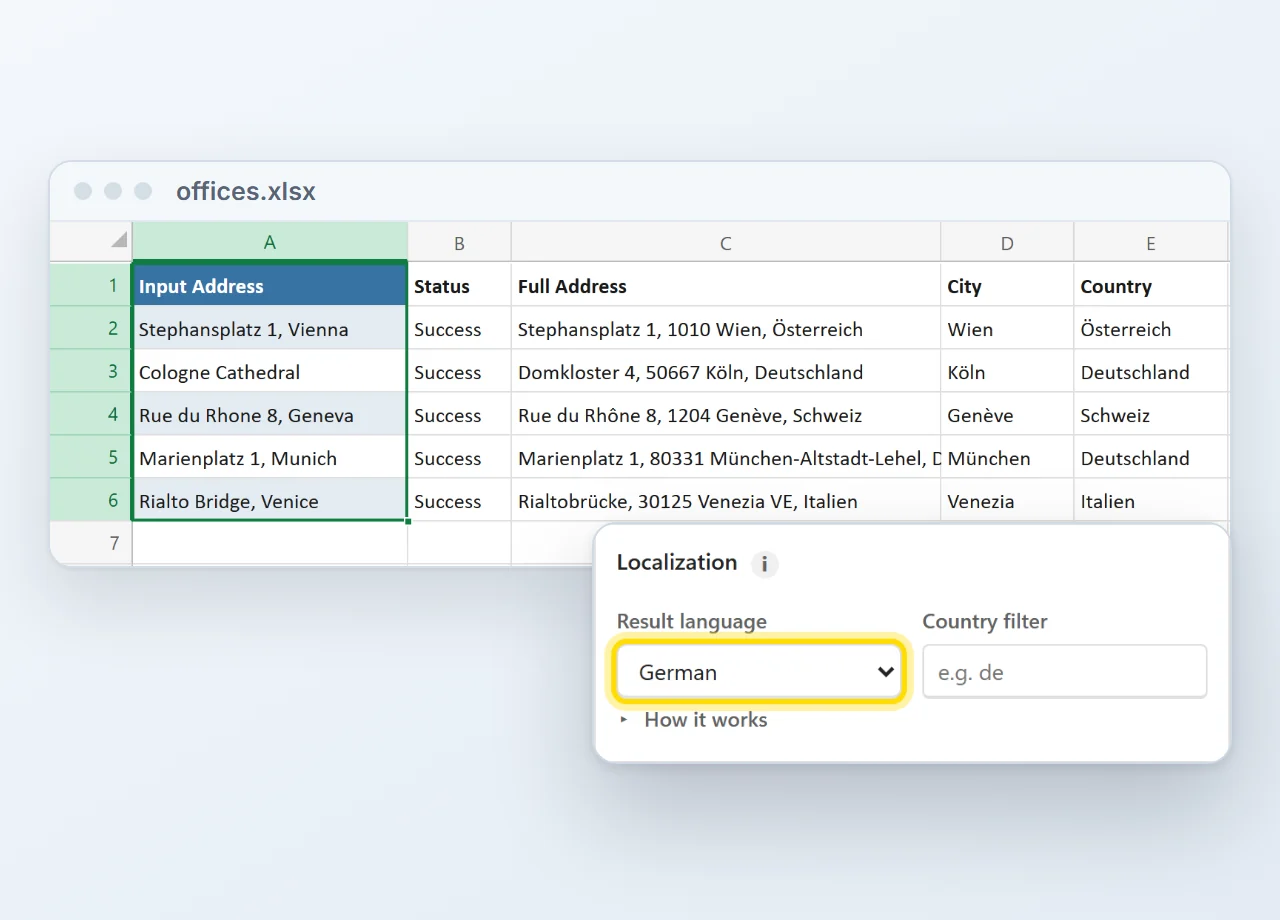
Results in your language
Get addresses back in English, German, Spanish, French, Italian, Portuguese or Dutch, and add a country filter so a bare postcode lands in the right country.
Prefer formulas? They are in there too.
- Type it like any Excel function. =GEO.FULL(A2) for the clean address, =GEO.FIELD(A2, "city") for one field, =GEO.LAT and =GEO.LNG for the coordinates.
- Fill down like any formula. Drag the little green handle down the column and every row gets its clean value.
- Recalculating costs nothing. Results are cached, so an address the add-in already knows is never sent to Google again.
| Input | Full Address | City | Latitude |
|---|---|---|---|
| Eiffel Tower | Av. Gustave Eiffel, 75007 Paris | Paris | 48.8584 |
| SW1A 1AA | London SW1A 1AA, UK | London | 51.5010 |
| 40.7128,-74.0060 | New York, NY 10007, USA | New York | 40.7128 |
Click any cell: the formula bar shows what is inside it. GEO.FIELD takes any of the 13 field names, so one formula covers the lot.
Installed in about a minute
Straight from Microsoft's add-in store, inside Excel. No installer file, no macros to enable, and from then on it is there in every workbook.
- 1In Excel, go to Home → Add-ins → More Add-ins.
- 2On the Store tab, search for Address Formatter by Bosau Digital.
- 3Click Add, open it from the Home tab and paste your license key and Google Maps key.
Depending on your Excel version, look under Insert → Get Add-ins instead.
- Windows, Mac and the web
- No macro warnings
- Updates arrive by themselves
- Follows your light or dark theme
What you need
Three things, and two of them you have already.
Your addresses go to Google, and nowhere else
The add-in uses your own Google Maps key, and your Excel talks to Google directly. There is no server of mine in the middle, and I never see your customer list.
Pay once. Keep it forever.
No subscription, free updates, and no markup on lookups: your Google key pays Google directly, which under 10,000 a month means paying nothing.
- One license key for 1 user on up to 3 computers
- Batch runs and the GEO formulas
- All 13 output fields, plus a Status column
- Reverse geocoding from GPS coordinates
- Excel on Windows, Mac and the web
- Free updates, forever
- Email support, usually within 24 hours
- One license key for up to 15 users
- Batch runs and the GEO formulas
- All 13 output fields, plus a Status column
- Reverse geocoding from GPS coordinates
- Excel on Windows, Mac and the web
- Free updates, forever
- Email support, usually within 24 hours
14-day refund, no questions asked. If it is not for you, email me and you get your money back.
- Excel on Windows
- Excel on Mac
- Excel on the web
- Microsoft 365 or Office 2021 and later
Frequently asked questions

Still have a question?
I’m Sven, the developer, and I usually reply within a day.
Ready to stop cleaning addresses by hand?
Turn a messy column into clean, structured address data in your own workbook.
Get the Address Formatter add-inGoogle and Google Maps are trademarks of Google LLC. Microsoft, Excel and Microsoft 365 are trademarks of Microsoft Corporation. This product is made by Bosau Digital LLC and is not affiliated with or endorsed by Google or Microsoft.