
Create a Distance Matrix in Excel in Seconds
Addresses across the top, addresses down the side, one click. The add-in fills every cell of the grid with the real driving distance and travel time from Google Maps, then colours it green to red so the nearest option jumps out.
One-time price. Windows, Mac and the web.
Reviewed by Microsoft Listed on Microsoft MarketplaceHow are you comparing every site to every stop today?
A 10 by 10 grid is 100 lookups. By hand, that is most of a morning.
- One pair at a time in Google Maps, typed back into one cell. Then the next 99.
- Put one number in the wrong cell and the whole comparison quietly points at the wrong site.
- Straight-line formulas measure through lakes and mountains, not along roads.
- Add one depot next week and you are back at the start.
- Point at the From row and the To column, click Calculate matrix.
- Every cell gets its real road distance and travel time from Google Maps.
- A green-to-red heatmap colours the grid, so the nearest option is obvious.
- Add a row or a column later, run it again, and the cells you already have are skipped.
See how it works
Three steps, and none of them is "learn something new".
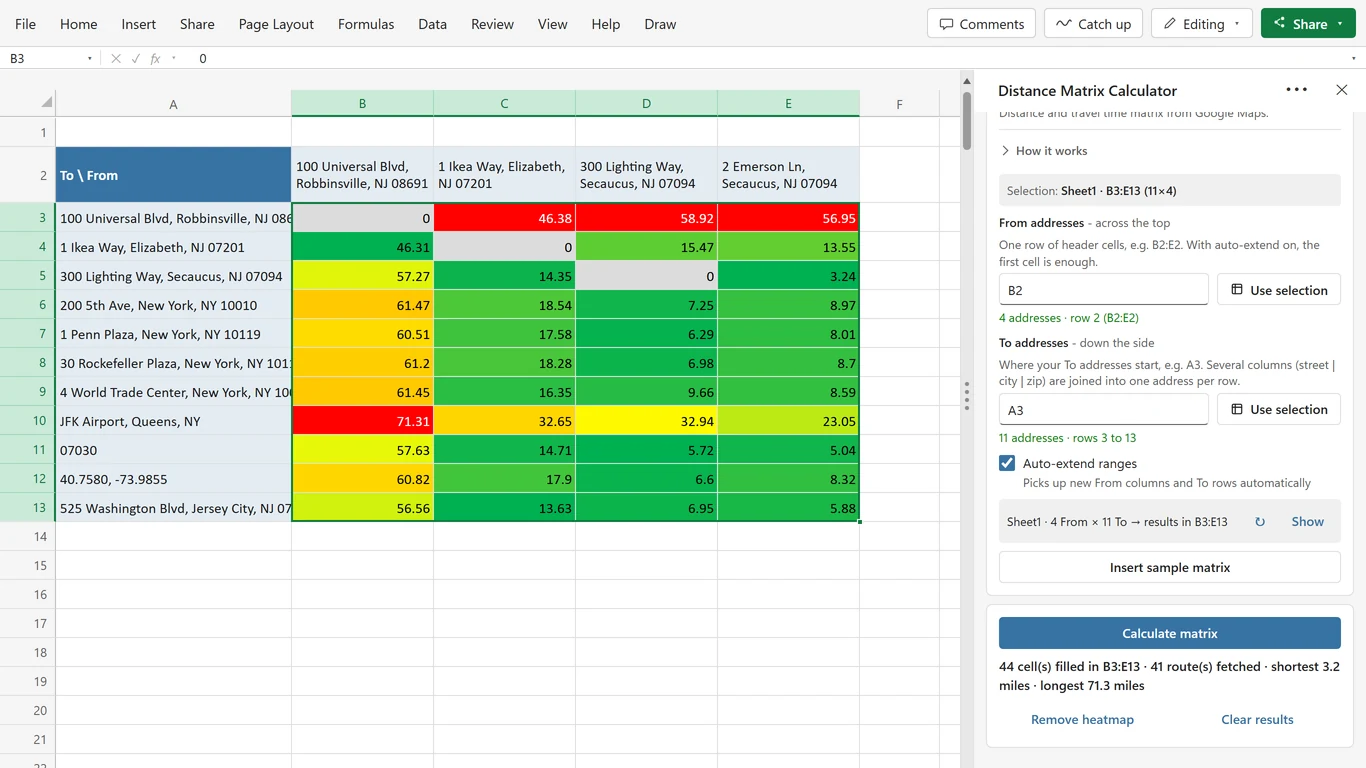
Lay out your addresses
From addresses in a row across the top, To addresses in a column down the side. The classic layout is already the default, so an old workbook needs no setup at all.
Check the preview
The pane tells you exactly what it is about to do: "4 From × 11 To, results in B3:E13". Click Show and it highlights that block in your sheet first.
Click Calculate matrix
Cells fill in as the run goes, then the heatmap colours them. Stop halfway and everything already calculated stays in the sheet.
Your addresses can look like anything
If Google Maps can find it, the add-in can use it. Anywhere in the world, and you can mix all of these in one grid.
| Address | What it is |
|---|---|
| 100 Universal Blvd, Robbinsville, NJ 08691 | A full address |
| Hauptstraße 12, Heidelberg | Just street and city |
| 07030 | Only a ZIP code |
| SW1A 1AA | A postcode works too |
| JFK Airport, Queens, NY | A landmark or place name |
| 40.7580, -73.9855 | Latitude, longitude |
| Split across columns | |
| Street | City | ZIP in three columns | Joined into one address per row |
From and To do not have to match, either: a ZIP code on one axis and a landmark on the other works just fine.
Made for the sheet you already have
Your layout, your units, your way of getting there. Every picture comes from real runs of the add-in, with real Google Maps results.
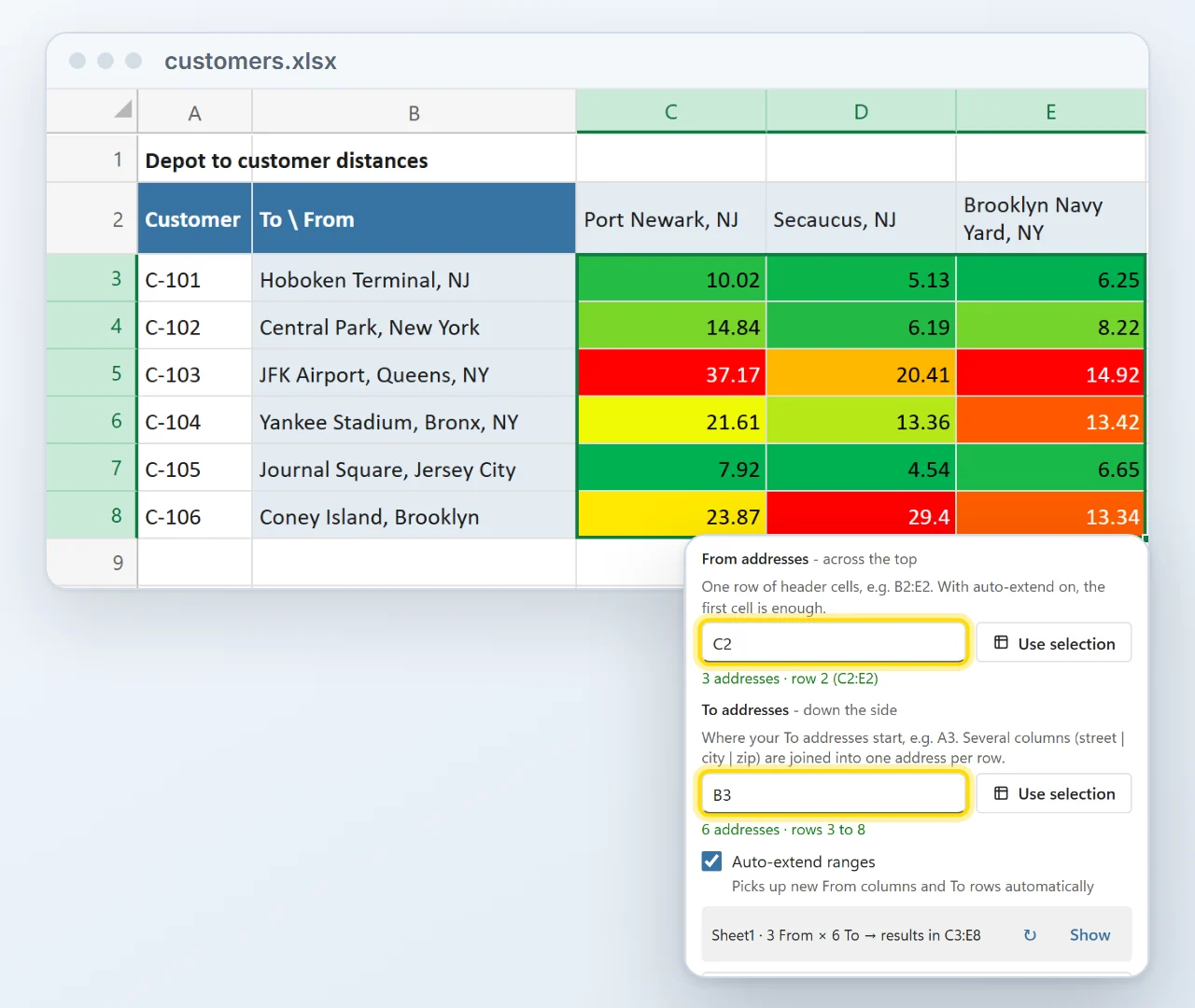
Works with your existing layout
Your addresses do not have to start in a fixed cell. Point the From and To pickers at wherever they already sit, next to your other columns, and a live preview shows where the results will land before anything is written.
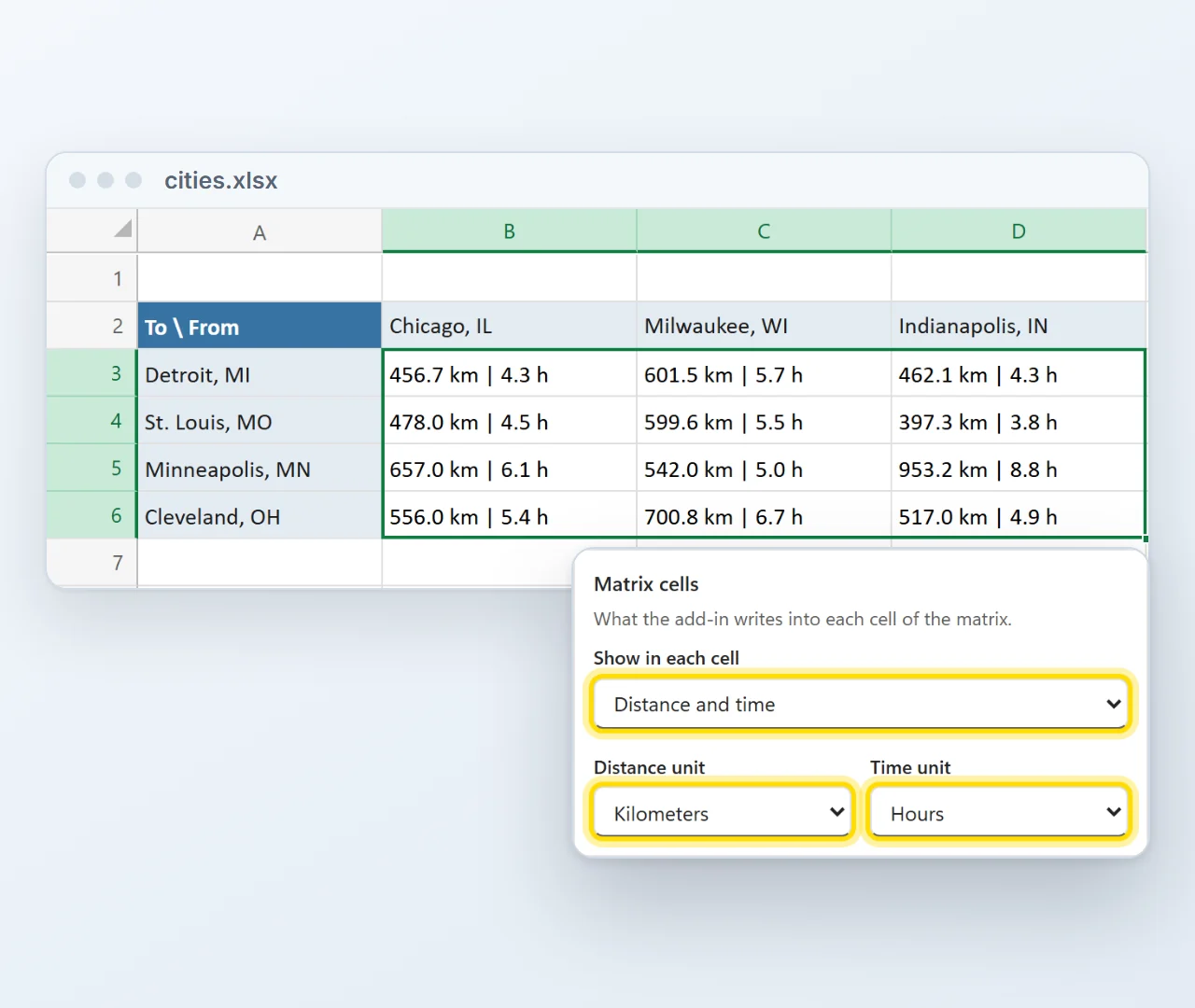
Distance, travel time or both in each cell
Choose what every cell shows, in miles or kilometers and minutes or hours. With both switched on a cell reads 456.7 km | 4.3 h, so one grid answers both questions.
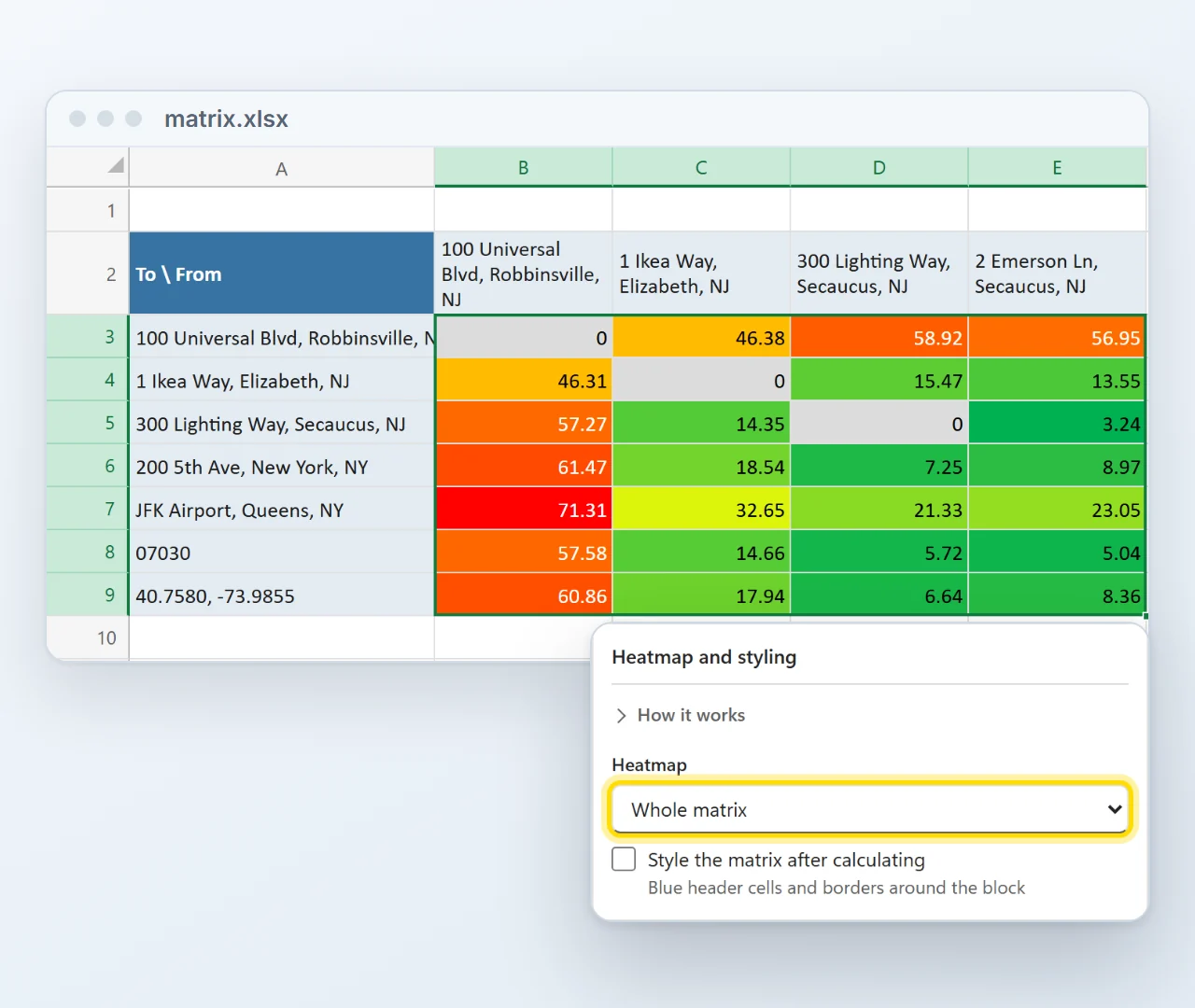
The nearest option jumps out
A green-to-red heatmap, per From column or across the whole matrix, marks the short and the long trips at a glance. Where an address meets itself the cell is simply 0, with no Google call.
Drive, walk, cycle or take public transit
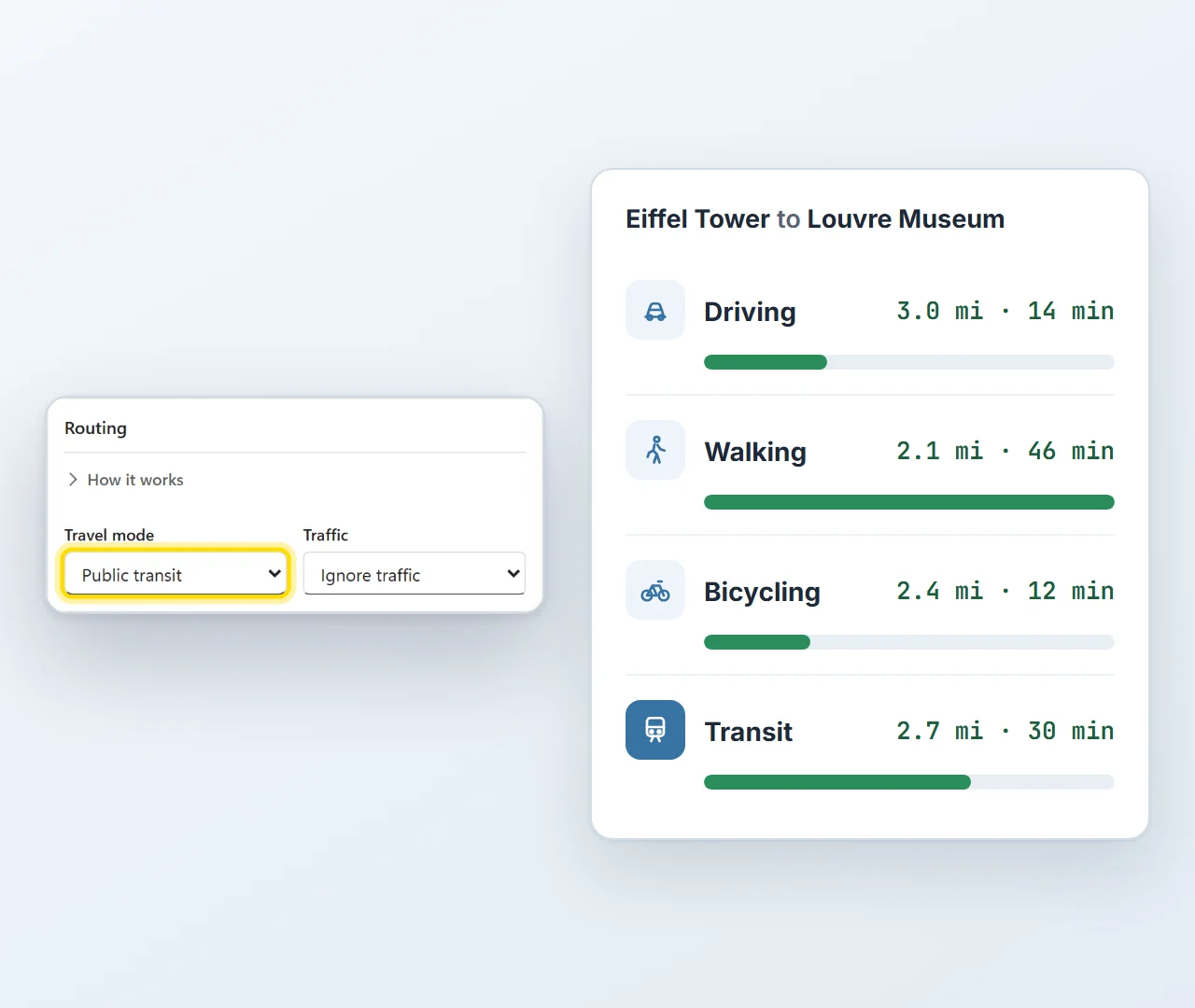
The same trip can take 12 minutes or 46, depending on how you travel. Choose driving, walking, bicycling, public transit or two-wheeler, and switch on traffic-aware driving when today's roads matter.
Installed in about a minute
Straight from Microsoft's add-in store, inside Excel. No installer file, no macros to enable, and from then on it is there in every workbook.
- 1In Excel, go to Home → Add-ins → More Add-ins.
- 2On the Store tab, search for Distance Matrix Calculator by Bosau Digital.
- 3Click Add, open it from the Home tab and paste your license key and Google Maps key.
Depending on your Excel version, look under Insert → Get Add-ins instead.
- Windows, Mac and the web
- No macro warnings
- Updates arrive by themselves
- Follows your light or dark theme
What you need
Three things, and two of them you have already.
Your addresses go to Google, and nowhere else
The add-in uses your own Google Maps key, and your Excel talks to Google directly. There is no server of mine in the middle, and I never see your data.
Pay once. Keep it forever.
No subscription, free updates, and no markup on lookups: your Google key pays Google directly, which under 10,000 a month means paying nothing.
- One license key for 1 user on up to 3 computers
- Full distance and travel-time matrix
- Green-to-red heatmap, one click on or off
- All travel modes, units and options
- Excel on Windows, Mac and the web
- Free updates, forever
- Email support, usually within 24 hours
- One license key for up to 15 users
- Full distance and travel-time matrix
- Green-to-red heatmap, one click on or off
- All travel modes, units and options
- Excel on Windows, Mac and the web
- Free updates, forever
- Email support, usually within 24 hours
14-day refund, no questions asked. If it is not for you, email me and you get your money back.
- Excel on Windows
- Excel on Mac
- Excel on the web
- Microsoft 365 or Office 2021 and later
Frequently asked questions

Still have a question?
I’m Sven, the developer, and I usually reply within a day.
Ready to stop filling that grid one cell at a time?
Build the whole distance matrix directly in your workbook.
Get the Distance Matrix Calculator add-inGoogle and Google Maps are trademarks of Google LLC. Microsoft, Excel and Microsoft 365 are trademarks of Microsoft Corporation. This product is made by Bosau Digital LLC and is not affiliated with or endorsed by Google or Microsoft.