
Mail merge from Excel, with each person's own table
Personal emails to your whole list, from Excel or from your contacts.
Do you send the same report to a lot of people every month? Then you know the routine: copy someone's rows, paste them into a new email, repeat. SheetCourier sends one personal email to everyone on your Excel list, and each person gets only their own rows.
100 free emails, every feature included.
No credit card. No sign-up.
Via Microsoft Store · Windows 10 and 11
Each person gets their own table
One sheet with everyone's numbers. You tell SheetCourier which column says who a row belongs to, and every email carries only that person's rows.
| A | B | C | D | E | |
|---|---|---|---|---|---|
| 1 | Region | Month | Product | Units | Revenue |
| 2 | North | Sep 2026 | Desk lamp | 120 | $3,480.00 |
| 3 | North | Sep 2026 | Office chair | 35 | $6,965.00 |
| 4 | South | Sep 2026 | Desk lamp | 88 | $2,552.00 |
| 5 | East | Sep 2026 | Office chair | 41 | $8,159.00 |
| 6 | South | Sep 2026 | Monitor arm | 52 | $2,288.00 |
| 7 | North | Sep 2026 | Monitor arm | 64 | $2,816.00 |
| 8 | East | Sep 2026 | Desk lamp | 97 | $2,813.00 |
| Product | Units | Revenue |
|---|---|---|
| Desk lamp | 120 | $3,480.00 |
| Office chair | 35 | $6,965.00 |
| Monitor arm | 64 | $2,816.00 |
| Total | 219 | $13,261.00 |
| Product | Units | Revenue |
|---|---|---|
| Desk lamp | 88 | $2,552.00 |
| Monitor arm | 52 | $2,288.00 |
| Total | 140 | $4,840.00 |
| Product | Units | Revenue |
|---|---|---|
| Office chair | 41 | $8,159.00 |
| Desk lamp | 97 | $2,813.00 |
| Total | 138 | $10,972.00 |
Keep your fonts, colors and number formats. Does your table have a totals row? It is worked out again for each person's own rows, so nobody sees anyone else's totals.
Just need to email a list? Keep your contacts in SheetCourier
Not every mailing needs a spreadsheet. Bring your people in once from Excel or a CSV file, put them in lists, and send one personal email to everyone on a list. Contacts are free and unlimited, and they stay on your PC.
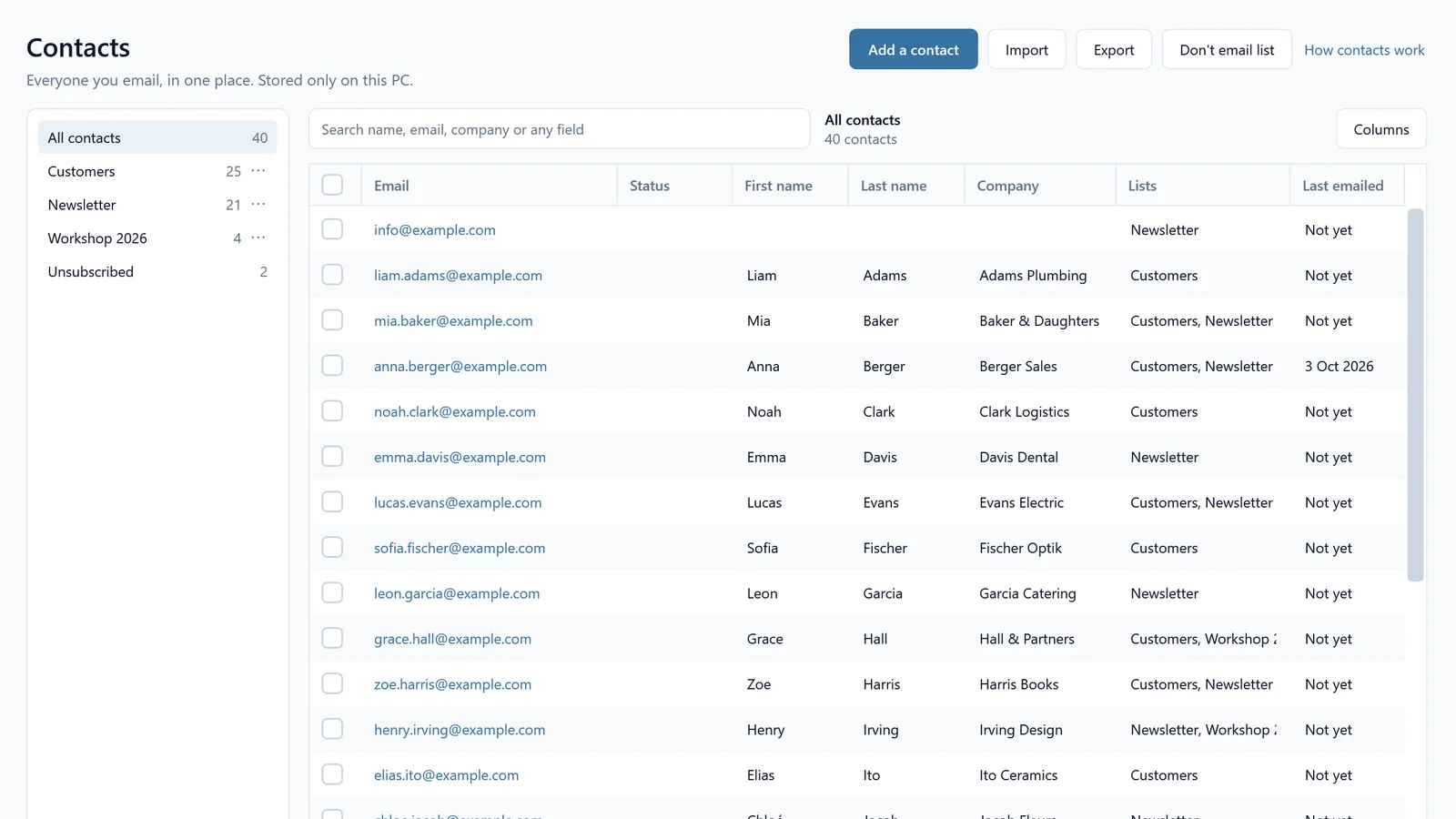
Everyone you email, in one place
Find anyone by name, email, company or any field you add. Put people in lists like Customers or Newsletter, and one person can be in several lists. You see at a glance who unsubscribed and when you last emailed someone.
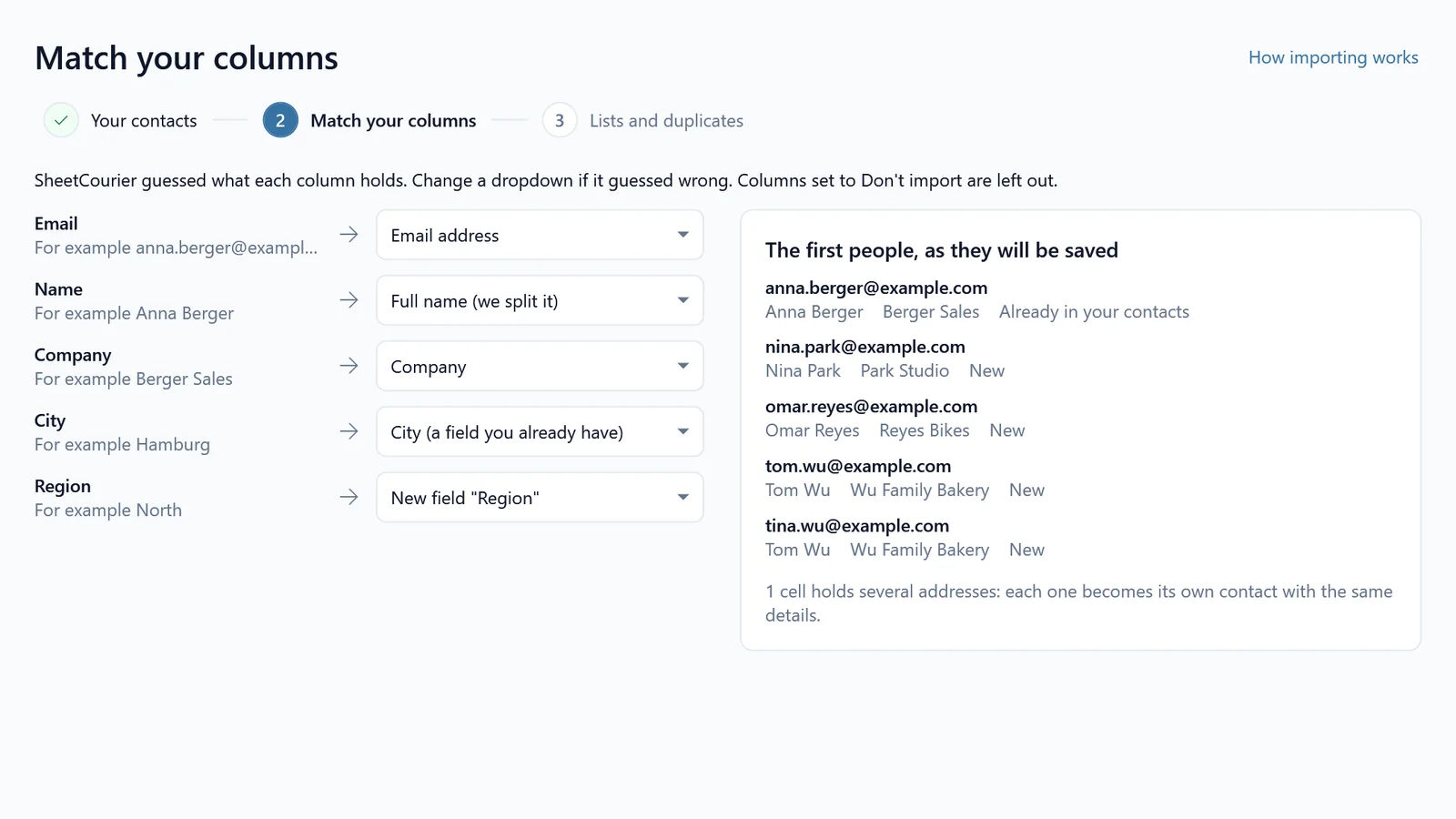
Bring your list in from Excel or CSV
SheetCourier guesses which column holds the email addresses, the names and the company, and you can keep any other column as a field of your own. People who are already in your contacts are not added twice.
Then start a mailing, pick My contacts, tick your lists and write your email. People who asked not to get your emails are left out of every mailing.
How it works
Works with the email you already have
Your emails go out from your own address, so replies come straight back to you.
Gmail
Normal Gmail or Google Workspace with your company's domain. You connect it with an app password, a special password Google gives you for apps.
Outlook on this PC
Sends through classic Outlook on your computer. No password needed, and every email shows up in Outlook's Sent Items.
Your own domain
An address like you@yourcompany.com at IONOS, GoDaddy, Hostinger, Strato, Namecheap and others. SheetCourier can find the settings for you.
Also built in: Microsoft 365 / Outlook.com, Yahoo, iCloud, Zoho Mail, AOL, GMX, WEB.DE and Fastmail.
Sending to hundreds or thousands of people? Use a sending service with your own domain: Brevo, SMTP2GO, Amazon SES or Mailjet.
Who it is for
Anyone who keeps the numbers in Excel and has to send each person their part.
Sales managers
Every rep gets their own sales for the month, as a neat table in the email. Next month you update the sheet, click Send again and send it to everyone on the list.
Each person gets their own rows, matched by the rep's name or region.Teachers and trainers
Each student or parent gets only their own grades or attendance, straight from your grade book.
Each person gets their own rows, matched by the student's name or ID.Small businesses and bookkeepers
Send every customer a statement of their open invoices, in the email or as a PDF they can file away.
Each person gets their own rows, sent as a table or a PDF attachment.Team leads with several branches
One workbook, one sheet per branch. Every branch manager gets their own sheet, charts included.
Each person gets their own sheet, sent as a picture or PDF (needs Excel on your PC) or as an Excel file.How SheetCourier compares
Most mail merge tools live in Google Sheets and charge every month. SheetCourier works with the Excel file on your PC, and you pay once.
| SheetCourier | YAMM | Mailmeteor | GMass | Word mail merge | |
|---|---|---|---|---|---|
| Your list | Excel or CSV file on your PCOr your contacts, or pasted addresses | Google Sheets | Google SheetsAlso offers an Excel add-in | Google Sheets | Excel file on your PC |
| Contact lists | Built in, on your PCImport from Excel or CSV, free and unlimited | Your Google SheetCan import Google Contacts into it | In its online dashboard | Google Sheets or a Gmail contacts label | Outlook contacts |
| Sends through | Gmail, Outlook on this PC, your own domainPlus Microsoft 365 / Outlook.com, Yahoo, iCloud and more | Gmail | Gmail or Outlook | Gmail | Outlook on your PC |
| Each person gets their own rows of a table | YesAs a table in the email, a picture, a PDF or an Excel file | Not listed | Not listed | Not listed | Not built inWorkarounds exist |
| How you pay | OnceNo subscription, updates included | Subscription | SubscriptionMonthly or yearly | SubscriptionMonthly or yearly | Part of Microsoft Office |
| Free to try | 100 emails per computerEvery feature, tests to yourself always free | 20 recipients a day | 50 emails a day | 7-day free trialUp to 50 emails a day | Comes with Office |
| Runs on | Windows 10 and 11 | Your browser | Your browserPlus Office add-ins | Gmail in Chrome | Windows or Mac |
As of October 2026, from each product's public pricing and feature pages. "Not listed" means I could not find the feature there. YAMM, Mailmeteor and GMass are products of their respective owners.
Your list stays on your PC
SheetCourier reads your Excel file and keeps your contacts on your computer, and it sends through your own email account. Your list and your emails never pass through a server of mine.
Try it free. Pay once to keep it.
Every feature is in every plan. The only difference is how many emails and computers.
- 100 emails per computer
- Every feature, Excel tables included
- Unlimited contacts and lists
- Unlimited tests to yourself
- Updates through the Store

- Unlimited emails
- Every feature, Excel tables included
- Unlimited contacts and lists
- Unlimited tests to yourself
- 3 computers
- Unlimited emails
- Every feature, Excel tables included
- Unlimited contacts and lists
- Unlimited tests to yourself
- 15 computers
Sven, SheetCourier developer
Frequently asked questions
If you bought Gmail Blaster, it keeps working and its documentation stays online. Gmail Blaster customers get a SheetCourier Single user license for free: look for my email, or write to me with the form below if it did not reach you.
The new Outlook for Windows and Outlook on the web cannot be used by other apps. Outlook.com, Hotmail and work or school Microsoft 365 accounts can also sign in with Microsoft using the Microsoft 365 / Outlook.com tile, no classic Outlook needed.

Still have a question?
I’m Sven, the developer, and I usually reply within a day.
Try SheetCourier for free
Send your next monthly report straight from Excel, with each person's own table.
Download free for WindowsSheetCourier is an app by Bosau Digital LLC. It is not affiliated with, endorsed by or sponsored by Microsoft Corporation or Google LLC. Excel, Outlook and Microsoft 365 are trademarks of Microsoft Corporation; Gmail and Google Workspace are trademarks of Google LLC.
SheetCourier is a Windows app
SheetCourier installs on a Windows 10 or 11 PC and sends through your own email account. Copy the download link and send it to your PC to get started.