
Print address labels straight from Excel
No Word mail merge. Pick your label sheet, click Create PDF, print. Works on Windows, Mac and the web.
- True-size preview of every page before you print
- An exact PDF that lines up with your label sheet
- Calibration for printers that shift the page
Listed on Microsoft Marketplace. Free for one full sheet per print job, no account.
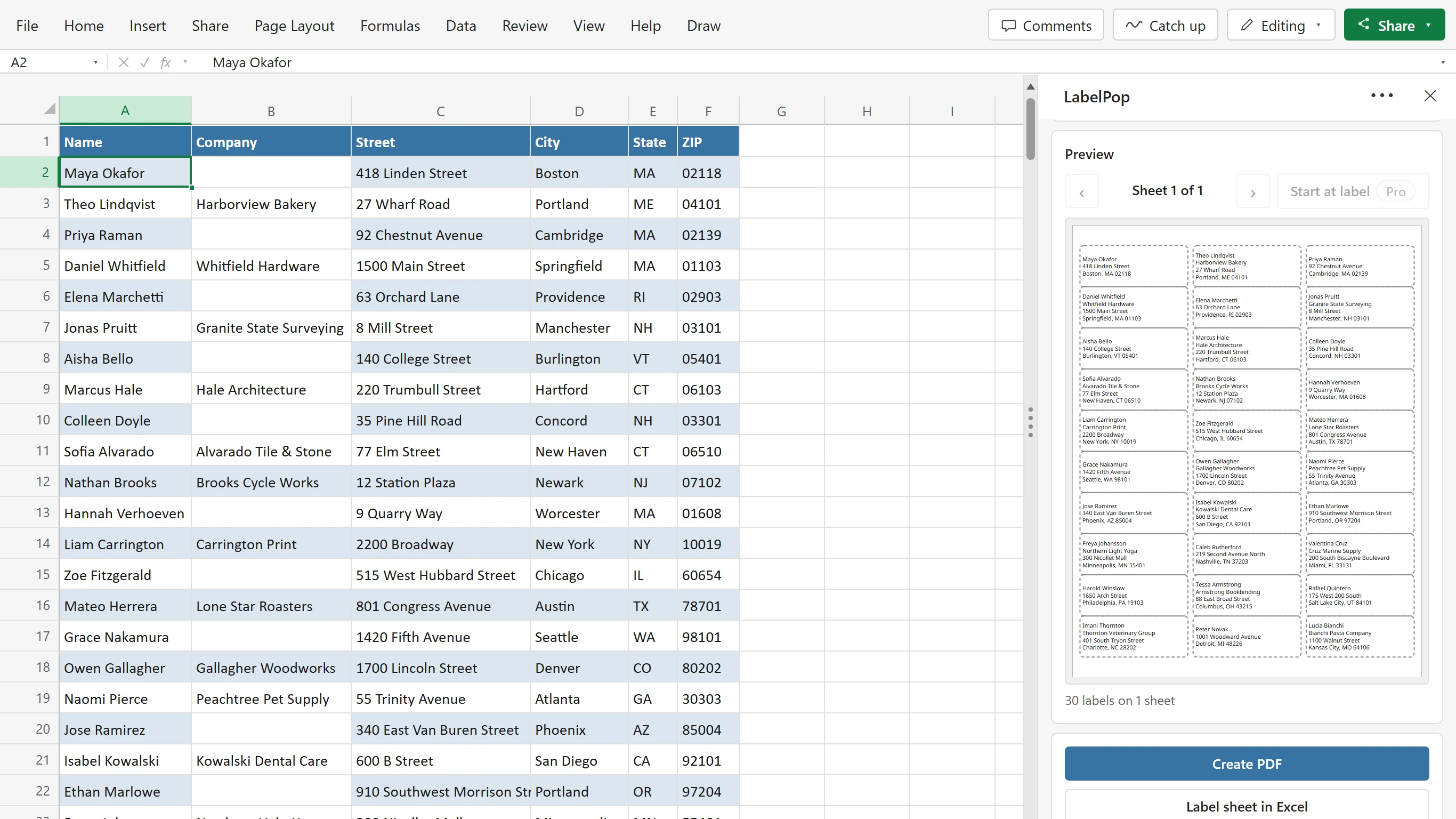
From a list in Excel to a sheet of labels
Click a cell in your list. LabelPop suggests the layout from your column headers, shows the sheet at true size and makes a PDF that lines up with your label sheet.
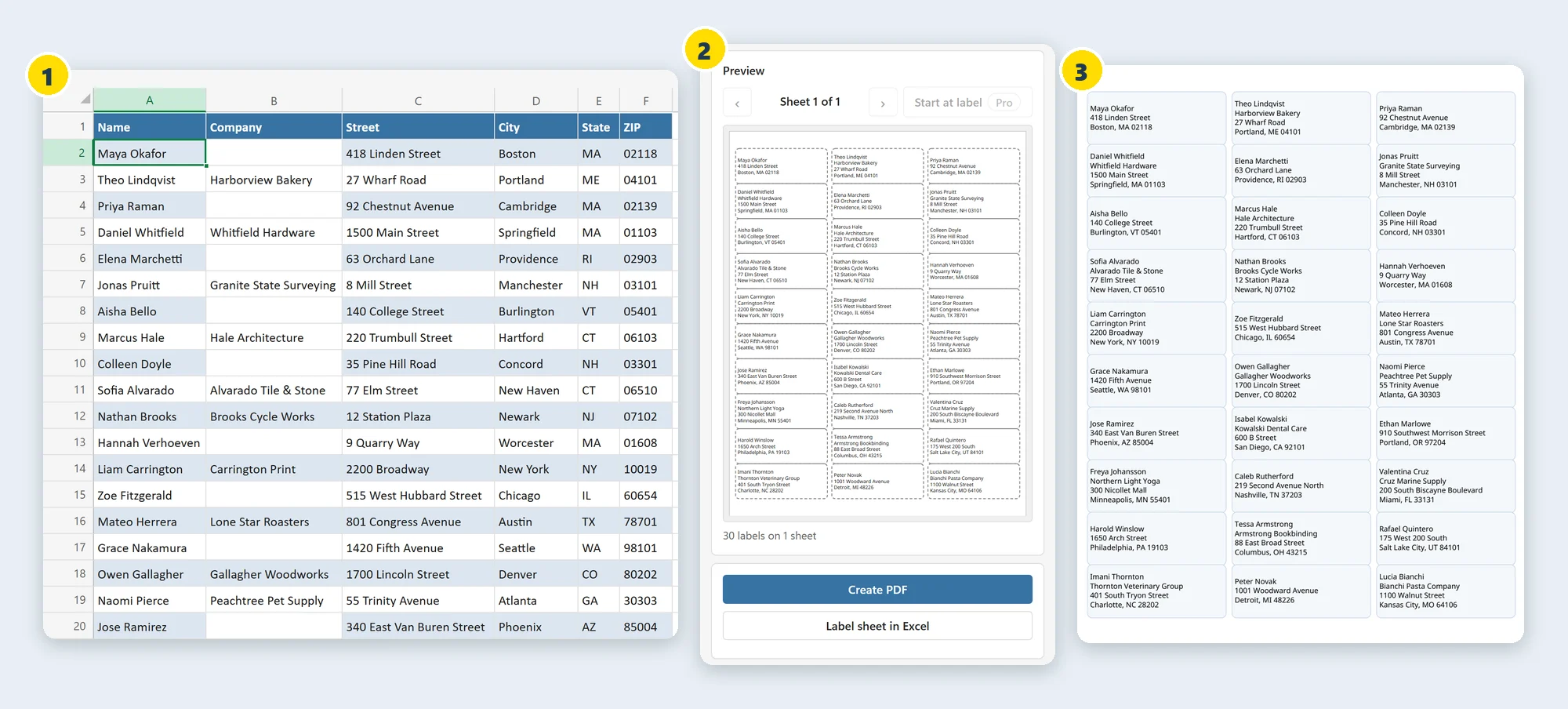
- Your list, as it isClick any cell in the list. LabelPop finds the table and maps name, company, street, city, state and ZIP from the headers. ZIP codes keep their leading zeros, and filtered rows stay filtered.
- A true-size previewEvery page is drawn at true scale, and long names shrink to fit. A warning shows when a line does not fit the label.
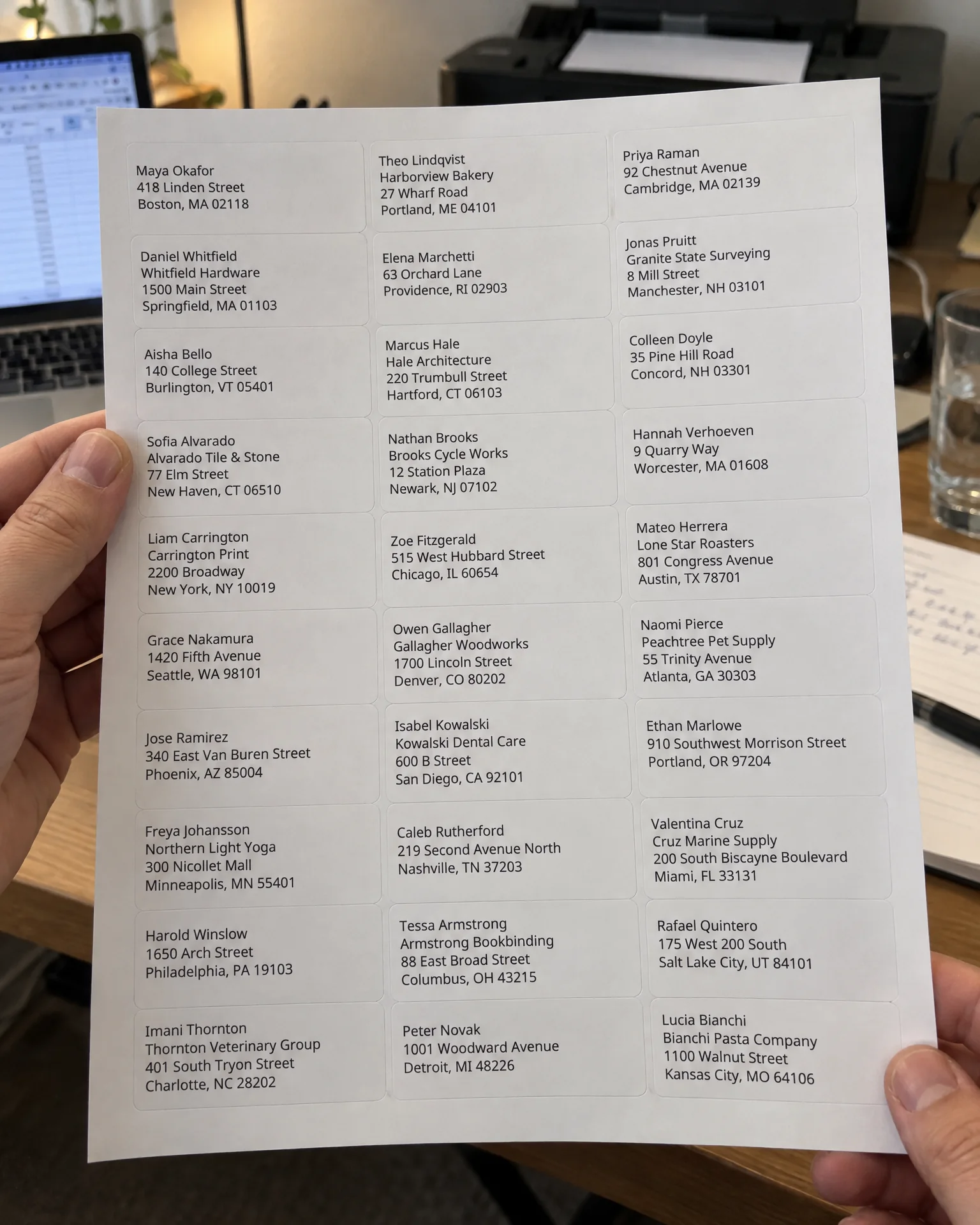
- An exact PDFPrint it at Actual size and the text lands inside the labels. If your printer shifts the page, a calibration page fixes it once for that computer.
Why not mail merge?
Mail merge works, but it takes two apps and a wizard, and the labels often drift off the sheet. LabelPop keeps the whole job in Excel.
Mail merge in Word
Excel for the list, Word for the labels
- Two apps that have to stay linked: the list in Excel, the labels in Word.
- Seven steps in a wizard, repeated every time the list changes.
- Alignment drifts between the label sheet and the page, and you only see it on paper.
- Not available in Word for the web, so it stops working outside the desktop app.
LabelPop in Excel
One pane beside your list
- One pane in Excel. No Word document and no data source to link.
- A true-size preview of every page, so you see the sheet before you print.
- An exact PDF with the label positions set to the millimeter, not a layout that drifts.
- Calibration for the printers that still shift the page. Works on Windows, Mac and the web.
How it works
Open the pane from the Home tab. Three steps later you have a PDF.
Click your list
Click any cell in your address list. LabelPop finds the table and suggests a layout from the column headers.
Pick the label size
Choose the size of your label sheet. Each size lists the pack numbers it matches, and the preview shows every page at true size.
Create PDF
Click Create PDF, open it and print at Actual size. The addresses land inside your die-cut labels.
The common label sheets, US Letter and A4
Each size is named by what it is. The numbers are the packs that use the same size, so you can match yours to the number on the box.
Address labels
US Letter- Address 30 per sheet1 x 2-5/8 inSame size as 5160, 8160, 5260, 18160, 15660, 5520
- Address 20 per sheet1 x 4 inSame size as 5161
- Address 14 per sheet1-1/3 x 4 inSame size as 5162
Return address labels
US Letter- Return address 80 per sheet1/2 x 1-3/4 inSame size as 5167
- Return address 60 per sheet2/3 x 1-3/4 inSame size as 5195
File folder labels
US Letter- File folder 30 per sheet2/3 x 3-7/16 inSame size as 5366
Square and round labels
US Letter- Square, 12 per sheet2 x 2 inSame size as 22816, 22806
- Round, 12 per sheet2 in diameterSame size as 22807
Shipping and large labels
US Letter- Shipping 10 per sheet2 x 4 inSame size as 5163, 8163
- Shipping 6 per sheet3-1/3 x 4 inSame size as 5164
- Postcard-size 4 per sheet3-1/2 x 5 inSame size as 5168
- Shipping 2 per sheet5-1/2 x 8-1/2 inSame size as 5126
- Full sheet8-1/2 x 11 inSame size as 8165
Name badges
US Letter- Name badge 8 per sheet2-1/3 x 3-3/8 inSame size as 5395, 8395
- Name badge insert 6 per sheet3 x 4 inSame size as 5392
A4 sheets
A4- Address 21 per sheet63.5 x 38.1 mmSame size as L7160, J8160
- Address 14 per sheet99.1 x 38.1 mmSame size as L7163, J8163
- Address 16 per sheet99.1 x 33.9 mmSame size as L7162, J8162
- Address 8 per sheet99.1 x 67.7 mmSame size as L7165, J8165
- Mini 65 per sheet38.1 x 21.2 mmSame size as L7651, J8651
- Address 24 per sheet70 x 36 mmSame size as 3490, 3475
- Address 24 per sheet70 x 37 mmSame size as 3474
- Address 18 per sheet63.5 x 46.6 mmSame size as L7161, J8161
- Full sheet label199.6 x 289.1 mmSame size as L7167, J8167
- Full page A4210 x 297 mmThe whole A4 page, not a die-cut label sheet
Any other sheet: enter its size in Pro (custom label sizes).
Avery, Zweckform and Herma are trademarks of their respective owners. LabelPop is an independent product by Bosau Digital LLC and is not affiliated with or endorsed by them. Product numbers are listed only to identify compatible sheet sizes.
Installed in about a minute
Straight from Microsoft's add-in store, inside Excel. No installer file, no macros and no account.
- 1In Excel, go to Home → Add-ins → More Add-ins.
- 2On the Store tab, search for LabelPop by Bosau Digital.
- 3Click Add, open LabelPop from the Home tab, then click a cell in your list.
Listed on Microsoft Marketplace
Depending on your Excel version, look under Insert → Get Add-ins instead.
- Windows, Mac and the web
- No macros, no Word
- Labels are built on your computer
- Our server cannot read your addresses
Pay once. No subscription.
Every label size is free for one full sheet per print job. Pro prints the whole list.
- Every label size, US Letter and A4
- True-size preview and exact PDF
- Calibration for printers that shift
- One full sheet per print job
- One license key for 3 devices
- Every Pro feature
- Every future update included
- 14-day money-back guarantee
- One license key for 15 devices
- Every Pro feature
- Every future update included
- 14-day money-back guarantee
Pro adds unlimited sheets (up to 5,000 labels per print job), starting on a partly used sheet, copies per row, sorting, one label per unique address, barcodes and QR codes, your logo on every label, custom label sizes, saved designs and extra fonts.
Frequently asked questions

Still have a question?
I’m Sven, the developer, and I usually reply within a day.
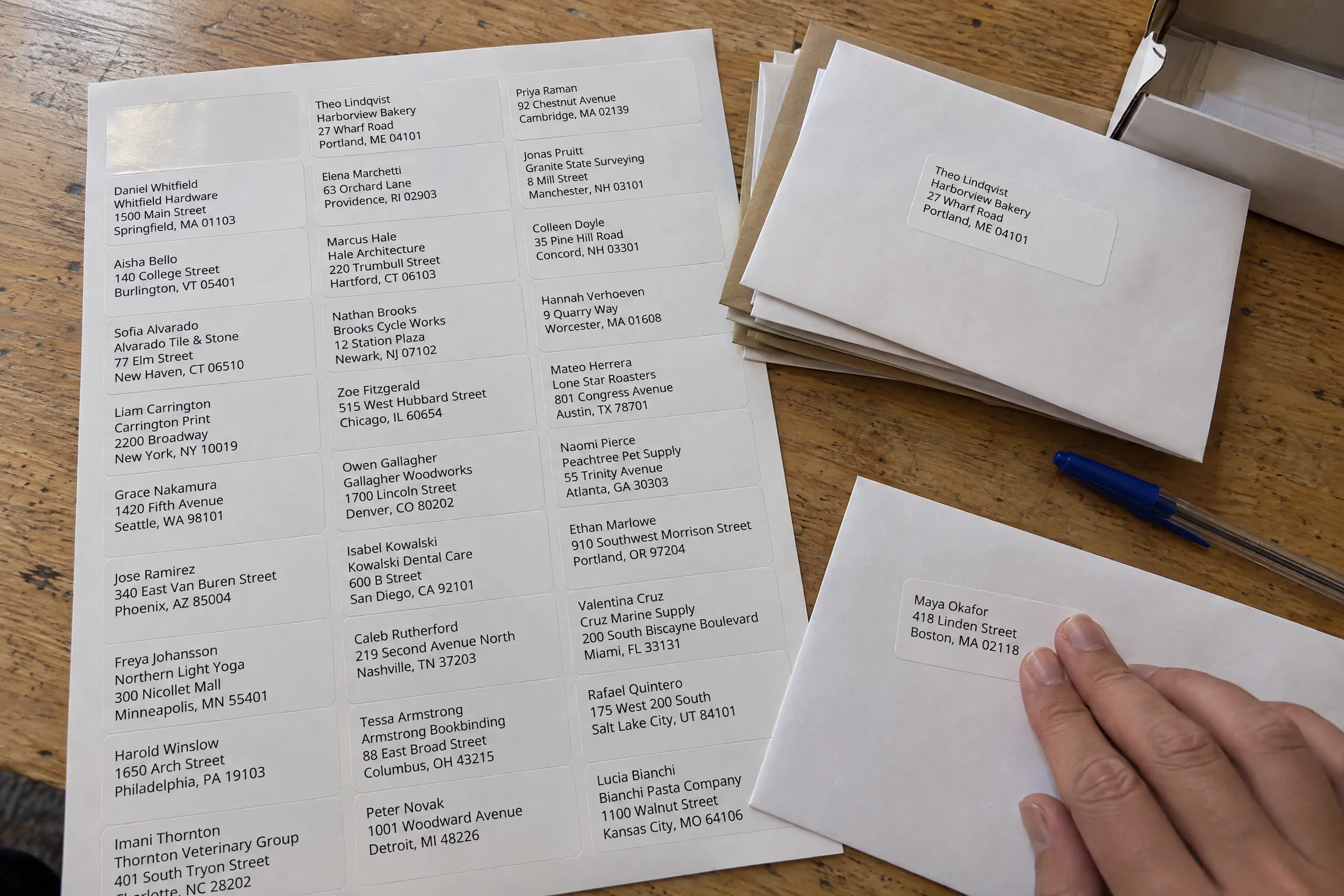
Skip the mail merge. Click Create PDF.
Add LabelPop to Excel from Microsoft Marketplace. The free version prints a full sheet of any label size, with no account.
LabelPop is an independent product by Bosau Digital LLC. It is not affiliated with, endorsed by or sponsored by Microsoft. Microsoft and Excel are trademarks of the Microsoft group of companies.