
Your address list on a live map, right in Excel
Plot customers, stores or jobs as pins, colour them by any column and keep the map in sync with your sheet. No upload, no monthly fee. Windows, Mac and the web.
- Finds your address columns and looks up the coordinates once, with your own Google Maps key
- Follows your sheet: edits, new rows and filters show on the map
- Click a pin to see the row and select it in the sheet
Coming soon to Microsoft Marketplace
Excel on Windows, Mac and the web.
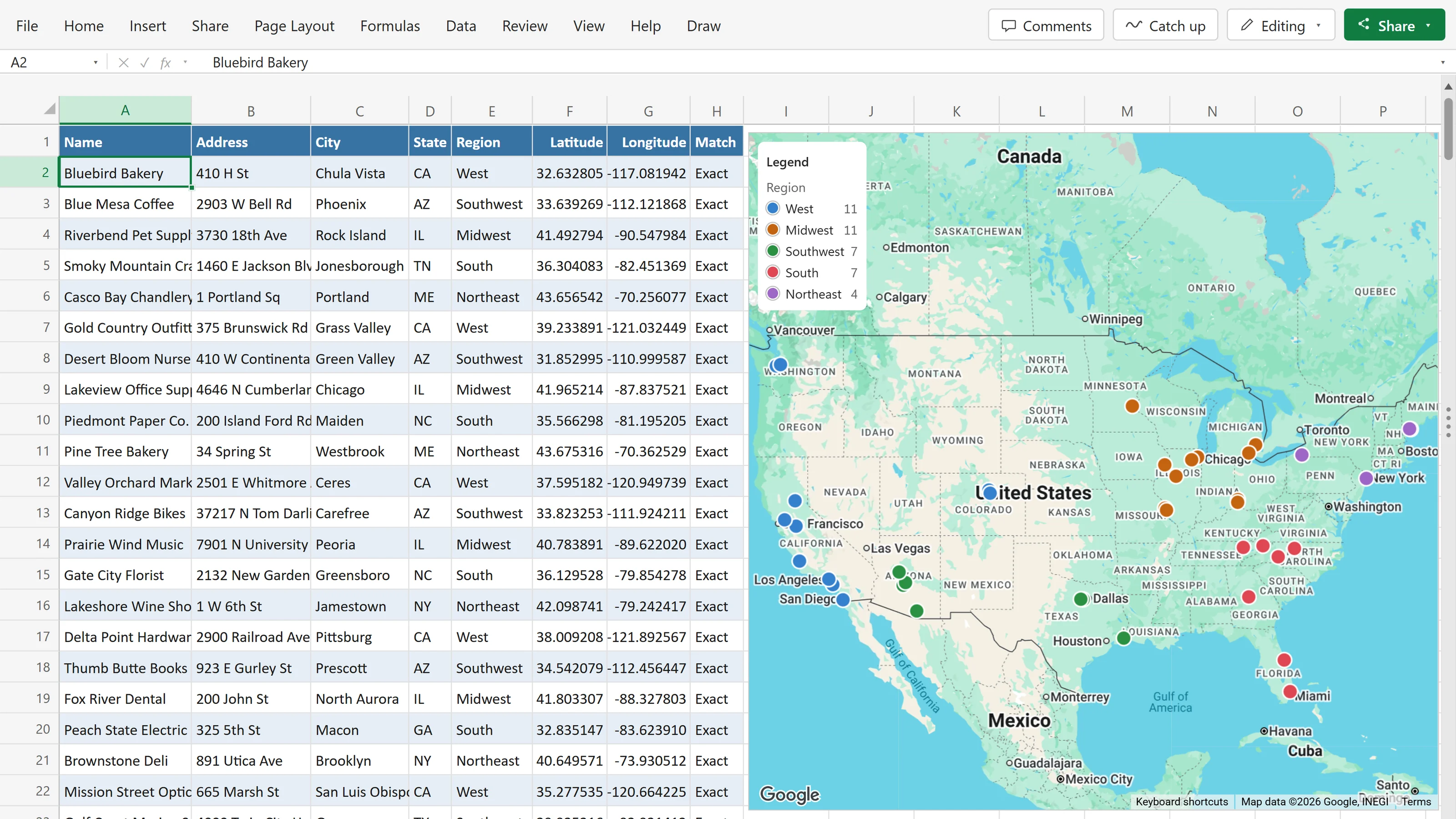
From a list of addresses to pins on a map
Click a cell in your table and choose Insert map. PinPop finds the address columns, looks up the coordinates and puts every row on a live map that sits on the sheet like a chart.
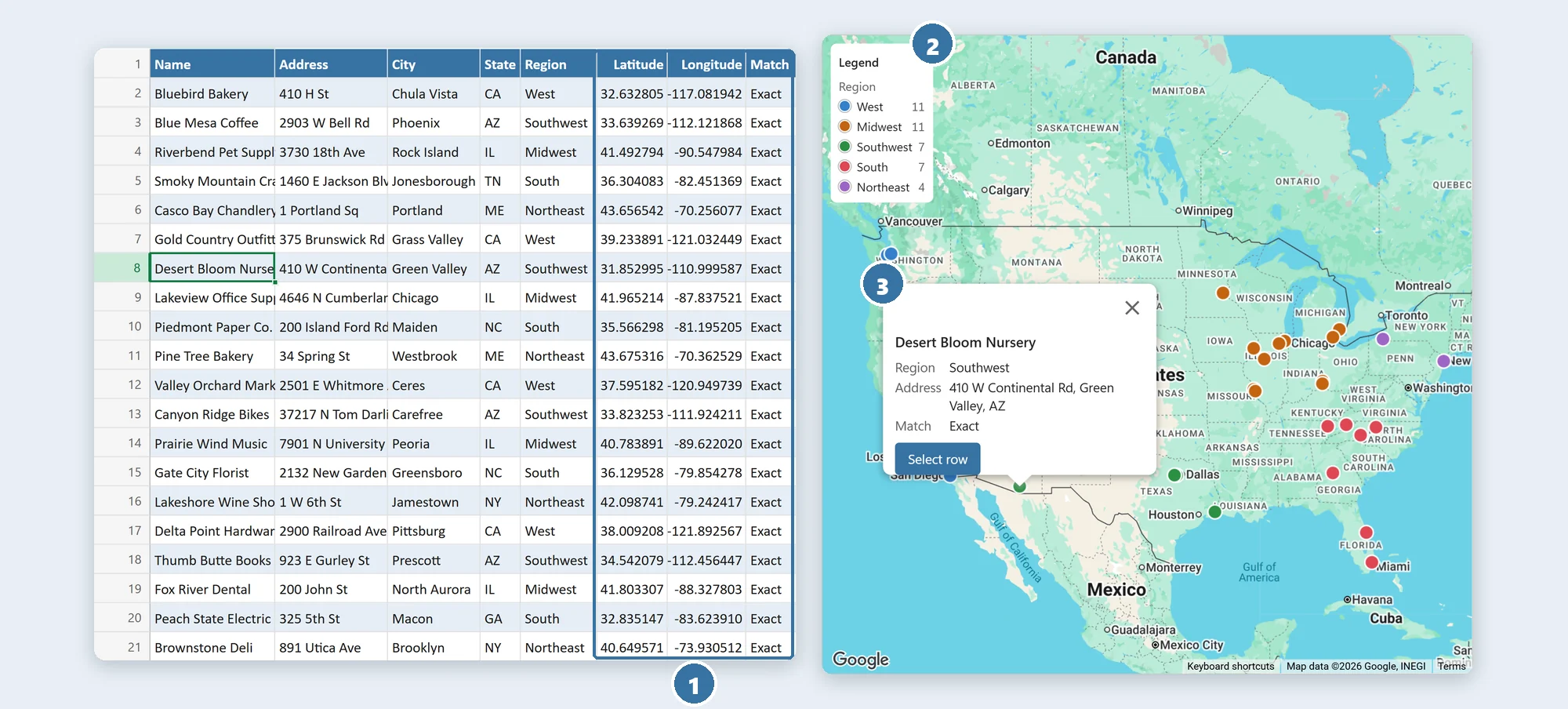
- Your list, as it isOne address column, or street, city, postcode and country in separate columns, or latitude and longitude. The coordinates PinPop looks up go into Latitude, Longitude and Match columns, so you can check every row.
- Colour by any columnPick a column such as Region, Status or Sales rep, and every pin takes its colour, with a legend. Clusters keep large lists readable.
- Click a pin, find the rowThe popup shows the columns you choose. Select row jumps to that row in the sheet, even after you sort.
Why map your list inside Excel
Web map tools want your list pasted or uploaded, and the map is out of date the moment the sheet changes. PinPop keeps the map in the workbook, next to the data it shows.
A web map tool
Copy, paste, repeat
- Paste or upload the list into a website, and again after every change.
- Your customer list sits on someone else's servers.
- The map lives elsewhere, as a link or a picture, apart from the rows it came from.
- A monthly plan for anything beyond a small list.
PinPop
A live map on your sheet
- No copy and paste: click a cell in your table and the map is there.
- Your data stays in your workbook. Addresses go only to Google, with your own key, to find the coordinates.
- The map updates when the sheet does: edits, new rows, sorting and filters.
- One payment instead of a monthly plan, and a free version for up to 250 pins.
How it works
Add your Google Maps key once. After that, a map is three steps away.
Click a cell
Click any cell in a table of customers, stores, jobs or properties. A header row is all PinPop needs.
Insert map
PinPop finds the address or coordinate columns, looks up what is missing and shows every row as a pin.
Colour by a column
Choose Colour by, pick the popup columns, and the map is ready to share, print or put in a slide.
Everything a list map needs, and nothing it does not
Defaults that look good with zero settings. The rest sits in the map's toolbar, with Pro features marked Pro.
See the list
Free- PinsFreeOne pin per row, coloured by any column, with a legend
- PopupsFreeThe columns you choose, the address and how well it matched
- ClustersFreeLarge lists stay readable; a click zooms in
- Base mapsFreeRoad, light, dark, satellite and satellite with labels
Export and print
Free and Pro- Download PNGFreeA picture of the map for slides; Free adds a small Made with PinPop badge, Pro is clean
- Place picture in sheetProA picture of the map next to your table, for printing and sharing
Stay in sync
Free- Follows filtersFreeFilter the table and the hidden rows leave the map
- Follows editsFreeNew and changed addresses are looked up once, in one batch
- Click to selectFreeSelect row in a popup selects that row in the sheet
Bigger lists, more insight
Pro- Heat mapProWhere your rows are densest, optionally weighted by a number column
- Radius circlesProOne radius around every pin, in miles or kilometres
- Up to 50,000 pinsProPer map, with as many maps per workbook as you like
The free version maps up to 250 pins, with one map per workbook.
Uses your own Google Maps key
Most people stay inside Google's free monthly allowance. Setting up the key is a one-time step of a few minutes, and the guide walks you through it.
- Create a key in Google CloudGoogle asks for a billing account with a card before the key works. Use beyond the free monthly allowance is billed by Google to your project, never by us.
- Turn on three APIsMaps JavaScript API for the map, Geocoding API for the coordinates and Maps Static API for pictures. A key you already use for our other Google Maps add-ins works once these are on.
- Paste it into PinPopSave and test checks each API and names any that is missing. The key stays in this device's browser storage for the add-in, never in the workbook.
Coordinates are looked up once and written into your table, so an unchanged row is never looked up again. How to get a Google Maps key
Coming to Microsoft Marketplace
PinPop installs from Microsoft's add-in store, inside Excel. It is on its way and not listed yet.
Once it is listed, this is the whole install:
- 1In Excel, go to Home → Add-ins → More Add-ins.
- 2On the Store tab, search for PinPop by Bosau Digital.
- 3Click Add. A map frame appears on the sheet: paste your Google Maps key, then insert a map from your table or start with a sample.
Depending on your Excel version, look under Insert → Get Add-ins instead.
- Windows, Mac and the web
- No installer, no macros
- Your table stays in your workbook
- Your own Google Maps key
Pay once. No subscription.
Map up to 250 pins for free, one map per workbook. Pro removes the limits and adds heat maps, radius circles and clean exports.
- A live map that follows your sheet
- Colour by a column, popups, clusters and the legend
- Road, light, dark and satellite maps
- Up to 250 pins, one map per workbook
- Lifetime license for 3 devices
- Every Pro feature
- Every future update included
- 14-day money-back guarantee
- Lifetime license for 15 devices
- Every Pro feature
- Every future update included
- 14-day money-back guarantee
Pro adds up to 50,000 pins per map, unlimited maps per workbook, heat maps, radius circles, a clean PNG without the badge and Place picture in sheet. Map and lookup use runs on your own Google Maps key, billed by Google, not part of the license.
Frequently asked questions

Still have a question?
I’m Sven, the developer, and I usually reply within a day.
Your list, on a live map.
PinPop is on its way to Microsoft Marketplace. The free version will map up to 250 pins with your own Google Maps key, with no account.
PinPop is made by Bosau Digital LLC and is not affiliated with or endorsed by Google or Microsoft. Google Maps is a trademark of Google LLC. Microsoft and Excel are trademarks of the Microsoft group of companies.