
Convert All Excel Formulas into Values using Python
openpyxl can open a workbook with data_only=True, which reads the results Excel cached instead of the formulas. Saving that workbook as a copy turns every formula into a plain value. The script below does it for every file in a folder; a second version uses xlwings to convert only chosen sheets.
The example files
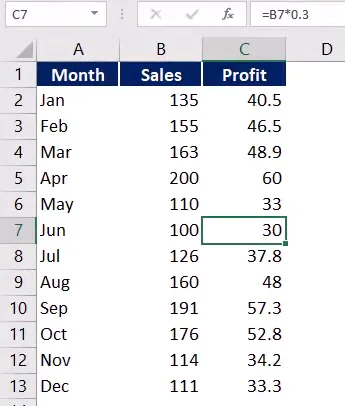
The INPUT folder holds several workbooks with the same layout. The Sales sheet calculates profit with formulas such as =B7*0.3, and the Overview sheet has grey-shaded formula cells as well. The goal is a copy of each file where all of those cells hold values.
The folder loop is the same one I use to find and replace values in multiple Excel files.
Setup
The script needs pathlib (part of Python) for the file paths and openpyxl for reading and writing the workbooks. Install openpyxl once:
pip install openpyxlThe paths are relative to the script: the source files sit in an INPUT folder next to it, and the script creates an OUTPUT folder for the converted copies if it does not exist yet.
from pathlib import Path  # core library

from openpyxl import load_workbook  # pip install openpyxl


# Define the folder where the files are located
current_dir = Path(__file__).parent if "__file__" in locals() else Path.cwd()
input_dir = current_dir / "INPUT"
output_dir = current_dir / "OUTPUT"
output_dir.mkdir(parents=True, exist_ok=True)
Convert every workbook
The loop collects every Excel file in INPUT, opens each one with data_only=True so openpyxl reads values instead of formulas, and saves it to OUTPUT with _valuecopy added to the file name. The originals stay unchanged. Here is the complete script, including the folder setup from above.
Watch out: data_only=True reads the results Excel cached the last time it saved the file. A workbook that was created or edited by a script and never opened and saved in Excel has no cached results, so those cells come back empty. Open and save such files in Excel first, or use the xlwings method below, which lets Excel calculate.
from pathlib import Path  # core library

from openpyxl import load_workbook  # pip install openpyxl


# Define the folder where the files are located
current_dir = Path(__file__).parent if "__file__" in locals() else Path.cwd()
input_dir = current_dir / "INPUT"
output_dir = current_dir / "OUTPUT"
output_dir.mkdir(parents=True, exist_ok=True)

# List all the excel files in the folder
xl_files = list(input_dir.rglob("*.xls*"))

# Loop through all the files, read only the values and save them
for xl_file in xl_files:
    wb = load_workbook(xl_file, data_only=True)
    wb.save(output_dir / f"{xl_file.stem}_valuecopy{xl_file.suffix}")
Check the result
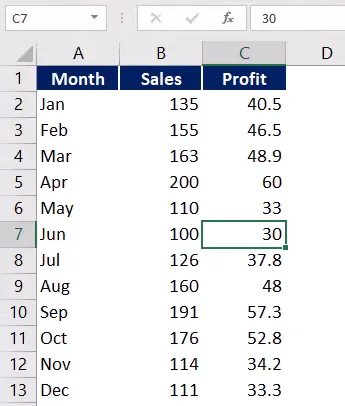
Open one of the copies in OUTPUT and click a former formula cell. The formula bar now shows the number instead of the formula, on every sheet. Compare a few totals with the original file to be sure the cached results were present. openpyxl also drops objects it does not read, such as shapes, so check workbooks that contain drawings.
Convert only some sheets
To keep the formulas on some sheets and convert others, use xlwings. It opens each file in a hidden Excel instance and writes each listed sheet’s used range back onto itself as values. Because Excel calculates, it also works on files that have no cached results. Install it with:
pip install xlwingsThe sheets list names the sheets to convert, here only Sales. The copies get _valuecopy_only_sht in their name so they do not overwrite the openpyxl results. xlwings drives a real Excel instance, so this version needs Excel installed (Windows or Mac).
from pathlib import Path  # core library

import xlwings as xw  # pip install xlwings


# Define the folder where the files are located
current_dir = Path(__file__).parent if "__file__" in locals() else Path.cwd()
input_dir = current_dir / "INPUT"
output_dir = current_dir / "OUTPUT"
output_dir.mkdir(parents=True, exist_ok=True)

# List all the excel files in the folder
xl_files = list(input_dir.rglob("*.xls*"))

# List all the sheets that should be converted
sheets = ["Sales"]

with xw.App(visible=False) as app:
    for xl_file in xl_files:
        wb = app.books.open(xl_file)
        for sheet in sheets:
            wb.sheets[sheet].used_range.value = wb.sheets[sheet].used_range.value
        wb.save(output_dir / f"{xl_file.stem}_valuecopy_only_sht{xl_file.suffix}")
Starting Excel makes this version slower: my folder took about 8 seconds. In the copies, only the Sales sheet holds values; the Overview sheet keeps its formulas. If you also want to protect the formulas you keep, see how to lock cells in Excel with Python.