
Build a ChatGPT Clone With Streamlit in 50 Lines of Code
The Streamlit chat elements, st.chat_message and st.chat_input, handle the message bubbles and the input box, so a working ChatGPT clone lands at about 50 lines. Session state keeps the history across reruns, which is the part that usually trips people up.
Update (November 2026): The video’s openai.ChatCompletion.create call and gpt-3.5-turbo no longer work, so the ChatGPT clone below uses the OpenAI 1.x client and gpt-6-luna.
A single chat message
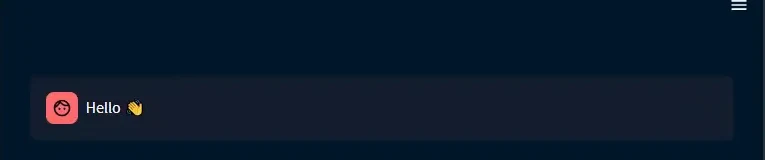
st.chat_message draws one message bubble with an avatar for the role you pass, such as “user” or “assistant”. It is a container, so text, images or charts inside its with block appear in the bubble. The chat elements need a recent Streamlit, so upgrade first:
pip install streamlit --upgradeA greeting from the user role is three lines:
import streamlit as st

with st.chat_message("user"):
    st.write("Hello")
Run it with streamlit run app.py and the app shows one bubble with the user avatar.
Echo bot with history
Streamlit reruns the whole script on every input, so a chat needs session state to remember earlier messages. The echo bot stores each message in st.session_state and repeats whatever you type, which shows the pattern before any AI is involved.
The history is a list called messages, created once. Each entry is a dictionary with the role (user or assistant) and the content:
if "messages" not in st.session_state:
    st.session_state.messages = []
On every rerun, the app first draws the history, one bubble per stored message:
for message in st.session_state.messages:
    with st.chat_message(message["role"]):
        st.write(message["content"])
st.chat_input puts the input box at the bottom of the page. A new message is shown and added to the history:
if prompt := st.chat_input("Say something"):
    st.session_state.messages.append({"role": "user", "content": prompt})
The reply is the same text with “Echo:” in front, stored as an assistant message:
response = f"Echo: {prompt}"
st.session_state.messages.append({"role": "assistant", "content": response})
Here is the complete echo bot script. The conversation stays on screen as long as the browser tab is open:
import streamlit as st

st.title("Echo Bot")

# Initialize chat history
if "messages" not in st.session_state:
    st.session_state.messages = []

# Display chat messages from history on app rerun
for message in st.session_state.messages:
    with st.chat_message(message["role"]):
        st.markdown(message["content"])

# React to user input
prompt = st.chat_input("What is up?")
if prompt:
    # Display user message in chat message container
    with st.chat_message("user"):
        st.markdown(prompt)
    # Add user message to chat history
    st.session_state.messages.append({"role": "user", "content": prompt})

    response = f"Echo: {prompt}"
    # Display assistant response in chat message container
    with st.chat_message("assistant"):
        st.markdown(response)
    # Add assistant response to chat history
    st.session_state.messages.append({"role": "assistant", "content": response})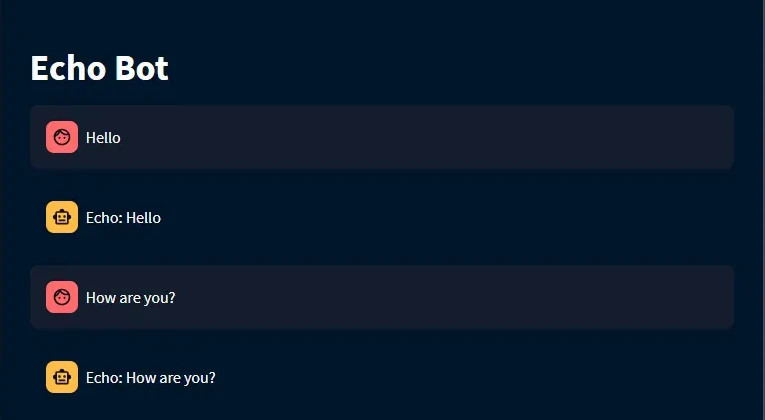
ChatGPT clone
The ChatGPT clone is the echo bot with the echo replaced by a call to the OpenAI API. It sends the whole history with every request and streams the answer into the assistant bubble. It needs the openai package and an OpenAI API key with a paid balance:
pip install openaiThe key goes into Streamlit’s secrets file instead of the code: create a folder named .streamlit next to the app with a secrets.toml file in it:
OPENAI_API_KEY = "YOUR_API_KEY"Keep this file out of Git, for example by adding .streamlit/secrets.toml to your .gitignore.
The app reads the key from st.secrets and sets the model. Any current chat model from OpenAI’s model list works the same way:
from openai import OpenAI

client = OpenAI(api_key=st.secrets["OPENAI_API_KEY"])
model = "gpt-6-luna"
The reply is requested with stream=True, so the text appears as the model writes it:
with st.chat_message("assistant"):
    stream = client.chat.completions.create(
        model=model,
        messages=st.session_state.messages,
        stream=True,
    )
    response = st.write_stream(stream)
st.session_state.messages.append({"role": "assistant", "content": response})
st.write_stream did not exist when I recorded the video. It prints the chunks as they arrive and returns the full text, which replaces the manual loop I wrote back then.
The last line adds the full response to the session variable to maintain the conversation history. Here is the complete app, which is the echo bot with the echo replaced by the OpenAI call:
from openai import OpenAI
import streamlit as st

st.title("ChatGPT-like clone")

client = OpenAI(api_key=st.secrets["OPENAI_API_KEY"])
model = "gpt-6-luna"

# Initialize chat history
if "messages" not in st.session_state:
    st.session_state.messages = []

# Display chat messages from history on app rerun
for message in st.session_state.messages:
    with st.chat_message(message["role"]):
        st.markdown(message["content"])

# React to user input
if prompt := st.chat_input("What is up?"):
    st.session_state.messages.append({"role": "user", "content": prompt})
    with st.chat_message("user"):
        st.markdown(prompt)

    with st.chat_message("assistant"):
        stream = client.chat.completions.create(
            model=model,
            messages=st.session_state.messages,
            stream=True,
        )
        response = st.write_stream(stream)
    st.session_state.messages.append({"role": "assistant", "content": response})
Because st.session_state.messages already uses the role and content format the API expects, the whole history goes to the model on every turn, so it remembers what was said earlier in the chat.
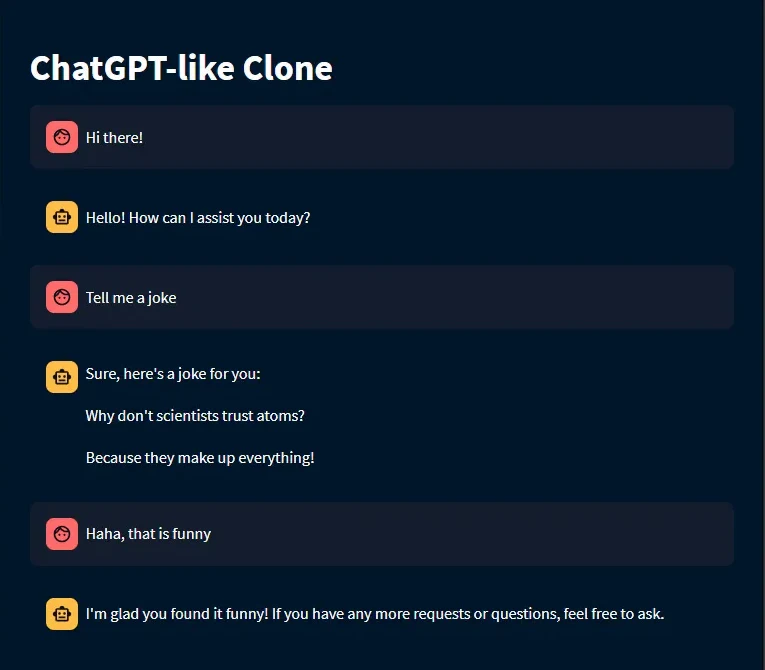
Each request contains the full history, so long chats cost more per message; trim old messages from the list if that matters. To make the chat one page of a larger app, see how to build a Streamlit multipage app; QuizTube shows a different kind of AI app built on the same tools.