
Calculate Distances for Hundreds of Addresses in Seconds
The Distance Calculator add-in writes real driving distances and travel times from Google Maps right next to your addresses, in any Excel workbook. Select your data, click once, done.
One-time price. Windows, Mac and the web.
Reviewed by Microsoft Listed on Microsoft MarketplaceHow are you getting distances into Excel today?
If the answer involves a second browser window and a lot of typing, this page will save you a few afternoons.
- Copy an address into Google Maps, read the distance, type it back. Repeat 200 times.
- One skipped row or one typo, and the whole column is suspect.
- Latitude formulas measure straight through lakes and mountains, not along roads.
- And the list changes next week, so you get to do it all again.
- Select your data, say which column is the start and which is the end, click Calculate.
- Real road distances and travel times from Google Maps, for every row at once.
- Results land in tidy columns next to your data, ready for the report you actually came for.
- New rows next week? Run it again. It can skip the rows that are already done.
See how it works
Three steps, and none of them is "learn something new".
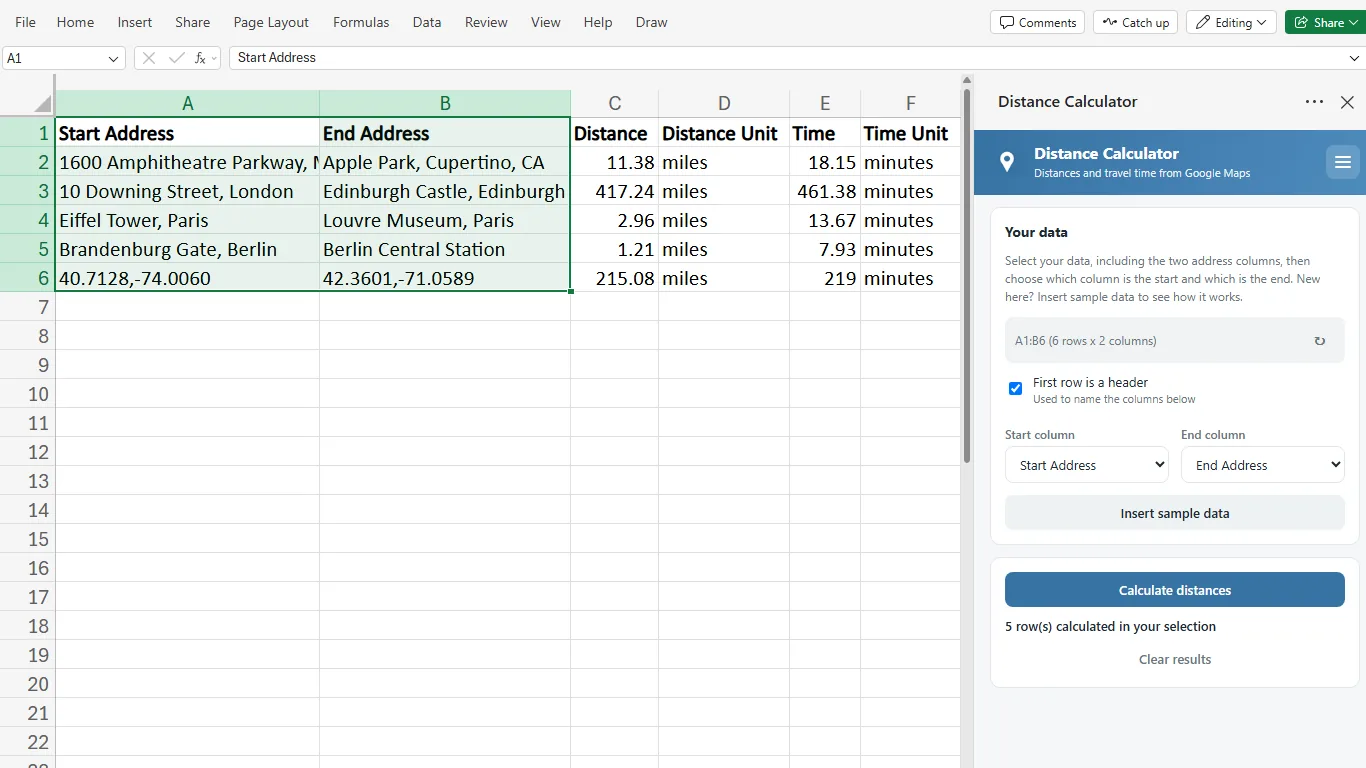
Select your addresses
Any two columns: full addresses, city names, postcodes, airports, even coordinates. Extra columns in between are fine. Clicking one cell inside your data is enough.
Pick start and end
Two dropdowns in the pane. The add-in reads your headers and usually suggests the right ones before you touch anything.
Click Calculate
Distance and travel time appear in new columns to the right, row by row as it runs. Interrupted halfway? Everything already calculated stays in the sheet.
Your addresses can look like anything
If Google Maps can find it, the add-in can use it. Anywhere in the world, and you can mix all of these in one list.
| Address | What it is |
|---|---|
| Addresses and places | |
| 1600 Amphitheatre Parkway, Mountain View, CA 94043 | A full address |
| Hauptstraße 12, Heidelberg | Just street and city |
| 90210, USA | A ZIP code with its country |
| SW1A 1AA | A postcode works too |
| Tokyo | Just a city |
| Sydney Opera House | A landmark or place name |
| JFK Airport | An airport |
| GPS coordinates | |
| 40.7128, -74.0060 | Latitude, longitude |
| 40.7128 N, 74.0060 W | With compass letters |
| 40°42'46"N 74°00'22"W | Degrees, minutes, seconds |
| 40° 42.767' N 74° 0.367' W | Straight off a GPS device |
Start and end do not have to match, either: from a postcode to a landmark works just fine.
Made for the sheet you already have
Your columns, your units, your way of getting there. Every picture comes from real runs of the add-in, with real Google Maps results.
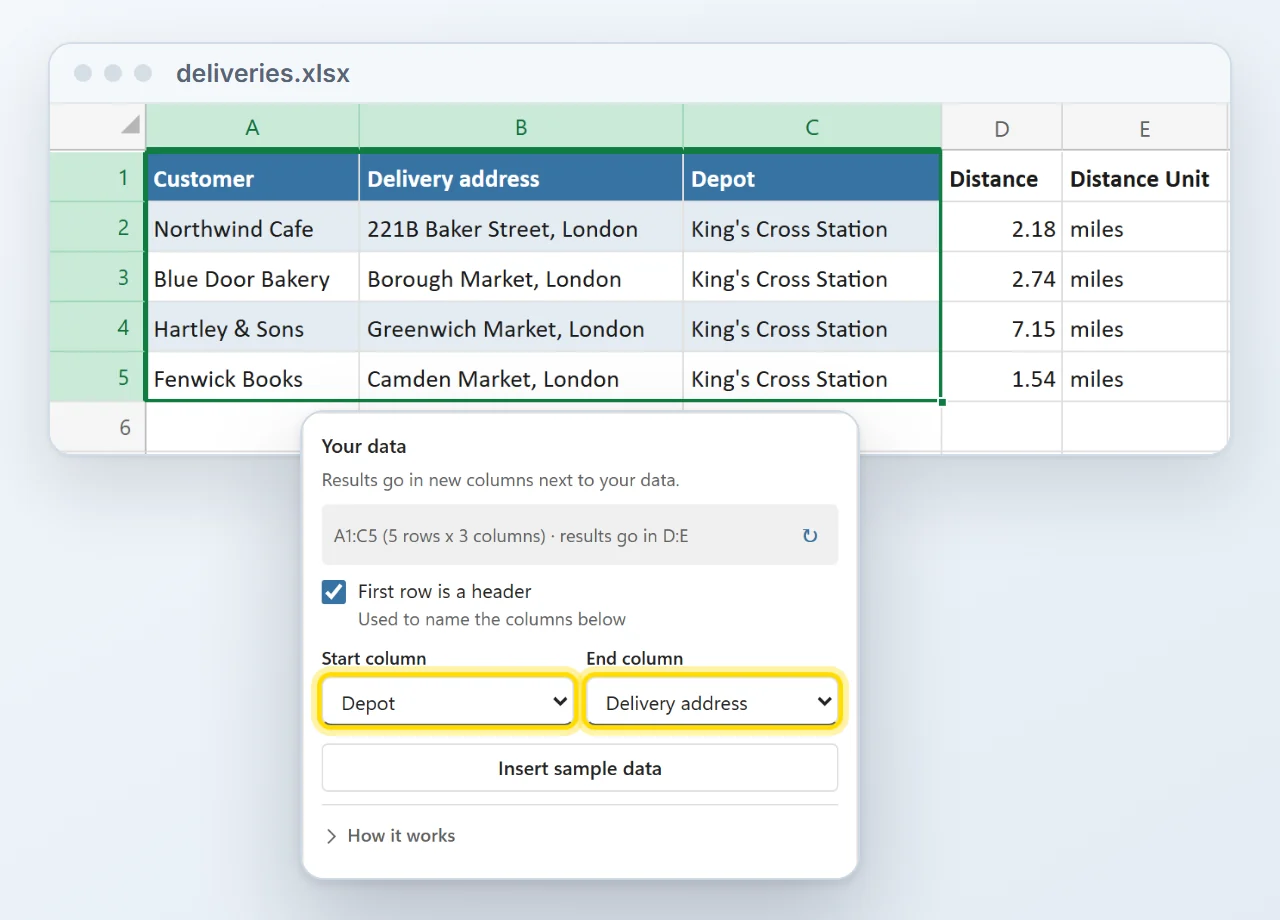
Works with your existing data
No template to copy your list into. Pick the start and end columns from the sheet you already have, in any order, even with other columns in between. The results land in new columns right next to your data.
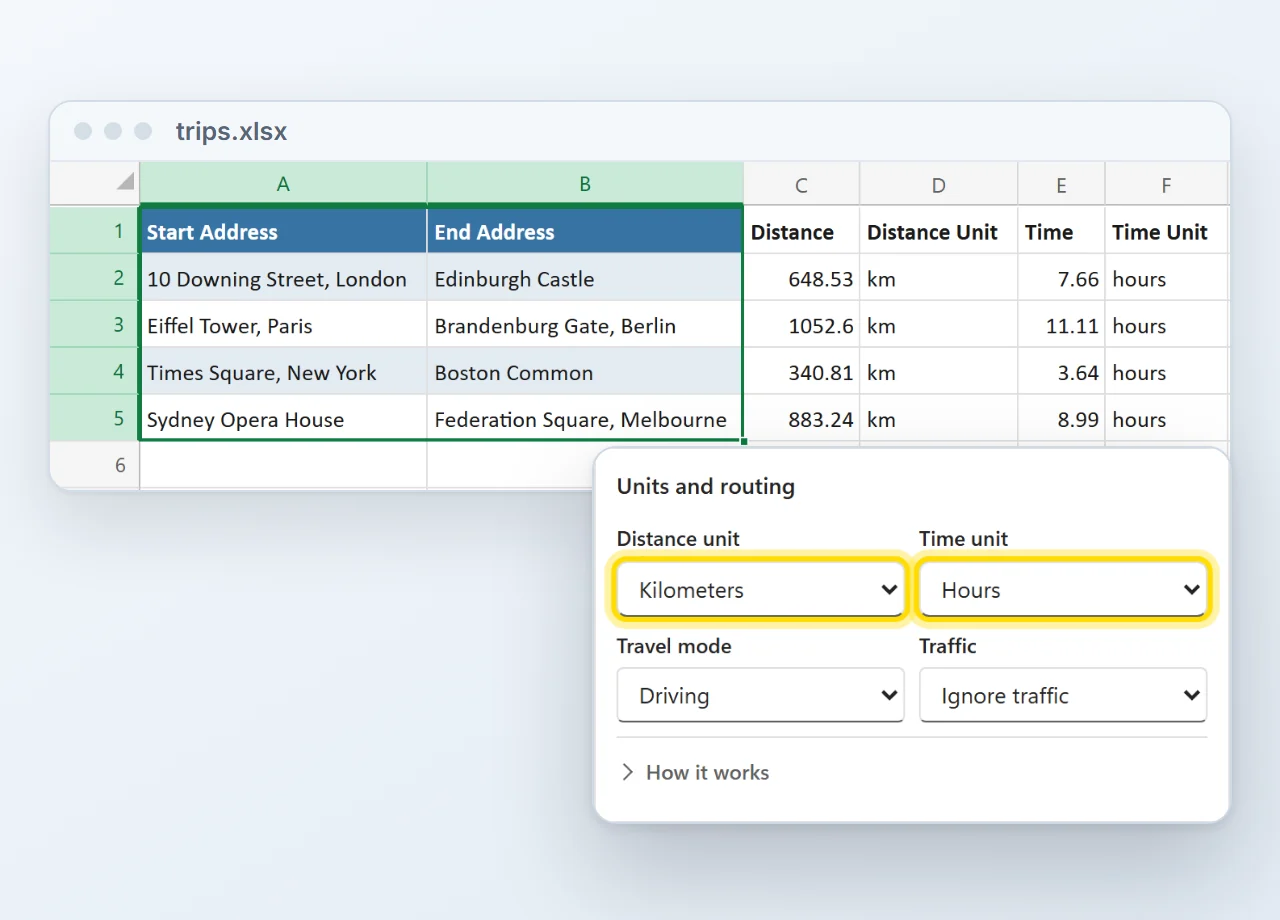
Miles or kilometers, minutes or hours
Pick the units your report needs once, and every run writes them. Distance and time can each get their own unit column, so nobody has to guess what 7.66 means.
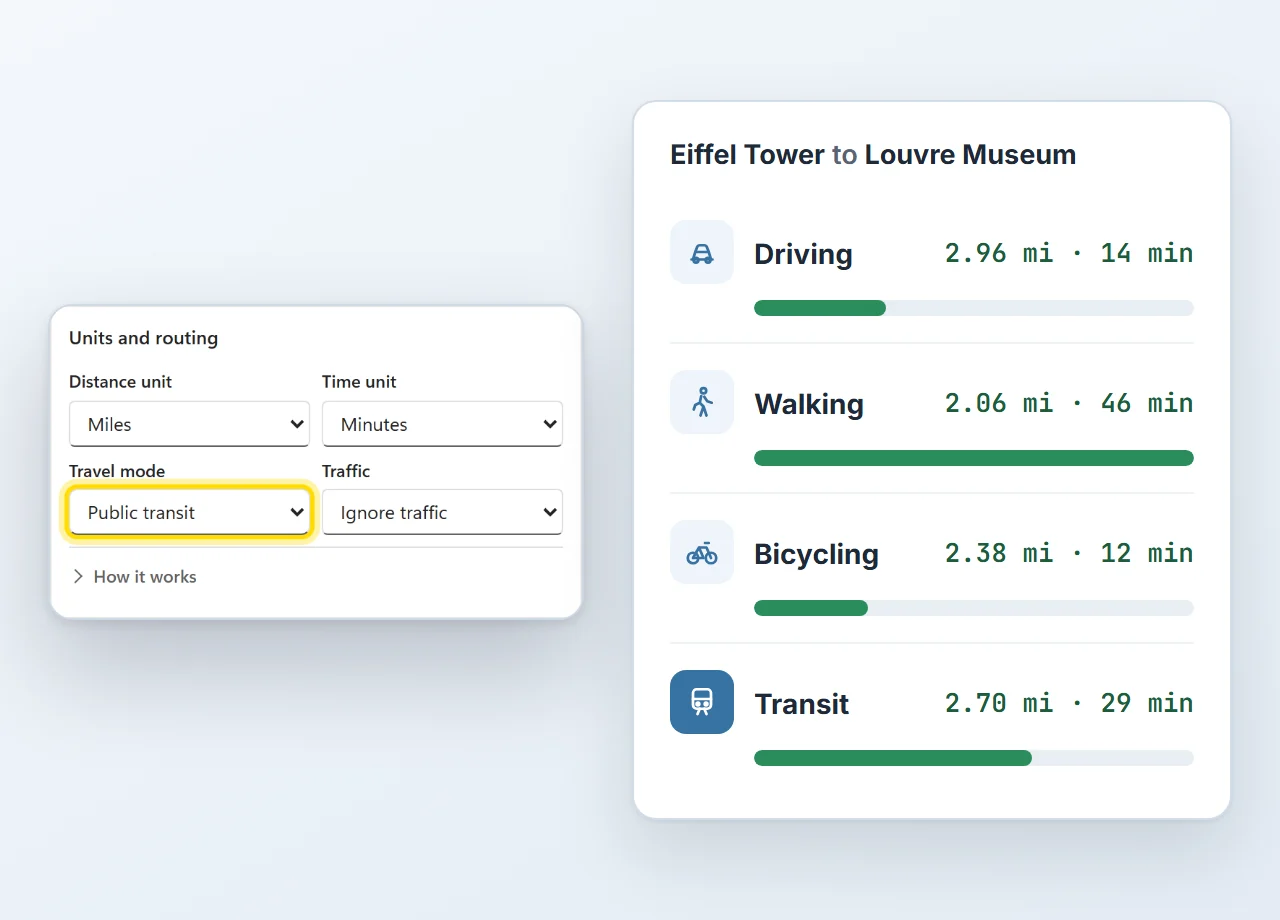
Drive, walk, cycle or take public transit
The same trip can take 12 minutes or 46, depending on how you travel. Choose driving, walking, bicycling, public transit or two-wheeler, and switch on traffic-aware driving when today's roads matter.
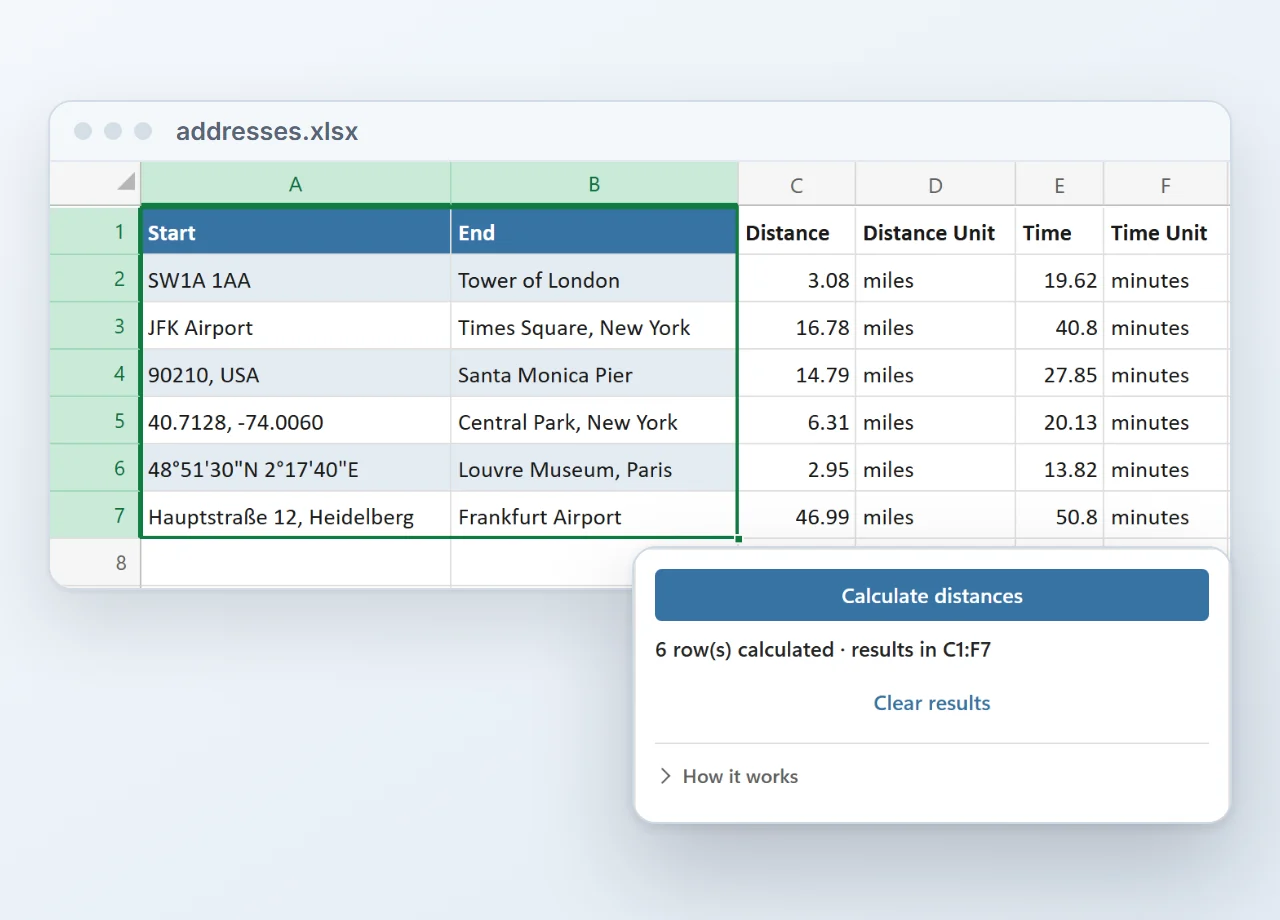
Works with all kinds of data
Street addresses, postcodes, landmarks, airports and GPS coordinates, even mixed in one column. If Google Maps can find the place, the add-in can measure the route to it.
Prefer formulas? They are in there too.
- Type it like any Excel function. =GMAPS.DISTANCE(A2, B2) for the distance, =GMAPS.TRAVELTIME(A2, B2) for the time.
- Fill down like any formula. Drag the little green handle down the column and every row gets its distance.
- Recalculating costs nothing. Results are cached, so a pair the add-in already knows is never sent to Google again.
| Start Address | End Address | Distance | Time |
|---|---|---|---|
| 10 Downing St, London | Edinburgh Castle | 417.24 | 461.38 |
| Eiffel Tower, Paris | Louvre Museum, Paris | 2.96 | 13.67 |
| Brandenburg Gate | Berlin Central Station | 1.21 | 7.93 |
Click any cell: the formula bar shows what is inside it. Travel mode and units are optional: driving, miles and minutes are the defaults.
Installed in about a minute
Straight from Microsoft's add-in store, inside Excel. No installer file, no macros to enable, and from then on it is there in every workbook.
- 1In Excel, go to Home → Add-ins → More Add-ins.
- 2On the Store tab, search for Distance Calculator by Bosau Digital.
- 3Click Add, open it from the Home tab and paste your license key and Google Maps key.
Depending on your Excel version, look under Insert → Get Add-ins instead.
- Windows, Mac and the web
- No macro warnings
- Updates arrive by themselves
- Follows your light or dark theme
What you need
Three things, and two of them you have already.
Your addresses go to Google, and nowhere else
The add-in uses your own Google Maps key, and your Excel talks to Google directly. There is no server of mine in the middle, and I never see your data.
Pay once. Keep it forever.
No subscription, free updates, and no markup on lookups: your Google key pays Google directly, which under 10,000 a month means paying nothing.
- One license key for 1 user on up to 3 computers
- Batch runs and the GMAPS formulas
- All travel modes, units and options
- Excel on Windows, Mac and the web
- Free updates, forever
- Email support, usually within 24 hours
- One license key for up to 15 devices
- Batch runs and the GMAPS formulas
- All travel modes, units and options
- Excel on Windows, Mac and the web
- Free updates, forever
- Email support, usually within 24 hours
14-day refund, no questions asked. If it is not for you, email me and you get your money back.
- Excel on Windows
- Excel on Mac
- Excel on the web
- Microsoft 365 or Office 2021 and later
Frequently asked questions

Still have a question?
I’m Sven, the developer, and I usually reply within a day.
Ready to stop looking them up one by one?
Calculate distances and travel times directly in your workbook.
Get the Distance Calculator add-inGoogle and Google Maps are trademarks of Google LLC. Microsoft, Excel and Microsoft 365 are trademarks of Microsoft Corporation. This product is made by Bosau Digital LLC and is not affiliated with or endorsed by Google or Microsoft.