Skip to content
New Saw the Excel template in one of my videos? The Distance Matrix Calculator is an add-in now. What changed?

Create a Distance Matrix in Excel in Seconds

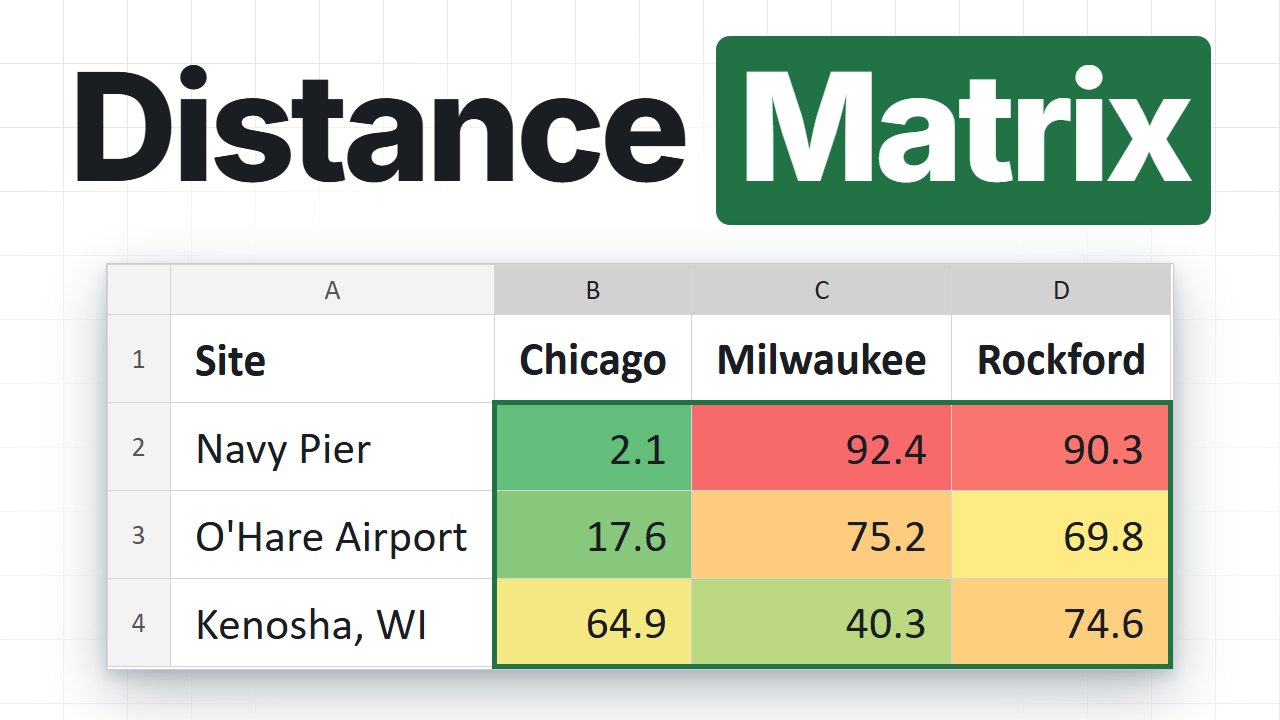
Addresses across the top, addresses down the side, one click. The add-in fills every cell of the grid with the real driving distance and travel time from Google Maps, then colours it green to red so the nearest option jumps out.

One-time price. Windows, Mac and the web.

Reviewed by Microsoft Listed on Microsoft Marketplace

How are you comparing every site to every stop today?

A 10 by 10 grid is 100 lookups. By hand, that is most of a morning.

Doing it by hand
  • One pair at a time in Google Maps, typed back into one cell. Then the next 99.
  • Put one number in the wrong cell and the whole comparison quietly points at the wrong site.
  • Straight-line formulas measure through lakes and mountains, not along roads.
  • Add one depot next week and you are back at the start.
With the add-in
  • Point at the From row and the To column, click Calculate matrix.
  • Every cell gets its real road distance and travel time from Google Maps.
  • A green-to-red heatmap colours the grid, so the nearest option is obvious.
  • Add a row or a column later, run it again, and the cells you already have are skipped.

See how it works

Three steps, and none of them is "learn something new".

Excel with the Distance Matrix Calculator pane open and a filled, heatmap-coloured distance matrix in the sheet
Walkthrough video is on its way
1

Lay out your addresses

From addresses in a row across the top, To addresses in a column down the side. The classic layout is already the default, so an old workbook needs no setup at all.

2

Check the preview

The pane tells you exactly what it is about to do: "4 From × 11 To, results in B3:E13". Click Show and it highlights that block in your sheet first.

3

Click Calculate matrix

Cells fill in as the run goes, then the heatmap colours them. Stop halfway and everything already calculated stays in the sheet.

Your addresses can look like anything

If Google Maps can find it, the add-in can use it. Anywhere in the world, and you can mix all of these in one grid.

Address What it is
100 Universal Blvd, Robbinsville, NJ 08691 A full address
Hauptstraße 12, Heidelberg Just street and city
07030 Only a ZIP code
SW1A 1AA A postcode works too
JFK Airport, Queens, NY A landmark or place name
40.7580, -73.9855 Latitude, longitude
Split across columns
Street | City | ZIP in three columns Joined into one address per row

From and To do not have to match, either: a ZIP code on one axis and a landmark on the other works just fine.

1 click
For the whole grid
10,000
Free Google lookups a month
100 × 100
Grid in a single run
14 days
No-questions refund

Made for the sheet you already have

Your layout, your units, your way of getting there. Every picture comes from real runs of the add-in, with real Google Maps results.
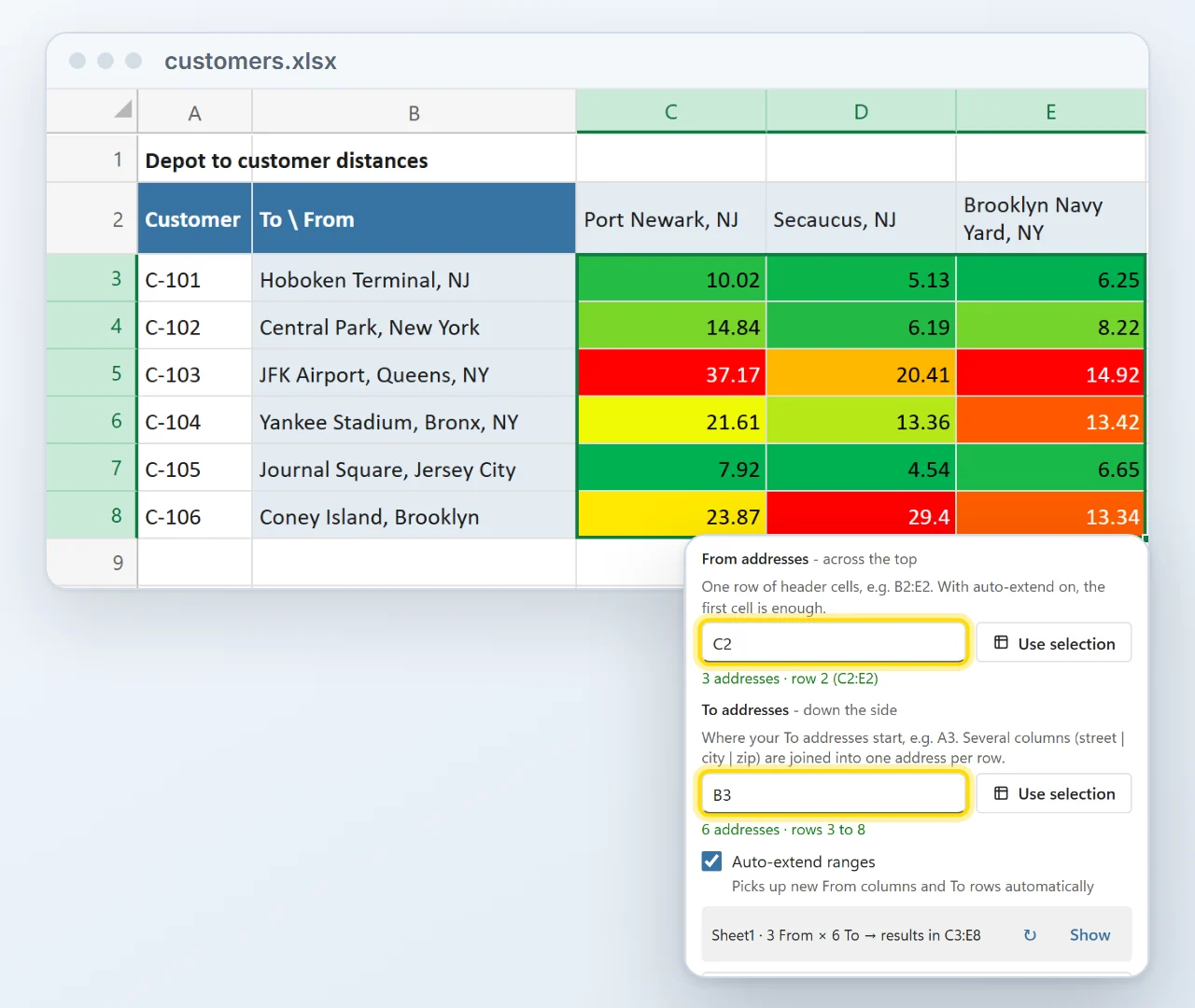
A customer list with IDs in column A, customer addresses in column B and three depots across row 2. The pane's From and To pickers point at C2 and B3, the preview reads 3 From by 6 To with results in C3 to E8, and the matrix is filled with distances coloured green to red.
Flexible

Works with your existing layout

Your addresses do not have to start in a fixed cell. Point the From and To pickers at wherever they already sit, next to your other columns, and a live preview shows where the results will land before anything is written.
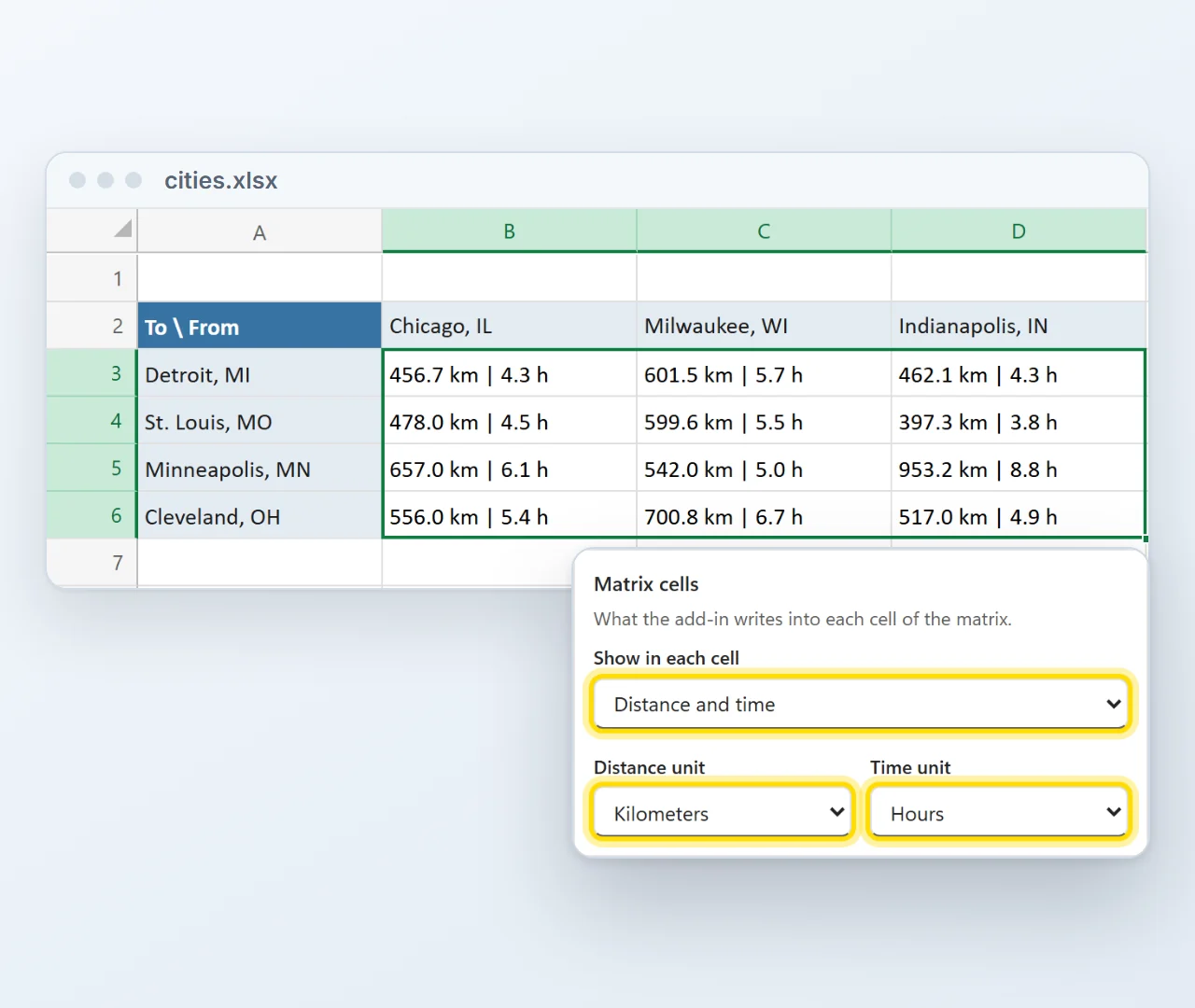
A matrix from Chicago, Milwaukee and Indianapolis to Detroit, St. Louis, Minneapolis and Cleveland where every cell shows distance and time, such as 456.7 km | 4.3 h, next to the pane's Matrix cells settings set to Distance and time, Kilometers and Hours.
Units

Distance, travel time or both in each cell

Choose what every cell shows, in miles or kilometers and minutes or hours. With both switched on a cell reads 456.7 km | 4.3 h, so one grid answers both questions.
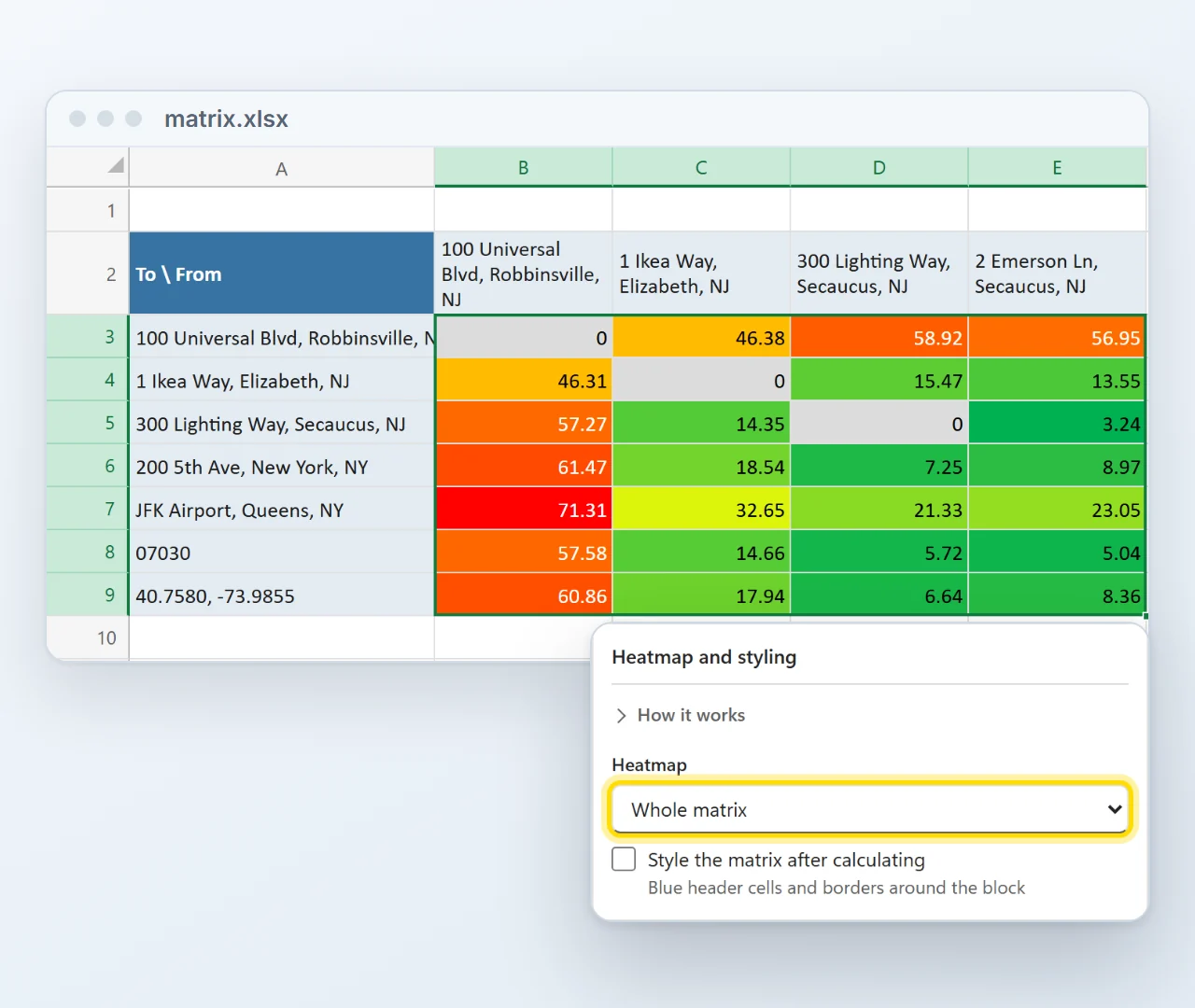
A four by seven matrix of New Jersey and New York addresses coloured green to red across the whole matrix, with grey zeros where an address meets itself, next to the pane's Heatmap setting set to Whole matrix.
Heatmap

The nearest option jumps out

A green-to-red heatmap, per From column or across the whole matrix, marks the short and the long trips at a glance. Where an address meets itself the cell is simply 0, with no Google call.
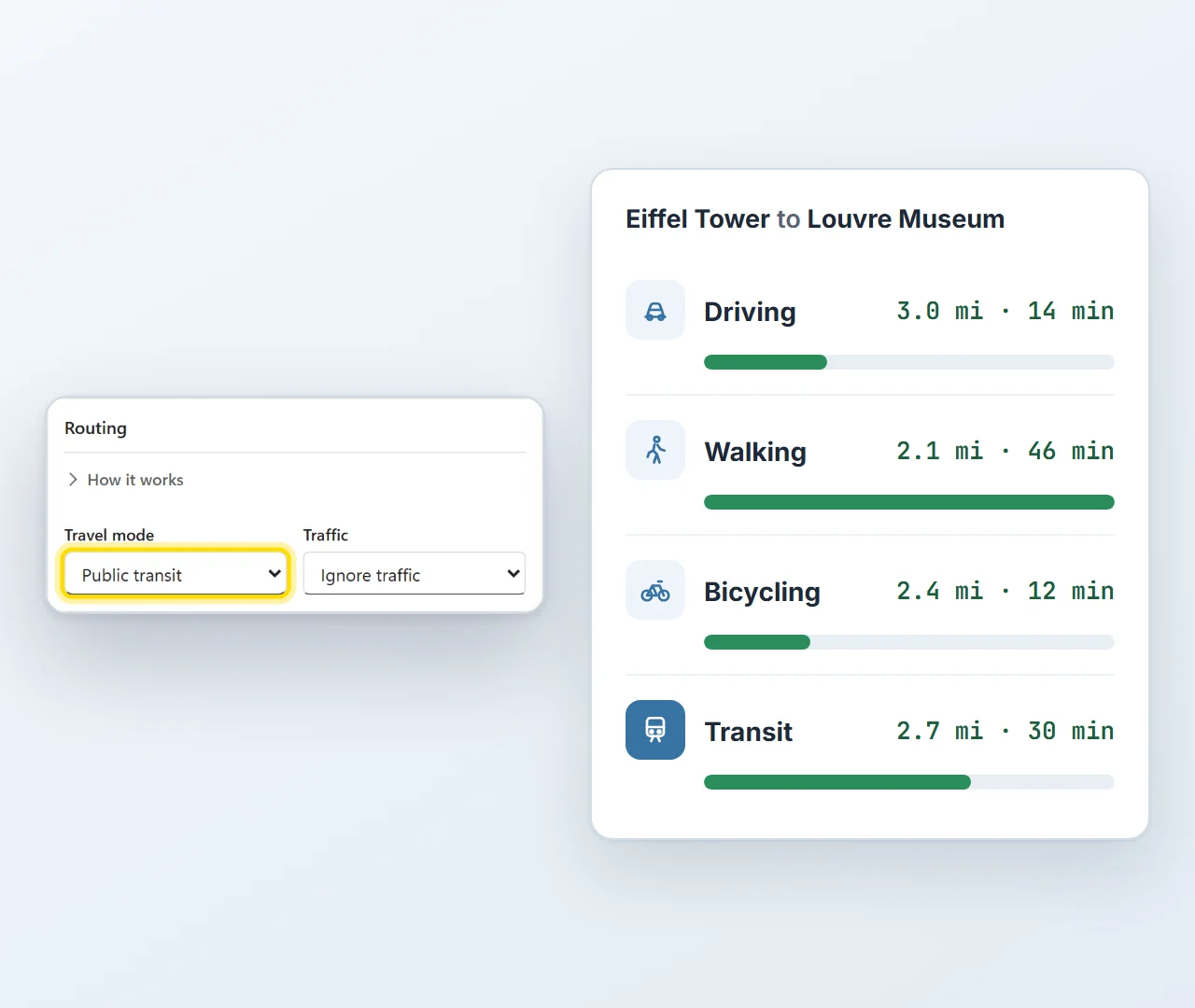
One trip from the Eiffel Tower to the Louvre Museum in four travel modes: driving 3.0 miles in 14 minutes, walking 2.1 miles in 46 minutes, bicycling 2.4 miles in 12 minutes and transit 2.7 miles in 30 minutes, next to the pane's Travel mode setting.
Travel mode

Drive, walk, cycle or take public transit

The same trip can take 12 minutes or 46, depending on how you travel. Choose driving, walking, bicycling, public transit or two-wheeler, and switch on traffic-aware driving when today's roads matter.

Installed in about a minute

Straight from Microsoft's add-in store, inside Excel. No installer file, no macros to enable, and from then on it is there in every workbook.

  1. 1In Excel, go to Home → Add-ins → More Add-ins.
  2. 2On the Store tab, search for Distance Matrix Calculator by Bosau Digital.
  3. 3Click Add, open it from the Home tab and paste your license key and Google Maps key.
Reviewed by Microsoft Distance Matrix Calculator passed Microsoft's review before it went on Microsoft Marketplace: Microsoft's own validation team tested it in Excel on Windows, Mac and the web. See Distance Matrix Calculator on Microsoft Marketplace

Depending on your Excel version, look under Insert → Get Add-ins instead.

  • Windows, Mac and the web
  • No macro warnings
  • Updates arrive by themselves
  • Follows your light or dark theme

What you need

Three things, and two of them you have already.

Excel Microsoft 365, or Office 2021 and later.
Windows, Mac or a browser Excel on the desktop, or Excel on the web. Your pick.
A Google Maps API keyA personal code from your own Google account that lets the add-in ask Google Maps for routes. Creating one is free, and you paste it into the add-in once. Free to create. Comes with 10,000 lookups a month at no cost.
Never made an API key before? You are covered. After purchase you get a video that walks you through the setup, click by click. It is a one-time job of about 5 to 10 minutes, and every step is explained. And because the key is your own, there is no markup from the add-in on your lookups: Google bills you at Google's prices, which under 10,000 a month means paying nothing at all.

Your addresses go to Google, and nowhere else

The add-in uses your own Google Maps key, and your Excel talks to Google directly. There is no server of mine in the middle, and I never see your data.

No middleman Each lookup goes straight from your computer to Google Maps. Nothing is uploaded to me, ever.
Your key, your budget Google gives your key 10,000 free lookups a month, and the add-in takes no markup on top. It also skips the free ones: a cell comparing an address with itself, and any route it has already fetched in the run.
Keys stay on your side License and Google key are stored in your own Office profile, not inside the workbook. Share a file and they stay behind.

Pay once. Keep it forever.

No subscription, free updates, and no markup on lookups: your Google key pays Google directly, which under 10,000 a month means paying nothing.

Lifetime license
Single user
$69
one-time payment
  • One license key for 1 user on up to 3 computers
  • Full distance and travel-time matrix
  • Green-to-red heatmap, one click on or off
  • All travel modes, units and options
  • Excel on Windows, Mac and the web
  • Free updates, forever
  • Email support, usually within 24 hours
Get the single user license
Lifetime license
Team
$199
one-time payment
  • One license key for up to 15 users
  • Full distance and travel-time matrix
  • Green-to-red heatmap, one click on or off
  • All travel modes, units and options
  • Excel on Windows, Mac and the web
  • Free updates, forever
  • Email support, usually within 24 hours
Get the team license

14-day refund, no questions asked. If it is not for you, email me and you get your money back.

  • Excel on Windows
  • Excel on Mac
  • Excel on the web
  • Microsoft 365 or Office 2021 and later

Frequently asked questions

Yes, and that is a feature, not a catch. Your key means your addresses go straight to Google, there is no markup on your lookups, and Google includes 10,000 of them a month for free. Setting it up is a one-time job of about 5 to 10 minutes: after purchase you get a video that walks you through every step, and the add-in tests the key for you.
Up to 10,000 cells in a single run, which is a 100 by 100 grid. You can run it as often as you like. Results are written into the sheet as the run goes, so if you cancel or something interrupts it, everything calculated so far is already there. Turn on "skip cells that already have results" and the next run only fills the gaps.
Google includes 10,000 lookups a month for free and charges beyond that. The add-in is careful with them: a cell that compares an address with itself is written as 0 without asking Google, a route that appears twice is fetched once, and "skip existing" resumes a matrix without paying for the cells you already have. A large run asks you to confirm before it starts, and you can set a hard spending cap in your Google account.
No. Point the two range pickers at wherever your From row and To column already are. The classic layout from the old template (From in row 2, To from A3 down) is the default, so an existing workbook works with no setup. Auto-extend picks up new From columns and To rows on its own, and the preview strip shows you exactly which block will be written before you start.
Yes. It runs in Excel on Windows, on Mac and in the browser at excel.office.com, with Microsoft 365 or Office 2021 and later.
Driving, walking, bicycling, public transit and two-wheeler. For driving you can switch on traffic-aware estimates, which use current road conditions instead of typical ones. Distances come back in miles or kilometers, times in minutes or hours, and each cell can show distance, time or both.
That cell gets N/A and a comment explaining why, so the rest of the matrix still finishes. One button jumps you to the first error. Fix the address, run again with "skip existing" on, and only the failed cells are retried.
From Microsoft's add-in store, right inside Excel: go to Home, Add-ins, More Add-ins, search the Store for Distance Matrix Calculator and click Add. The listing itself is free to install; your license key unlocks it. No installer file, no admin rights on most setups, and updates arrive through the store by themselves.
Yes. An admin can deploy it to people or groups from the Microsoft 365 admin center (Settings, then Integrated apps), and it appears in Excel on Windows, Mac and the web by itself, so nobody installs it by hand. That needs a Microsoft 365 plan with Exchange Online mailboxes, and a fresh rollout can take up to a day to reach everyone. Each person still enters the license key and their own Google Maps key once.
The add-in is the successor to the Distance Matrix Calculator macro workbook. Same job, but it works in every workbook instead of one fixed file, runs on Mac and in the browser too, and updates itself. And here is the good part: your existing license key works in the add-in as it is. Install the add-in, paste the key you already have, done. No new purchase, and the template keeps working too, so you can switch whenever it suits you.
For one small grid there is the free distance matrix calculator on this site: up to 5 origins by 5 destinations, three runs a day, right in your browser, with no sign-up and no Google key. The add-in is for everything beyond that: your own workbooks, and grids of up to 10,000 cells in one run.
Email me at sven@pythonandvba.com. You are writing to the person who built it, not a ticket queue, and I usually reply within a day. There is also a step-by-step guide and a help page right inside the add-in.
Yes, 14 days, no questions asked. Email me at sven@pythonandvba.com.
Sven Bosau

Still have a question?

I’m Sven, the developer, and I usually reply within a day.

Please enter your first name.

Please enter a valid email address.

Please write a little more (at least 10 characters).

Your email is only used to reply. No newsletter.

Ready to stop filling that grid one cell at a time?

Build the whole distance matrix directly in your workbook.

Get the Distance Matrix Calculator add-in

Desktop apps, Excel add-ins, and free tools for everyday work.

Stay Updated

Get new tool updates and exclusive deals.

Hi 👋