
How to Get Stock Data in Excel With VBA
VBA can read current stock prices from Yahoo Finance in two ways. A Selenium macro opens each quote page in Chrome and reads the price element, as in the video. A plain web request reads the same price from Yahoo’s chart data without a browser, which is faster and needs no driver. Both write the price next to each ticker.
Table of contents
Which method to use
If you have Microsoft 365, try Excel’s built-in Stocks data type first: it needs no code at all. VBA makes sense when you need a specific page element, run an older Excel version, or want the update to run inside a larger macro.
| Method | Needs | Good for | Watch out |
|---|---|---|---|
| Stocks data type (Data tab) | Microsoft 365 | Current quotes with no code | Microsoft 365 only |
| STOCKHISTORY function | Microsoft 365 | Daily history, such as closing prices for a date range | Not intraday |
| VBA web request | Any Excel for Windows | A fast price update for a list of tickers | Uses an unofficial Yahoo endpoint that can change |
| VBA with Selenium | SeleniumBasic, ChromeDriver, .NET Framework 3.5 | Any value you can see on the page | Slow; breaks when Chrome updates or Yahoo changes its layout |
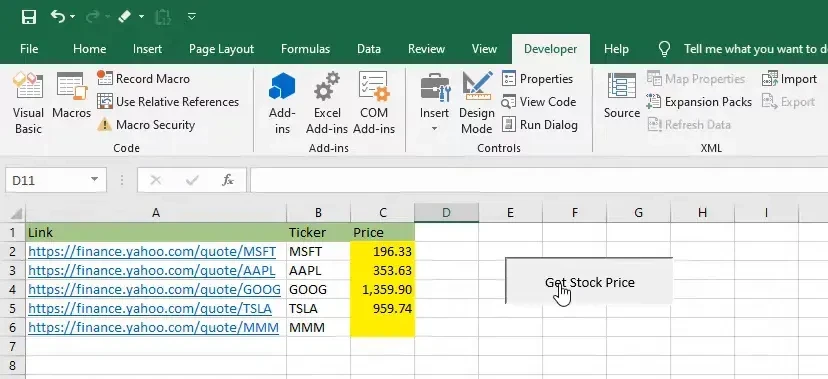
The sheet both macros below work with has the Yahoo Finance link in column A, the ticker in column B and the price in column C, with headers in row 1:
Set up Selenium
VBA drives Chrome through SeleniumBasic, a free library, plus a ChromeDriver that matches your Chrome version. SeleniumBasic has not been updated since 2016, so the driver that ships with it is far too old; you replace it with a current one.
-
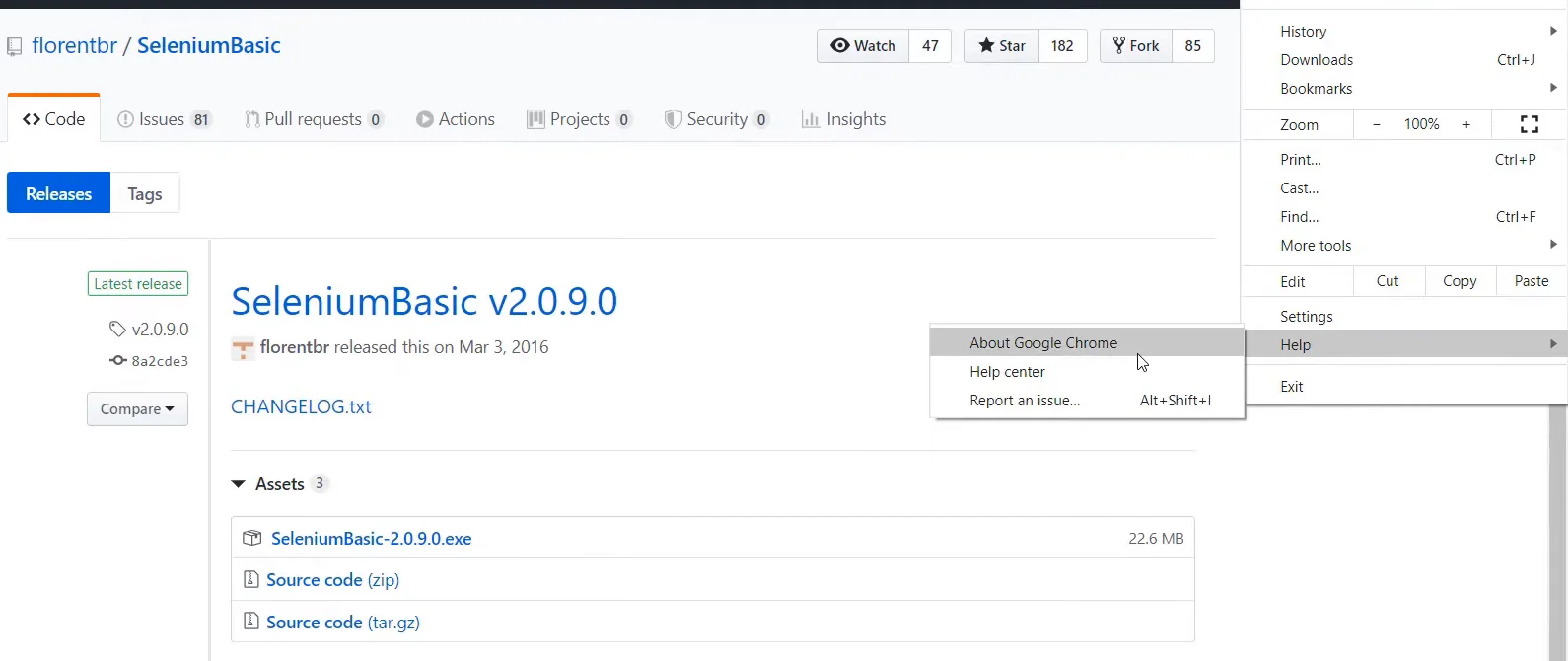
Install SeleniumBasic. Download the installer from the SeleniumBasic release page and run it. It installs into
C:\Users\YourName\AppData\Local\SeleniumBasic. -
Check your Chrome version. In Chrome, open the menu and click Help > About Google Chrome. Note the first number, for example 142.
-
Download the matching ChromeDriver. Get the chromedriver win64 zip for your version from the Chrome for Testing downloads page. The Stable row matches an up-to-date Chrome.
-
Replace the old driver. Unzip it and copy
chromedriver.exeinto the SeleniumBasic folder, over the outdated one that came with the installer.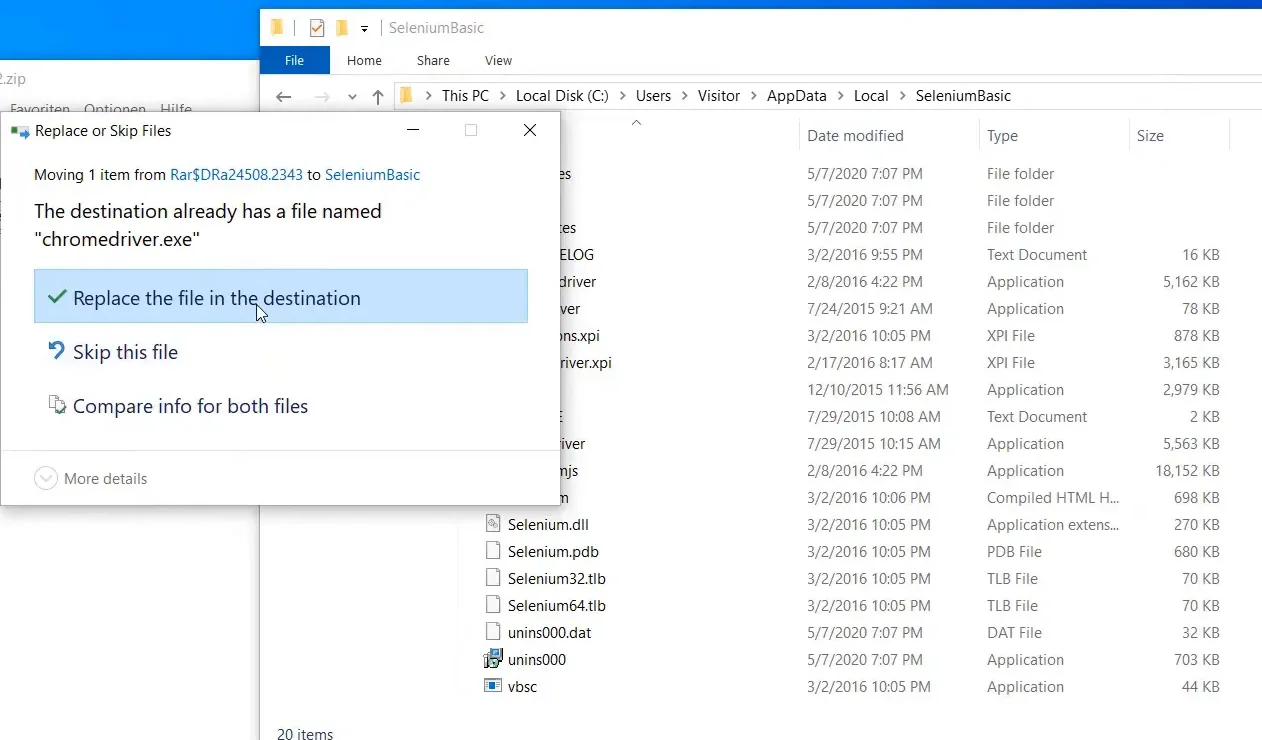
-
Turn on .NET Framework 3.5. SeleniumBasic needs it. Without it, the macro stops with an automation error; this fix for run-time error -2146232576 shows how to turn it on.
Chrome updates itself every few weeks, and each new major version needs a new ChromeDriver. When the macro suddenly stops starting Chrome, repeat steps 2 to 4. Automating any website with Excel VBA covers the Selenium setup in more depth.
The Selenium macro
The macro opens each link from column A in Chrome, waits for the price element, and writes the number into column C. It finds the price by its XPath, the element’s address on the page, which you can copy from Chrome’s developer tools.
-
Show the Developer tab. If it is missing, go to File > Options > Customize Ribbon and tick Developer.
-
Insert a module. Click Developer > Visual Basic, then Insert > Module.
-
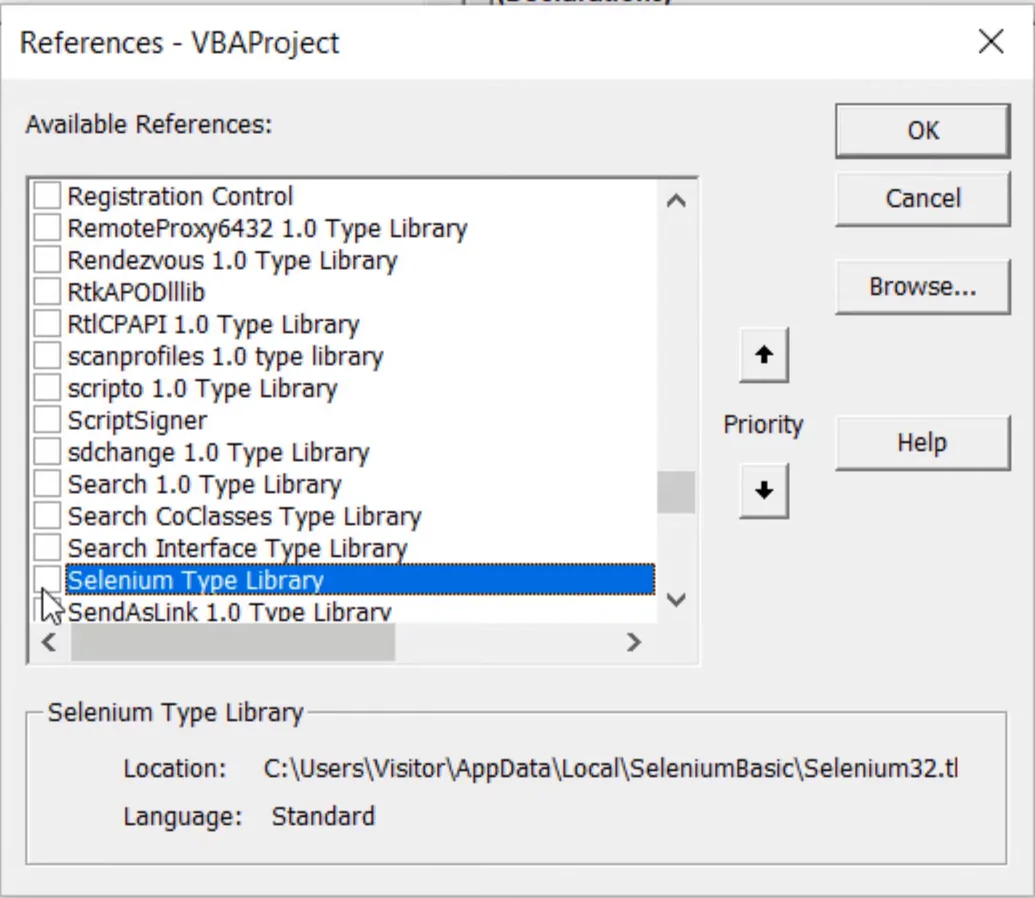
Add the Selenium reference. In the VBA editor, click Tools > References, tick Selenium Type Library and click OK.
-
Paste the macro. Copy the code below into the module.
-
Add a button. Click Developer > Insert > Button (Form Control), draw it on the sheet and assign
StockRetrieve.
Sub StockRetrieve()
    Dim bot As New WebDriver
    Dim ws As Worksheet
    Dim lastRow As Long, i As Long
    Dim priceText As String

    Set ws = ThisWorkbook.Sheets(1)
    lastRow = ws.Cells(ws.Rows.Count, "A").End(xlUp).Row

    bot.AddArgument "--headless"    ' delete this line to watch Chrome work
    bot.Start "chrome"

    For i = 2 To lastRow
        bot.Get ws.Range("A" & i).Value
        priceText = bot.FindElementByXPath("//*[@data-testid='qsp-price']", 10000).Text
        ws.Range("C" & i).Value = Val(Replace(priceText, ",", ""))
    Next i

    bot.Quit
    MsgBox "Done :)"
End Sub
What changed compared with the video:
- The XPath. Yahoo Finance has redesigned its quote pages since the recording, and the old path
//*[@id='quote-header-info']/div[3]/div/div/span[1]no longer exists. The price element now carriesdata-testid="qsp-price". I checked that path on the live AAPL, MSFT and SAP.DE pages in November 2026. An attribute like this survives small layout changes better than a long chain of div positions. - One tab. The video opened every link in a new tab with JavaScript and switched to it.
bot.Getloads each link in the same tab, which is simpler and leaves no tabs behind. - The rows. The loop runs to the last filled row in column A instead of a fixed range, so adding a ticker needs no code change.
- The number. Prices above 1,000 contain a thousands separator.
Replaceremoves it, andValconverts the text with a dot as the decimal point, whatever your regional settings. The cell then holds a real number you can calculate with.
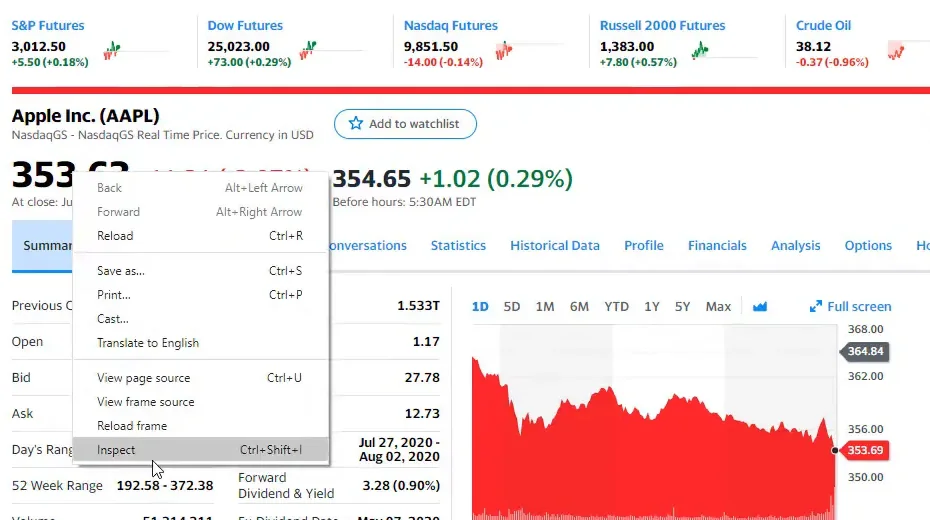
To read a different value, such as the market cap, right-click it on the Yahoo page, choose Inspect, and look for an attribute like data-testid or data-field on the highlighted element. Build the XPath from that attribute rather than using Copy XPath, which produces the fragile kind of path.
With --headless, Chrome runs without a window. Remove that line while you test, so you can see what the browser loads.
Without a browser
The quote page gets its numbers from Yahoo’s chart data, and VBA can request that data directly. This needs no Selenium, no ChromeDriver and no Chrome, and it is much faster than loading every quote page.
' Returns the current price for a Yahoo Finance ticker, or #N/A.
Function YahooPrice(ByVal ticker As String) As Variant
    Dim http As Object
    Dim json As String, key As String
    Dim p As Long, q As Long

    key = """regularMarketPrice"":"
    Set http = CreateObject("WinHttp.WinHttpRequest.5.1")
    http.Open "GET", "https://query1.finance.yahoo.com/v8/finance/chart/" & ticker, False
    http.SetRequestHeader "User-Agent", "Mozilla/5.0"
    http.Send

    YahooPrice = CVErr(xlErrNA)
    If http.Status <> 200 Then Exit Function

    json = http.ResponseText
    p = InStr(json, key)
    If p = 0 Then Exit Function
    p = p + Len(key)
    q = InStr(p, json, ",")
    YahooPrice = Val(Mid(json, p, q - p))
End Function

Sub UpdatePrices()
    Dim ws As Worksheet
    Dim i As Long

    Set ws = ThisWorkbook.Sheets(1)
    For i = 2 To ws.Cells(ws.Rows.Count, "B").End(xlUp).Row
        ws.Range("C" & i).Value = YahooPrice(ws.Range("B" & i).Value)
    Next i
End Sub
UpdatePrices reads the tickers from column B. Because YahooPrice is a public function in a module, you can also type =YahooPrice(B2) into a cell; it recalculates when B2 changes, or for all cells with Ctrl+Alt+F9.
I ran the same request through the WinHttp object from a script in November 2026: AAPL, MSFT, SAP.DE and the S&P 500 index returned their prices, and an unknown ticker returned status 404, which the function turns into #N/A. The response holds more than the price: previousClose, regularMarketDayHigh, regularMarketDayLow, regularMarketVolume and fiftyTwoWeekHigh can be read the same way by changing key.
Limits: this is not an official, documented API. Yahoo can change or block it at any time, and it rate-limits clients that send many requests in a short time. Use it for a personal watchlist, not for hundreds of tickers per minute. Index symbols start with a caret, which has to be written as %5E in the URL: %5EGSPC for the S&P 500.
Troubleshooting
Most failures come from a ChromeDriver that no longer matches Chrome, a missing reference, or a page that changed. The message usually tells you which.
- “This version of ChromeDriver only supports Chrome version …” Chrome updated. Download the ChromeDriver for your new version and replace the file in the SeleniumBasic folder.
- Run-time error ‘-2146232576 (80131700)’: Automation error. .NET Framework 3.5 is missing. See the fix for this error.
- Compile error: User-defined type not defined. The Selenium Type Library reference is not ticked. Add it under Tools > References.
- NoSuchElementError, or an empty price. The XPath no longer matches. Open the page without
--headlessand check what loads. In the EU, Yahoo first shows a cookie consent page, and the price element only appears after you accept it. - A price of 1 instead of 1,359.90. The thousands separator stopped the conversion. Keep the
Replace(priceText, ",", "")part. - #N/A from YahooPrice for every ticker. Yahoo rejected the request, often because of too many requests in a row. Wait a few minutes and update fewer tickers at once.
For the same job in Python, with history and more fields, see getting stock data into Excel with Python.