
Match two Excel lists by meaning, not just spelling.
Select your list and the list to match it against, like your customers and your vendor master. The AI finds the right entry for every row, even when names are abbreviated, renamed or misspelled, and says No match instead of guessing.
No signup. Excel on Windows, Mac and the web.
Reviewed by Microsoft Listed on Microsoft Marketplace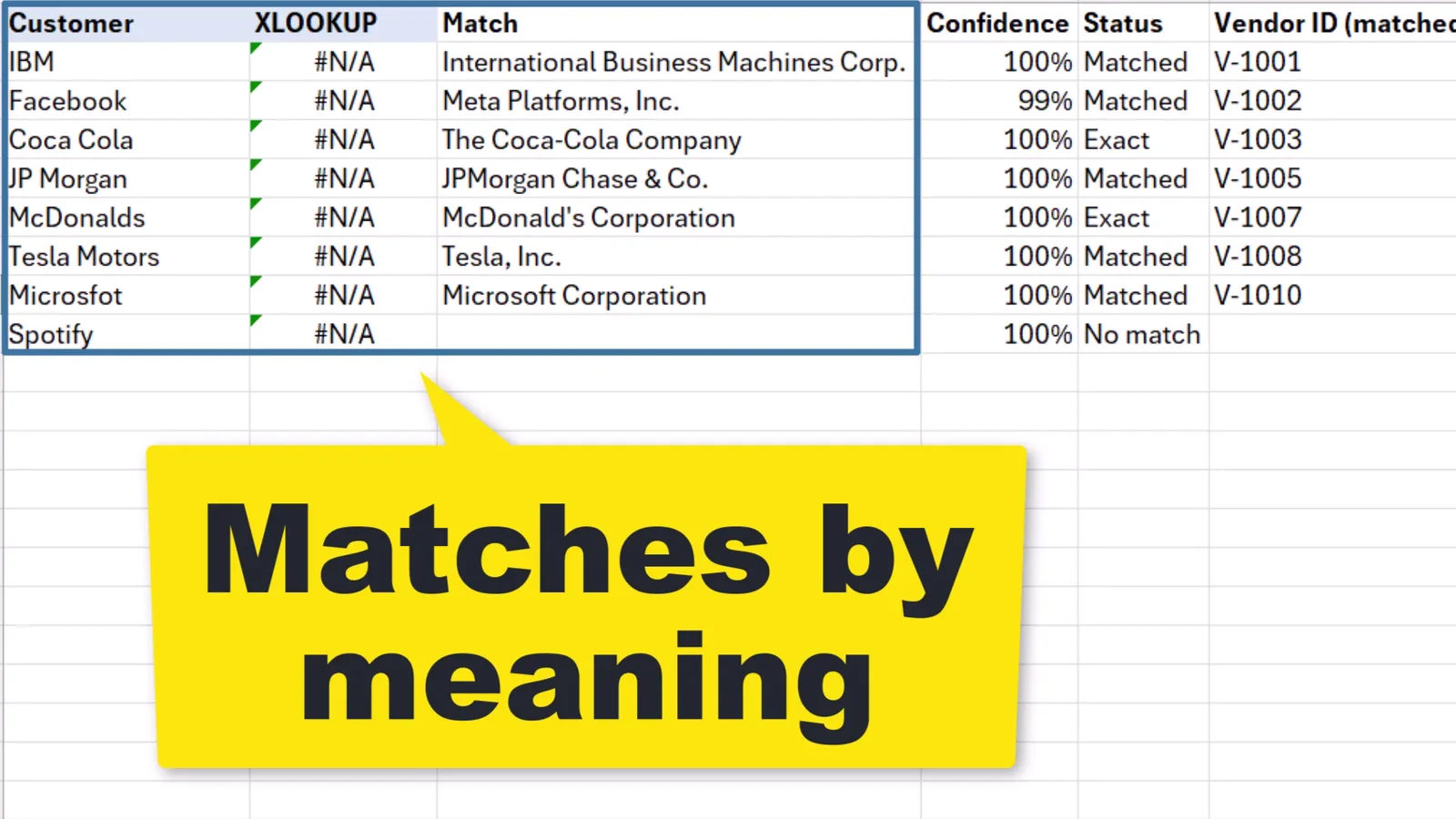
XLOOKUP vs AI Fuzzy Match
Same customers, same vendor list. XLOOKUP needs the exact same spelling. AI Fuzzy Match understands which company is meant.
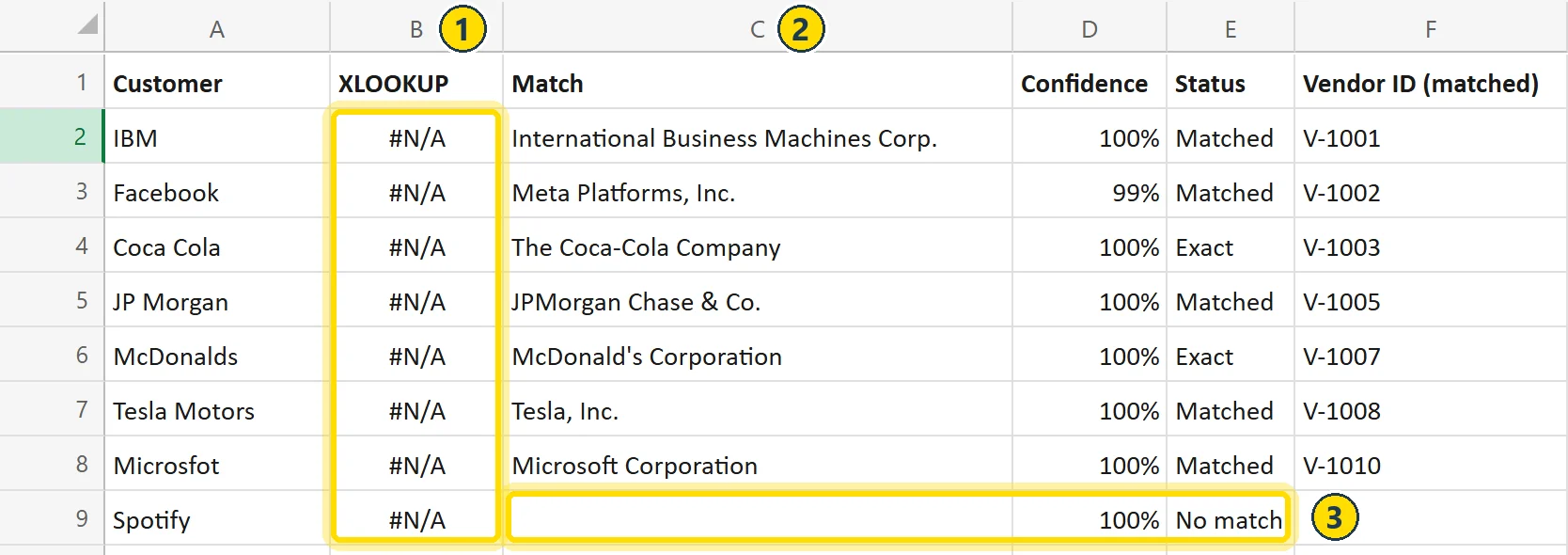
- XLOOKUP gives upNone of the eight names is spelled exactly like the vendor name, so every row is #N/A.
- AI Fuzzy Match finds itAbbreviations, new names and typos, each with a confidence and the vendor ID copied over.
- No guessingSpotify is not on the list, so it gets No match, not the look‑alike Shopify.
Names that differ only in punctuation or a legal form, like Coca Cola and The Coca-Cola Company, count as Exact: free and instant.
How to use it
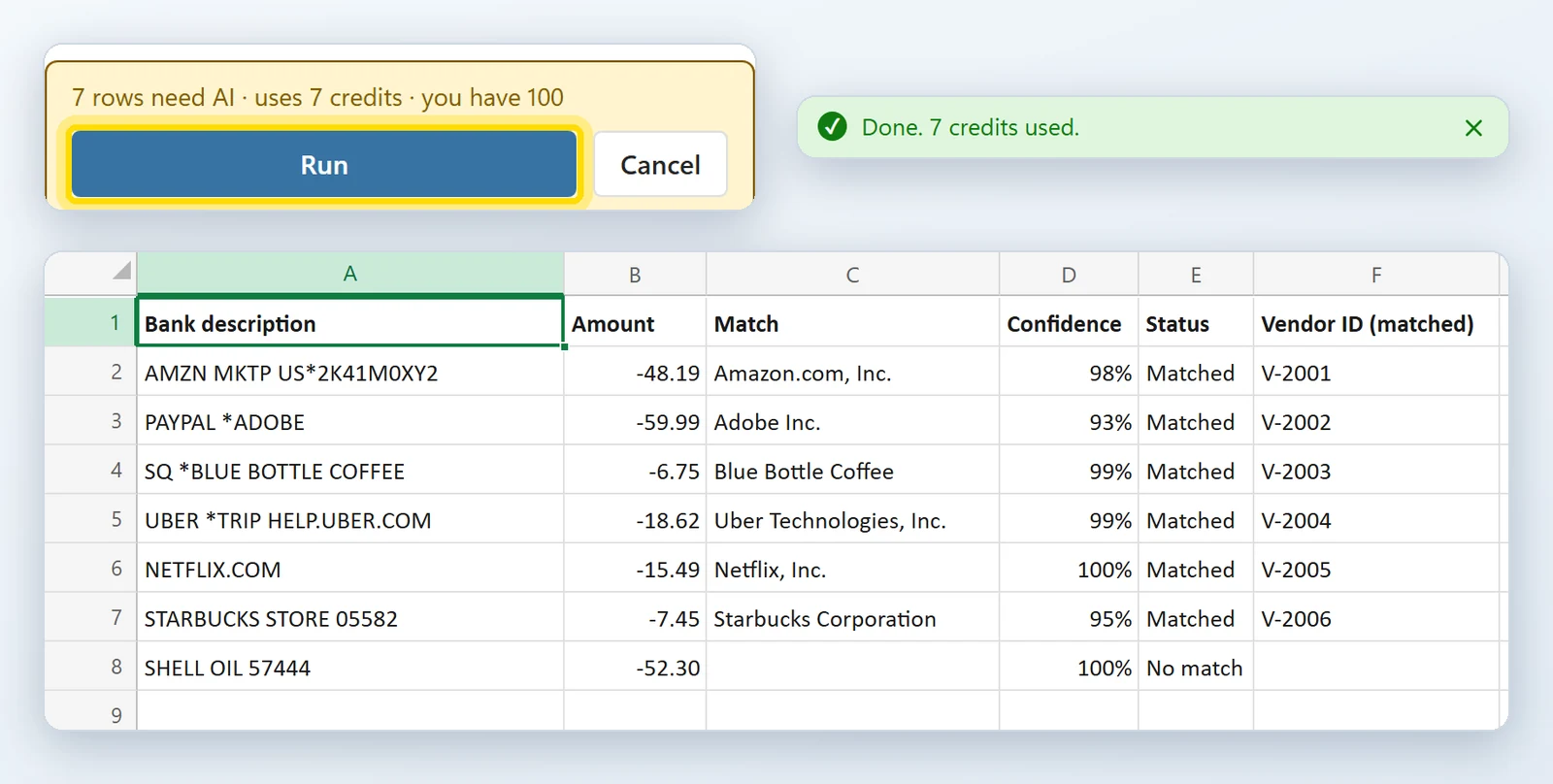
Another example: card payments from a bank statement, matched to a vendor list. Select two lists, check the cost, click Run.
Select the list to match
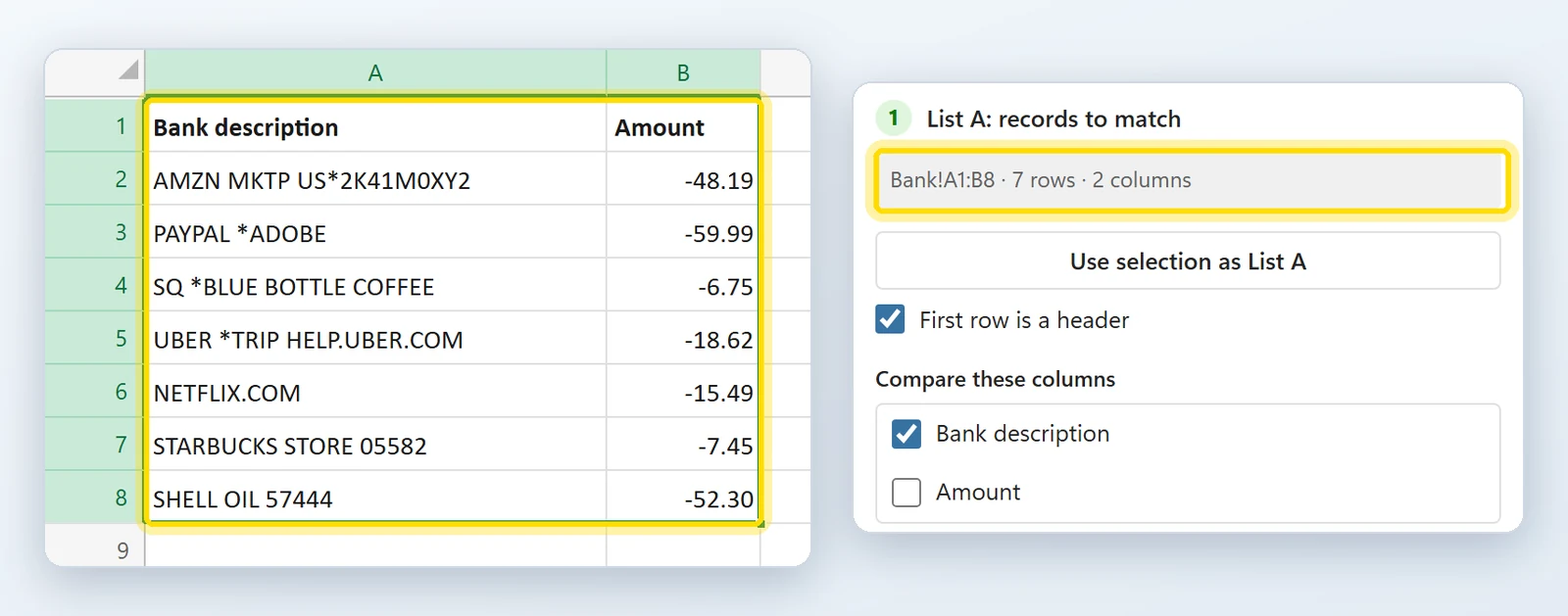
Select your bank lines, here A1:B8, and click Use selection as List A. The pane names the range it picked up, so you see exactly what will be matched. Leave only the description ticked.
Select the list to match against
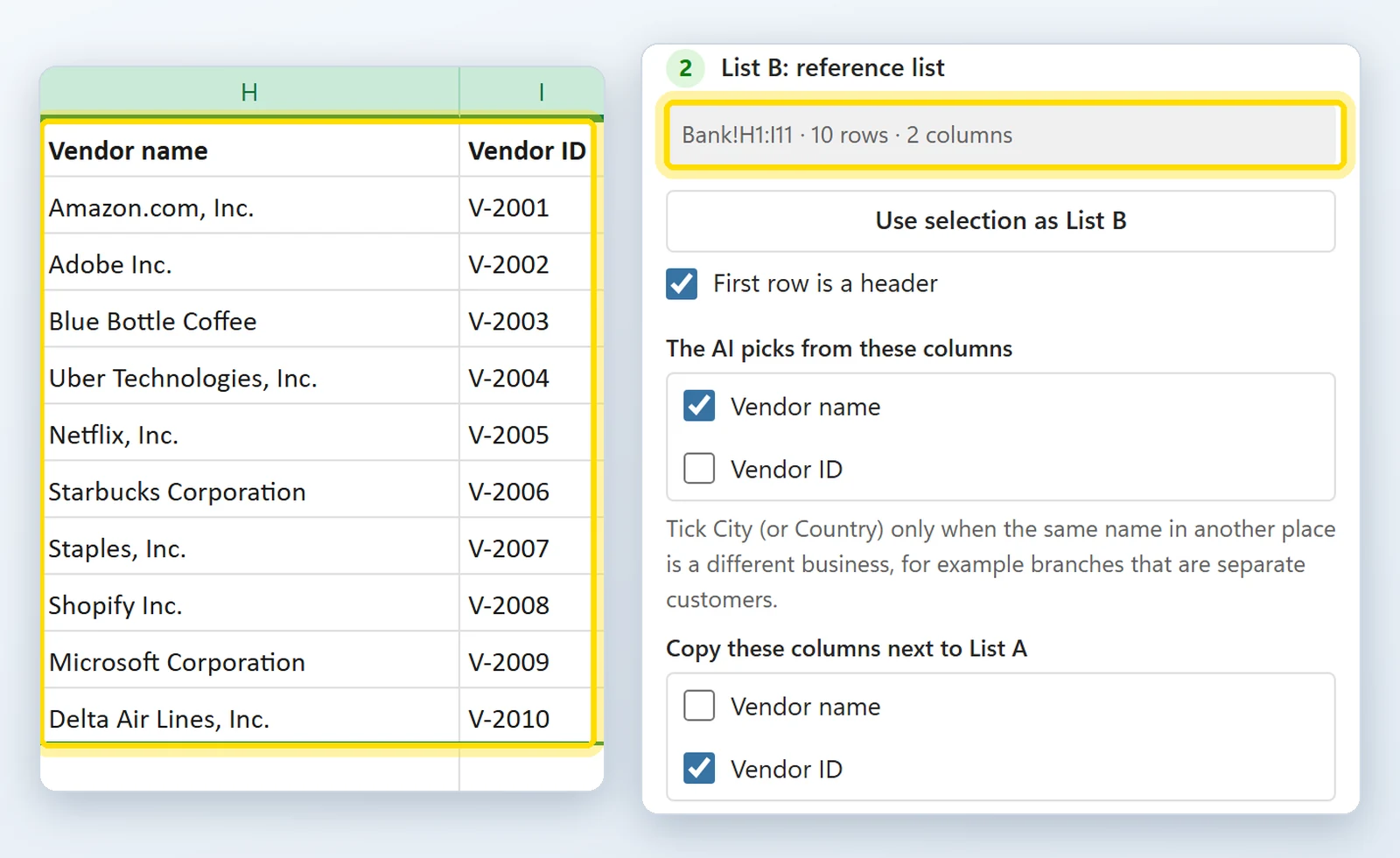
Select your vendor list, H1:I11, and click Use selection as List B. The AI picks from the vendor names, and the vendor ID is copied next to each bank line.
Check the cost, click Run
Click Check credits and run to see what the run uses, then Run. The results land in new columns next to List A: six vendors found with their IDs, and Shell marked No match because it is not on the list.
Installed in about a minute
Straight from Microsoft's add-in store, inside Excel. No installer file, no macros to enable, and 100 free credits waiting when you open it.
- 1In Excel, go to Home → Add-ins → More Add-ins.
- 2On the Store tab, search for AI Fuzzy Match by Bosau Digital.
- 3Click Add, open it from the Home tab, and click Insert sample or select your first list.
Depending on your Excel version, look under Insert → Get Add-ins instead.
- Windows, Mac and the web
- No macro warnings
- Exact matches are free and instant
- Only new result columns are written
Pay per use. Credits never expire.
One credit is one row the AI looks at. Exact matches cost nothing, and there is no subscription.
Try it free with 100 credits on every install, no signup
- 5,000 credits
- Every feature included
- Exact matches never use credits
- Adds to the credits you already have
- Excel on Windows, Mac and the web
- Email support, usually within 24 hours
- 25,000 credits
- Every feature included
- Exact matches never use credits
- Adds to the credits you already have
- Excel on Windows, Mac and the web
- Email support, usually within 24 hours
- 100,000 credits
- Every feature included
- Exact matches never use credits
- Adds to the credits you already have
- Excel on Windows, Mac and the web
- Email support, usually within 24 hours
- Excel on Windows
- Excel on Mac
- Excel on the web
Frequently asked questions

Still have a question?
I’m Sven, the developer, and I usually reply within a day.
Two lists that will not line up?
Try AI Fuzzy Match on your own data. The first 100 credits are on the house.
Try it free with 100 creditsMicrosoft, Excel and Microsoft 365 are trademarks of Microsoft Corporation. AI Fuzzy Match is made by Bosau Digital LLC and is not affiliated with or endorsed by Microsoft or TypeSafe AI.