
How To Fix | Run-time error '-2146232576 (80131700)': Automation Error in Excel
Run-time error -2146232576 (80131700) in Excel VBA almost always means the .NET Framework 3.5 is missing or switched off. Turn it on under Windows Features, or install the 3.5 SP1 package from Microsoft, and the macro will run.
Why This Error Shows Up
The number is less cryptic than it looks. It is the signed form of the hex code 0x80131700, and Windows reserves the 8013 block for errors raised by the .NET runtime. So nothing is wrong with your macro. Excel asked Windows for a .NET component and Windows had none to hand over.
That is simply the normal state of a new PC. Windows 10 and 11 ship with .NET Framework 4.x only, and version 3.5 sits switched off under Windows Features. Plenty of VBA depends on 3.5 anyway: CreateObject("System.Collections.ArrayList") for sorting and de-duplicating, for example, or a COM library built on .NET such as Selenium Basic. Switching it back on takes about two minutes.
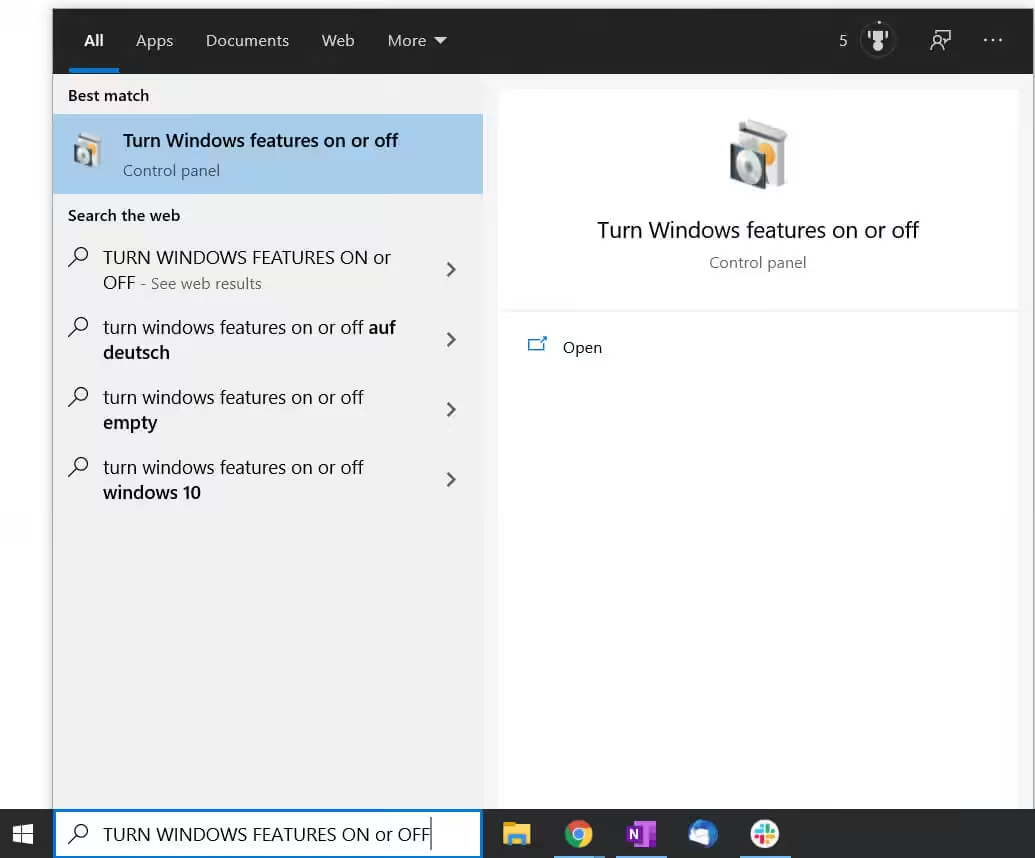
Step 1: Open Windows Features
Search for “Turn Windows features on or off” in the Start Menu and select it.
Step 2: Tick .NET Framework 3.5
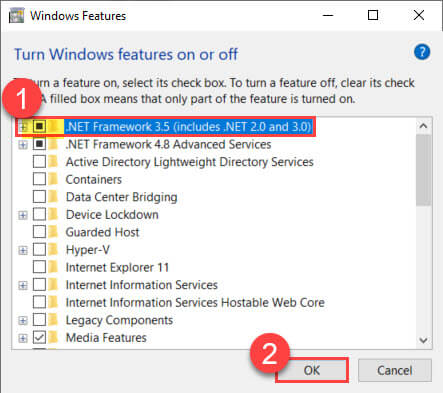
- Select the option that shows MICROSOFT .NET FRAMEWORK 3.5.1 in Windows 7.
- In Windows 10 and 11 it is listed as .NET FRAMEWORK 3.5 (includes .NET 2.0 and 3.0).
- Then click OK.
Step 3: Let Windows Download the Files
Windows will ask you to download the update. Choose Let Windows Update download the files for you.
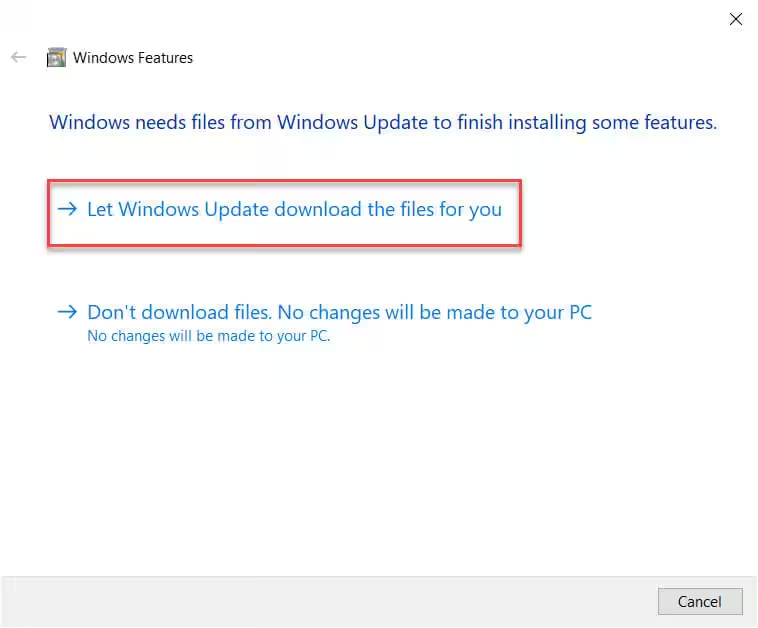
Once the download finishes, restart your computer. Afterwards, the Run-time error ‘-2146232576 (80131700)’ should be gone.
If the Error Is Still There
- Restart before you test again. The 3.5 files are only registered for COM once Windows has rebooted, so seeing the error again before that restart tells you nothing.
- On a work laptop, 3.5 may be blocked. Group policy can grey out the tick box, and a company update server often does not carry the package at all. Ask IT to push it, or use the offline installer below.
- Only one macro still failing? Then it is a different missing reference, not .NET. Step through the code with F8 and watch which line breaks; Excel VBA debugging shows how.
Optional: Install .NET Framework 3.5 SP1 Manually
If Windows Update cannot fetch the files, you can also download the Microsoft .NET Framework 3.5 Service Pack 1 (Full Package) yourself:
Download .NET Framework 3.5 SP1 from Microsoft
A Different Route: Automate Excel with Python
If you write VBA, you already know it handles the simple stuff and then gets complicated fast. Python picks up where it runs out, and it runs right inside Excel through a free add-in, so there is no Python to install and no .xlsm to explain to your colleagues. A few lessons of my Excel automation course are free to preview if you want to see the style first.
Merge dozens of files into one table, build interactive dashboards, generate Word documents in bulk. 52 lessons for Excel users with no coding background.