
How to Make a 2027 Calendar in Excel (With Holidays)
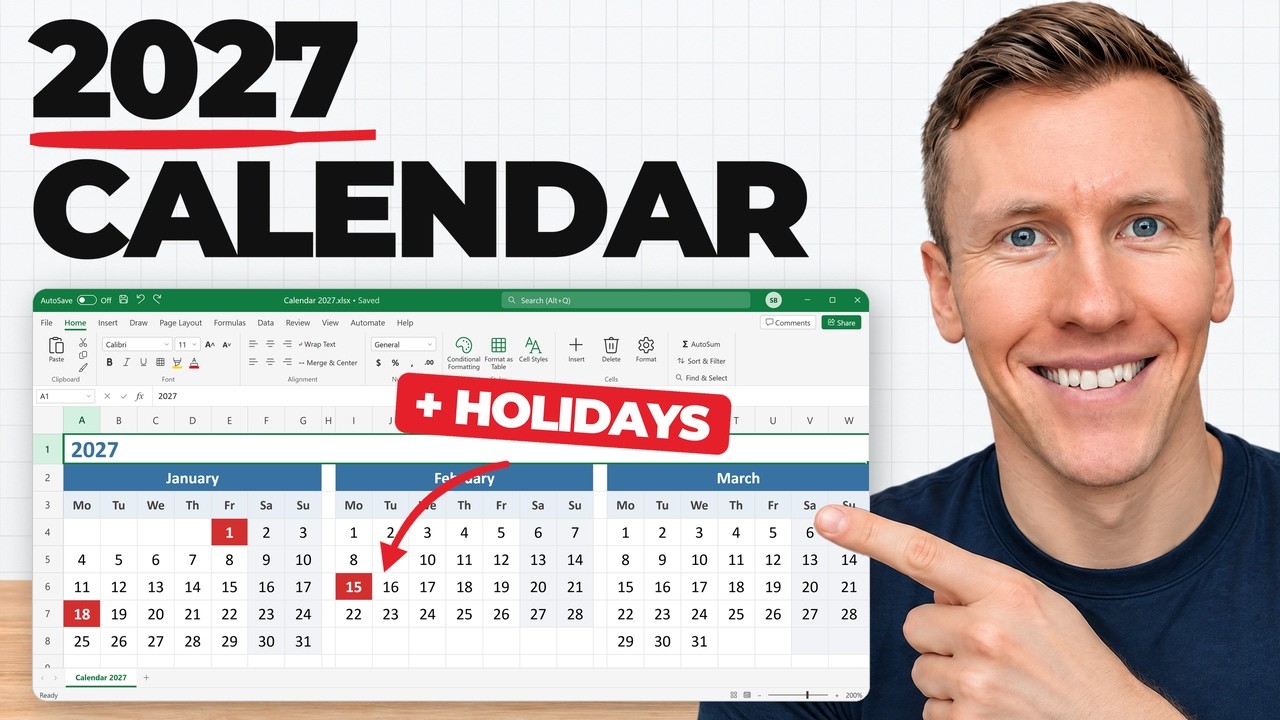
To make a 2027 calendar in Excel, download my free template below: one printable year page and twelve monthly pages, with all 2027 US federal holidays and week numbers, for Sunday or Monday weeks. To build one yourself, start each month with =DATE(2027,1,1)-WEEKDAY(DATE(2027,1,1))+1 and add 1 per cell.
Table of contents
The free 2027 template
My template has a year at a glance that prints on one landscape page, twelve monthly pages with room to write, the US federal holidays for 2027 and a switch for Sunday or Monday weeks. Every date is a formula, so typing 2028 in the Settings sheet turns it into next year’s calendar.
2027 calendar for Excel, with US holidays
A one-page year at a glance, twelve monthly planner pages with three note rows per day, and a Holidays sheet that calculates the US federal holidays for any year. Add your own days off and they are highlighted too.
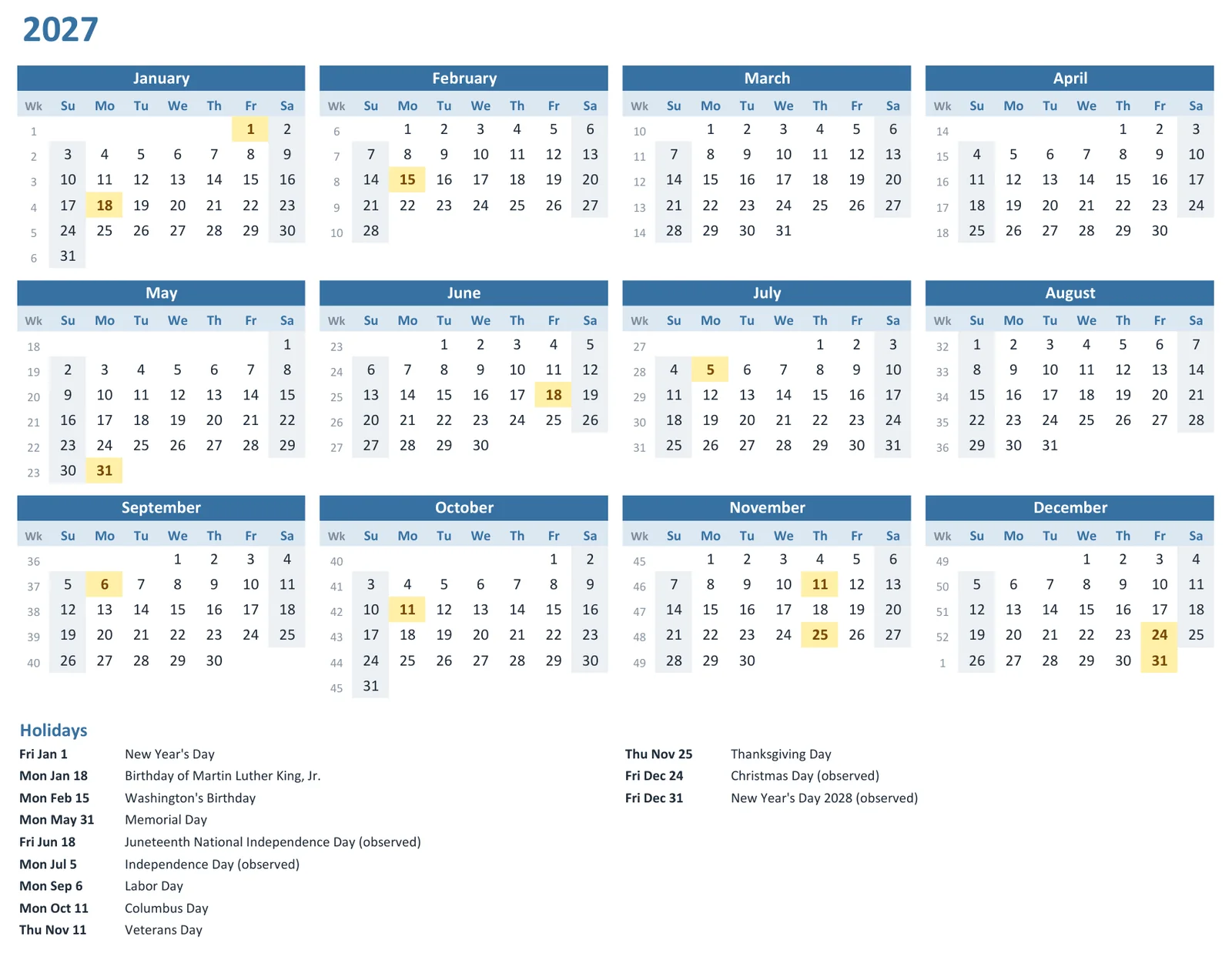
Here is the year page. Weekends are shaded grey and the observed holidays are highlighted in yellow, with the list of holidays below the months.
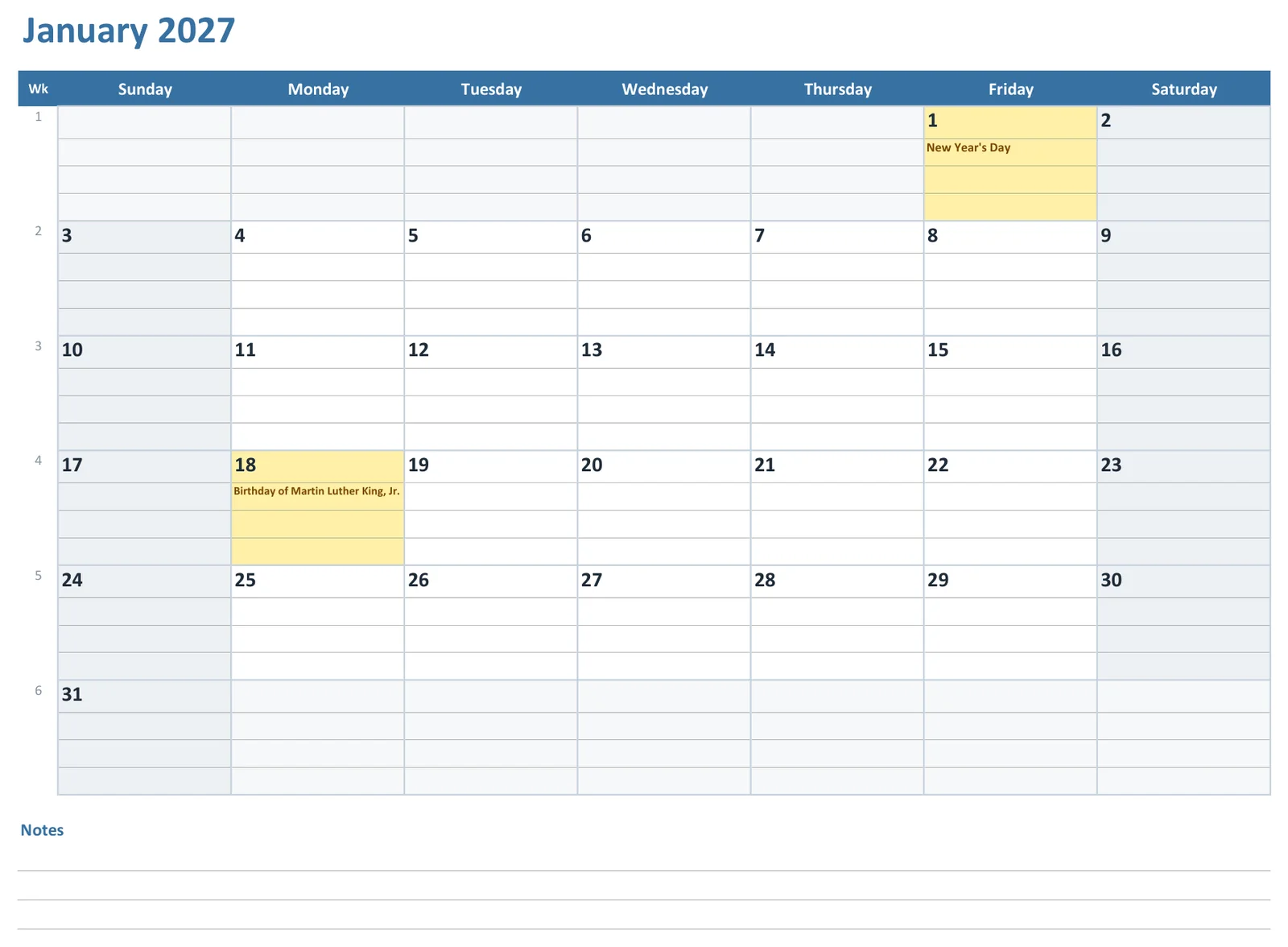
Each month also has its own page. Every day box has three empty rows to write in, and a holiday shows its name inside the box.
The Settings sheet holds three choices:
- Year: 2027 by default. Type another year and all thirteen calendar sheets and the holiday list follow.
- Week starts on: Sunday, the US habit, or Monday, which most of Europe uses.
- Week numbers: Show or Hide. Sunday weeks use US week numbers, Monday weeks use ISO 8601.
Excel also has its own calendar templates under File > New: search for “calendar”. They are a fine start when you do not need holidays or week numbers.
US federal holidays in 2027
2027 has eleven US federal holidays. Three fall on a weekend, so they are observed on a nearby weekday: Juneteenth on Friday, June 18, Independence Day on Monday, July 5, and Christmas on Friday, December 24. New Year’s Day 2028 falls on a Saturday, so it is observed on Friday, December 31, 2027.
The calendar below shows the whole year with those holidays highlighted. Pick Monday as the first day of the week or turn on week numbers, and look ahead to other years. The table under it lists every date.
2027 calendar at a glance
| Holiday | Date | Weekday | Observed |
|---|---|---|---|
| New Year’s Day | Jan 1, 2027 | Friday | Same day |
| Birthday of Martin Luther King, Jr. | Jan 18, 2027 | Monday | Same day |
| Washington’s Birthday | Feb 15, 2027 | Monday | Same day |
| Memorial Day | May 31, 2027 | Monday | Same day |
| Juneteenth National Independence Day | Jun 19, 2027 | Saturday | Friday, Jun 18, 2027 |
| Independence Day | Jul 4, 2027 | Sunday | Monday, Jul 5, 2027 |
| Labor Day | Sep 6, 2027 | Monday | Same day |
| Columbus Day | Oct 11, 2027 | Monday | Same day |
| Veterans Day | Nov 11, 2027 | Thursday | Same day |
| Thanksgiving Day | Nov 25, 2027 | Thursday | Same day |
| Christmas Day | Dec 25, 2027 | Saturday | Friday, Dec 24, 2027 |
| New Year’s Day 2028 | Jan 1, 2028 | Saturday | Friday, Dec 31, 2027 |
The observed days follow the rule of the US Office of Personnel Management: a holiday on a Saturday is observed the Friday before, and one on a Sunday the Monday after. Private employers set their own schedules, so check yours. With the twelve observed days, 2027 has 261 weekdays and 249 federal working days. In Excel you get that number with =NETWORKDAYS(DATE(2027,1,1),DATE(2027,12,31),Holidays), where Holidays is the range of observed dates.
Build the calendar with formulas
Build one month as a grid of seven columns and six rows. The first cell holds the Sunday on or before January 1, and every other cell adds one day. A number format of d shows only the day, and a conditional formatting rule fades the days that belong to the previous or next month.
-
Set up the inputs. Put the year in B1 (2027) and the month number in B2 (1 for January). Type the weekday names Su to Sa into A4:G4.
-
Find the first day of the grid. In A5, enter
=DATE($B$1,$B$2,1)-WEEKDAY(DATE($B$1,$B$2,1))+1. January 1, 2027 is a Friday, so this returns Sunday, December 27, 2026. For Monday weeks, use=DATE($B$1,$B$2,1)-WEEKDAY(DATE($B$1,$B$2,1),2)+1. -
Fill the grid. In B5, enter
=A5+1and copy it across to G5. In A6, enter=G5+1, then copy row 6 down to row 10. In Excel 365 one formula in A5 does the whole grid instead:=SEQUENCE(6,7,DATE($B$1,$B$2,1)-WEEKDAY(DATE($B$1,$B$2,1))+1). -
Show only the day number. Select A5:G10, press Ctrl+1, choose Custom and type
d. -
Fade the other months. Add a conditional formatting rule with the formula
=MONTH(A5)<>$B$2and a light grey font. -
Repeat for twelve months. Copy the block eleven times and change the month number in each copy. A title such as
=DATE($B$1,$B$2,1)formatted as mmmm shows the month name.
Six rows are needed because some months touch six different weeks. In 2027 that happens in January, May and October with Sunday weeks. That is the whole trick behind my template. It adds the week numbers, the holiday lookup and the print setup, which are the parts that take an afternoon.
Highlight holidays and weekends
Put the holiday dates in a range, then add a conditional formatting rule on the calendar grid with the formula =COUNTIF(Holidays,A5)>0 and a colored fill. For weekends, a second rule with =WEEKDAY(A5,2)>5 shades Saturdays and Sundays.
Name the holiday range under Formulas > Define Name, so the rule reads clearly. Rules apply top to bottom, so put the holiday rule above the weekend rule and the observed Friday gets the holiday color. In my template the Holidays sheet computes the dates by rule: Martin Luther King Jr. Day is the third Monday of January, for example =DATE(2027,1,1)+MOD(2-WEEKDAY(DATE(2027,1,1)),7)+14, which returns January 18. The observed date is =A2-(WEEKDAY(A2)=7)+(WEEKDAY(A2)=1): one day earlier on a Saturday, one day later on a Sunday.
The same COUNTIF rule works for any list you keep: school breaks, vacation days or project deadlines. Conditional formatting on a date grid is also the idea behind the formula version of my Gantt chart in Excel guide, where a rule colors the weeks between a start and an end date.
Week numbers
Use =ISOWEEKNUM(date) for ISO 8601 week numbers, used in most of Europe, or =WEEKNUM(date,1) for US week numbers. ISO weeks start on Monday and week 1 holds the first Thursday of the year. US weeks start on Sunday and week 1 holds January 1.
The difference shows right at the start of 2027. January 1, 2027 is a Friday, so under ISO 8601 it still belongs to week 53 of 2026, and ISO week 1 of 2027 starts on Monday, January 4. Under the US system, January 1 is in week 1. 2027 has 52 ISO weeks. In a calendar grid, take the week number of the Thursday in each Monday row for ISO, or of the Saturday in each Sunday row for US numbering, and the whole row gets one number.
Print a whole year on one page
Select the calendar, set it as the print area under Page Layout > Print Area, switch Orientation to Landscape and set Scale to Fit to 1 page wide and 1 page tall. Choose Letter or A4 under Size and check File > Print before printing.
- Remove gridlines from the print. Page Layout > Sheet Options > Gridlines, untick Print. Use cell borders where you want lines.
- Narrow the margins. Page Layout > Margins > Narrow leaves more room for the months.
- Keep columns square. Day columns of about 3.5 characters wide and rows of about 15 points read well on a one-page year.
- Print colors. Light fills print well on any printer. Very dark headers use a lot of ink, so my template uses one mid blue.
Both the year sheet and each month sheet in my template are already set up this way, for Letter. For A4, change Page Layout > Size and the pages scale themselves.
Holidays for any country with DatePop
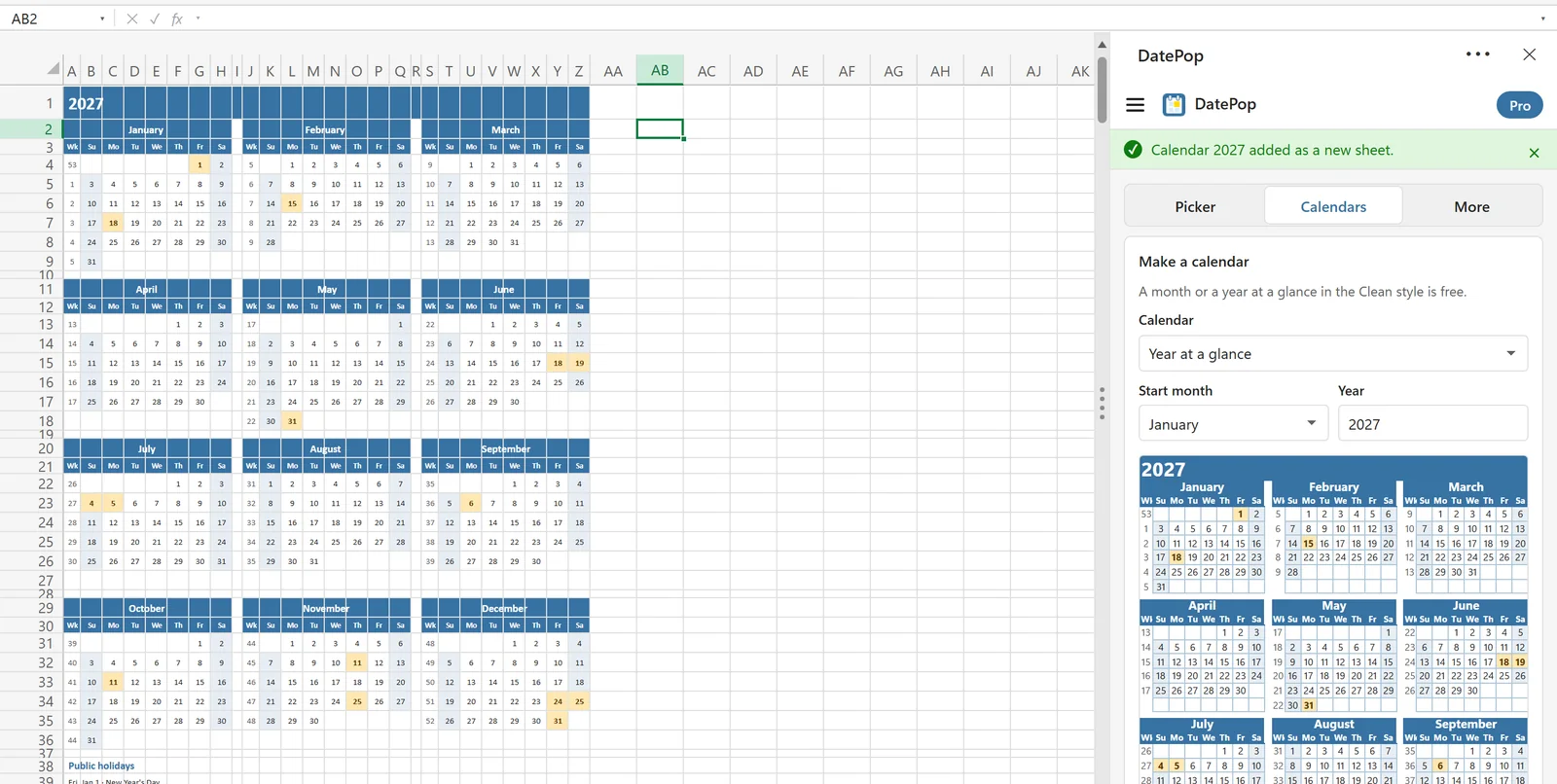
Use DatePop, the Excel add-in from the video. On the Calendars tab, pick Year at a glance, type 2027 and click Insert calendar. You get all twelve months on a new sheet, set up to print on one page. The year and month calendars are free. Public holidays for 207 countries are part of Pro.
-
Install DatePop. In Excel, go to Home > Add-ins > More Add-ins, search for DatePop and click Add. It works in Excel on Windows, Mac and the web.
-
Choose the calendar. Open the pane, click the Calendars tab, pick Year at a glance and type 2027. The pane previews the calendar before you insert it. The start month can be any month, so a school year or a fiscal year works too.
-
Add holidays (Pro). Under Public holidays, pick your country, and for some countries a region such as a US state or a German state, to get the local holidays as well.
-
Insert it. Click Insert calendar. The new sheet has every holiday highlighted and a list of all holidays by date and name below the months. File > Print shows the whole year on one page.
A month calendar is free too: pick Month, choose January 2027 and set Rows per day from 1 to 5, the date plus up to four rows to write in. With Pro you also get the other styles such as Bold, an accent color, a twelve-month layout with one big calendar per month, and a weekly planner with time slots. If you already keep a list of events or deadlines, Pro turns that table into a calendar colored by category and can export the events as an .ics file for Outlook or Google Calendar.
Inserting again adds a second sheet, so you never lose the first version. The same pane is also a date picker that writes real dates into cells, which I show in my guide to adding a date picker in Excel. The yearly calendar guide in the documentation covers every option.
Good to know
2027 is not a leap year. It has 365 days, starts on a Friday and ends on a Friday. That makes 53 Fridays, 261 weekdays and 52 ISO weeks. Easter Sunday is March 28, 2027, which matters for calendars in countries where Good Friday and Easter Monday are public holidays.
- Next year. Type 2028 on the Settings sheet and the holidays recalculate too. One quirk: New Year’s Day 2028 falls on a Saturday and is observed on December 31, 2027, so the 2028 calendar shows no New Year’s holiday in January.
- Week 53 on January 1. With Monday weeks the template uses ISO numbering, where January 1 to 3, 2027 still count as week 53 of 2026.
- Your own days off. Type birthdays or vacation days into the empty rows at the bottom of the Holidays sheet. They get the same highlight and appear by name on the month pages.
If you track the year’s tasks in the same workbook, my post on inserting check marks in Excel shows how to tick items off without breaking your formulas.
Year and month calendars for Excel in one click, plus a date picker for Windows, Mac and the web. Pro adds public holidays for 207 countries, planners and events calendars.