Skip to content

Free Excel to JSON Converter

Drop an Excel or CSV file and get JSON, right here in your browser. Your file is never uploaded.

Drop your spreadsheet here or click to choose a file ·
.xlsx .xls .xlsb .ods .csv .tsv .txt · max 5 MB

Converts in your browser. Your file never leaves your device.

Converting…

How to convert Excel to JSON

1
Drop your fileExcel (.xlsx, .xls, .xlsb), OpenDocument (.ods) or CSV/TSV, up to 5 MB. It is read right in your browser.
2
Get JSON instantlyPick a sheet and a layout: objects with your headers as keys, rows as arrays, or headers + rows.
3
Tweak, copy or downloadThe output is editable. Copy the JSON to your clipboard or save it as a .json file. Done.

JSON in the shape your code wants

The same two spreadsheet rows, three ways. Switch layouts with one click after converting - whichever your API, script or import expects.

Objects - headers as keys
[
  { "Product": "Widget", "Units": 42 },
  { "Product": "Gadget", "Units": 7 }
]
The default. What REST APIs, config files and most scripts expect.
Rows as arrays
[
  ["Product", "Units"],
  ["Widget", 42],
  ["Gadget", 7]
]
Positional data, headers included. Compact, order preserved.
Headers + rows
{
  "headers": ["Product", "Units"],
  "data": [["Widget", 42], ["Gadget", 7]]
}
Keys once, data as arrays. Chart libraries and wide tables like it.

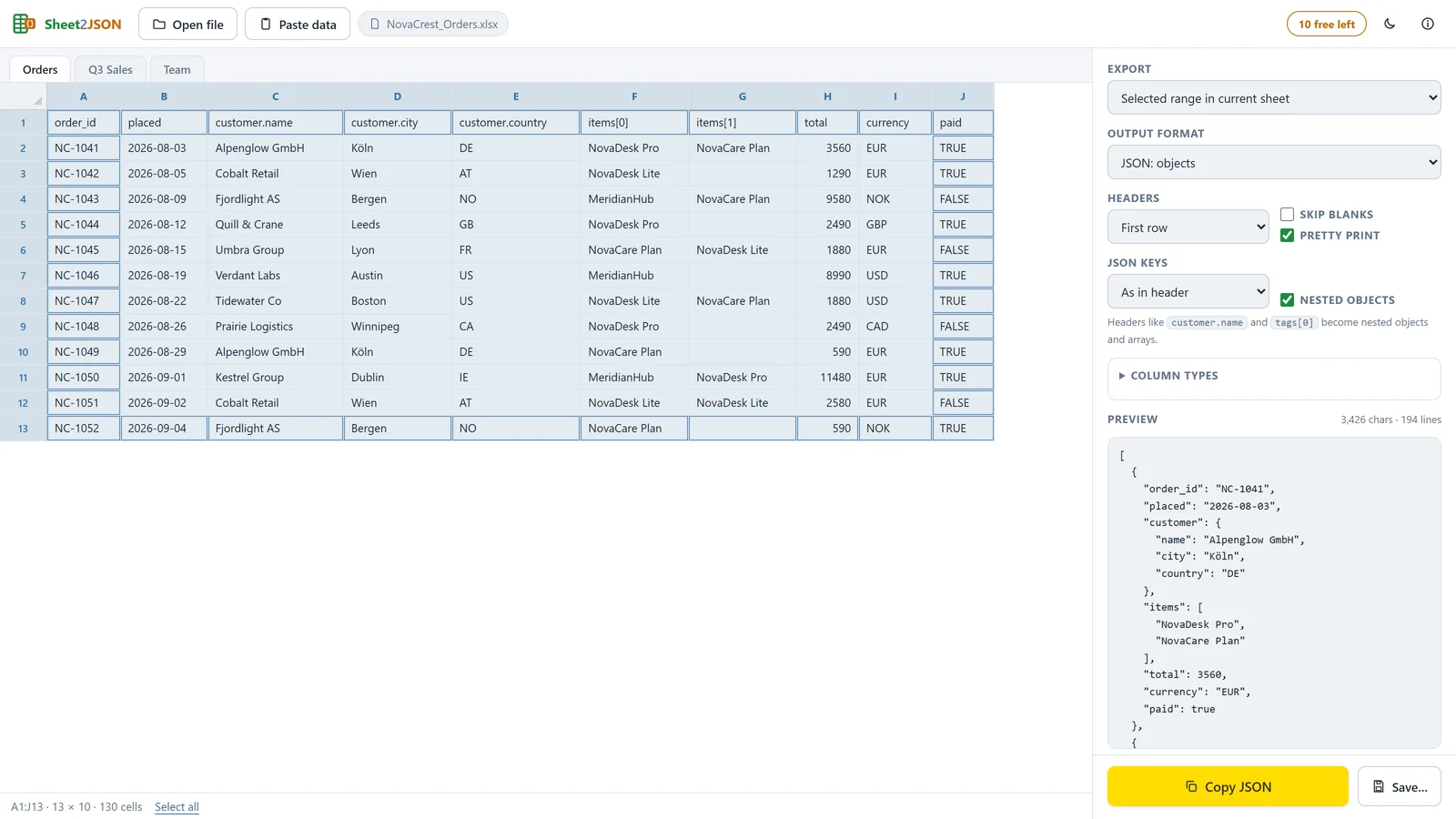
Need more structure? Headers like customer.name and tags[0] become real nested JSON objects and arrays in Excel2JSON for Windows - along with NDJSON (one object per line), an A1 cell map, per-column types and camelCase / snake_case keys. Click the locked chips in the tool above for a preview on your own data.

Convert XLSX, XLS, XLSB, ODS and CSV to JSON

Every common spreadsheet format is read directly in your browser - no Excel installation needed.

XLSX to JSONThe modern Excel workbook format. Multi-sheet files work: pick the sheet you need from the dropdown, and formula cells contribute their last calculated value.
XLS to JSONLegacy Excel 97–2003 workbooks convert the same way - no need to resave them in a newer Excel first.
XLSB to JSONExcel's binary workbook format, common for very large files, is read directly.
ODS to JSONOpenDocument spreadsheets from LibreOffice and OpenOffice convert without either program installed.
CSV and TSV to JSONComma- and tab-separated text files become JSON objects with the first row as keys - handy when an export lands as .csv instead of a workbook.
XLSM - in the desktop appMacro-enabled workbooks (plus pasting cells straight from any spreadsheet, Google Sheets included) are handled by Excel2JSON for Windows.

This page vs. Excel2JSON for Windows

This free tool handles the quick one-off file. The desktop app is the same idea grown up: private at any scale, and with real JSON shaping.

Excel2JSON for Windows: a 250,000-cell file, a range picked in the grid, and the output switched between five JSON shapes. No upload, no row cap.

This page, freeExcel2JSON for Windows
Where it convertsIn your browser, no uploadOn your PC, no upload
File sizeUp to 5 MBAny size
SheetsAny sheet, one at a timeEvery sheet, plus drag range selection in a grid
RowsFirst 2,000 rowsUnlimited
OutputObjects, arrays, headers+rows - flat onlyAll of those plus nested JSON, NDJSON, an A1 cell map and CSV/TSV
Types & keysAutomatic onlyPer-column Text/Number/Boolean/Date, camelCase & snake_case keys
Daily use10 conversions per day10 free conversions, then $29 once. No subscription

Frequently asked questions

Drop your .xlsx, .xls or .csv file into the converter at the top of this page (or click it to browse). The file is read in your browser, the sheet you pick becomes JSON with your first row as the keys, and you copy it to the clipboard or download it as a .json file. No sign-up, no software, no upload.
No. This converter runs entirely in your browser using a JavaScript spreadsheet reader; the file is opened on your device and never transmitted. You can even load this page, disconnect from the internet, and the conversion still works.
Yes - that is the point of this page. No Power Query, no VBA macro, no Python script: drop the file, pick a layout, copy the JSON. When exporting to JSON becomes a regular part of your workflow, the desktop app does the same job with more control and no browser tab.
Yes. CSV and TSV files convert exactly like Excel workbooks: the first row becomes the keys and each following line becomes a JSON object. Semicolon-separated files (common in Europe) work in the desktop app, which sniffs the delimiter automatically.
Excel workbooks (.xlsx, .xls, .xlsb), OpenDocument spreadsheets (.ods) and delimited text (.csv, .tsv, .txt), up to 5 MB, any sheet you pick. The output is JSON as objects (first row as keys), rows as arrays, or headers + rows - and you can edit it before copying. The desktop app additionally reads .xlsm, pastes cells from any spreadsheet, selects ranges in a grid, and produces nested JSON, NDJSON and an A1 cell map.
Not on this page: the free tool emits flat objects. Nested mode is the desktop app's speciality: headers like customer.name and tags[0] become nested objects and arrays. Excel2JSON for Windows includes 10 free conversions to try it.
Excel itself stores 007 as the number 7 unless the cell is formatted as text, so any converter sees a 7. The desktop app solves it properly with per-column types: set the ID column to Text and every value is emitted as a string, exactly as displayed.
This page is meant for the quick one-off file; 10 conversions a day covers that comfortably. If you convert regularly, the desktop app is the better home for the job anyway: drag, select, copy, no browser tab involved, and a one-time $29 license instead of a subscription.

Converting spreadsheets more than once a week?

Excel2JSON for Windows: nested JSON, NDJSON, column types, any file size, fully private. 10 free conversions included.

Get Excel2JSON for Windows