You can customize the colors of your charts using HTML color names (e.g., red, blue) or HTML color codes (e.g., #FF0000). Here’s how:
Note: Leave the colors field empty to use default colors. Invalid entries will be ignored.
Example 1: One Color for All Bars/Lines/Dots
Enter red in the colors field.
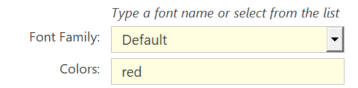
Result: All bars, lines, or dots will be red.

Example 2: Multiple Colors
Enter red, blue, green, yellow, #FF5733 in the colors field.

Result:
- 1st Element: Red
- 2nd Element: Blue
- 3rd Element: Green
- 4th Element: Yellow
- 5th Element: Orange (
#FF5733)