
WhatsApp Personal vs Business vs API: Which Should You Use?
Three ways to send WhatsApp at scale, with different trade-offs. Web automation is free but fragile and unofficial. The Business App is free and legitimate but capped and manual. The Business API scales properly, at a cost per conversation and an approval process.
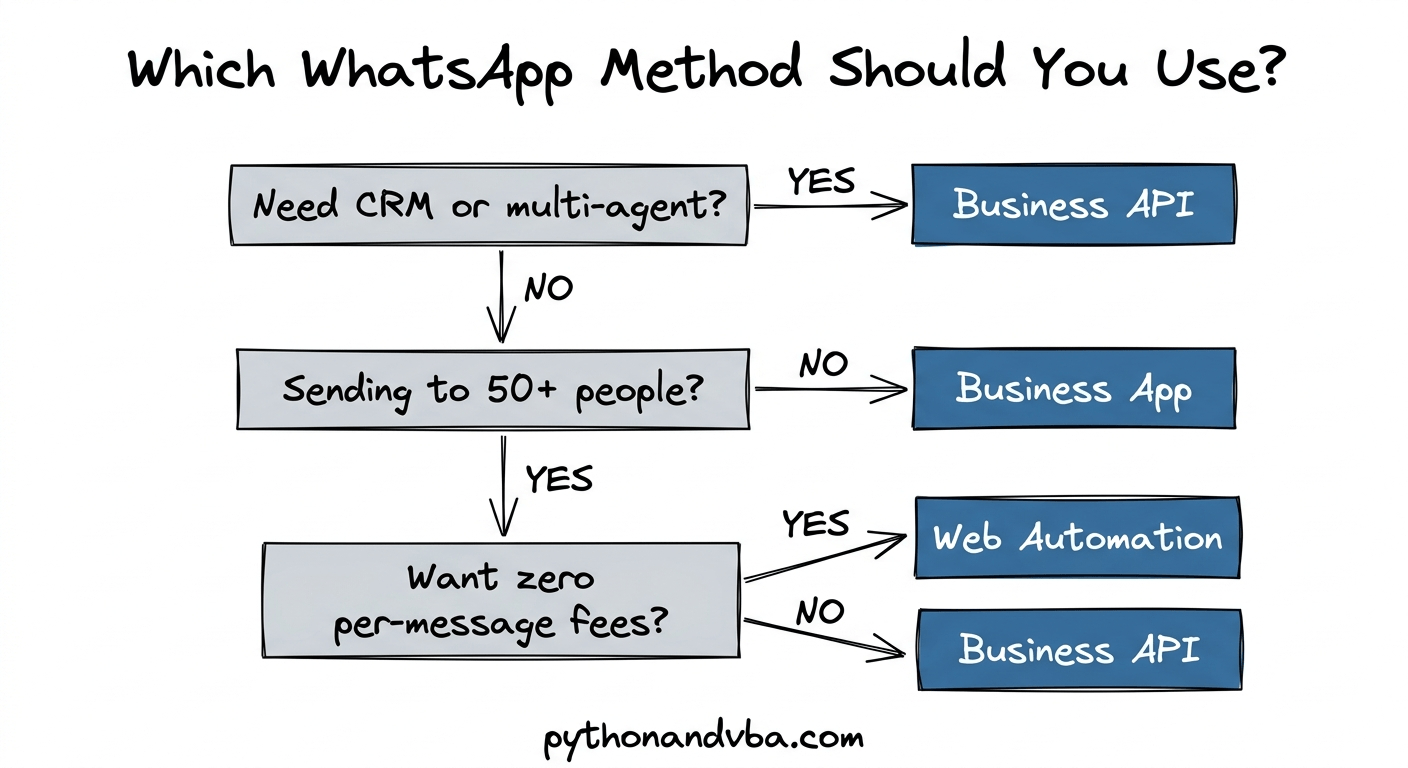
What are the three ways to send WhatsApp messages at scale?
You can send WhatsApp messages in bulk using web automation tools, the free WhatsApp Business App, or the official WhatsApp Business API. Each method targets a different use case, budget, and comfort level with risk.
Web automation uses browser automation to control WhatsApp Web directly. This includes Chrome extensions, standalone desktop tools, and spreadsheet-based senders. You send messages from your personal or business WhatsApp account without going through any official API. There is no approval process and no per-message fee.
WhatsApp Business App is a free app from Meta designed for small businesses. It adds features like quick replies, product catalogs, and broadcast lists on top of the standard WhatsApp experience.
WhatsApp Business API is the official programmatic interface. It requires approval from Meta, charges per message, and is built for companies that need high volume, CRM integration, or multi-agent support.
How does WhatsApp web automation work?
Web automation tools open a browser, load WhatsApp Web, and send each message automatically with randomized delays between them. No API key, no Meta approval, and no per-message fee required.
These tools come in different forms. Some are Chrome extensions that add a bulk-send button directly inside WhatsApp Web. Others are standalone desktop applications that control the browser in the background. And some work from a spreadsheet, where you load your contacts and messages into rows and the tool handles the rest.
The spreadsheet approach is popular because most people already have their contacts in a CSV, Excel file, or Google Sheet. Instead of copy-pasting numbers one by one, you just point the tool at your list and let it run.
Random delays between messages are important. Sending too many messages too fast looks like spam to WhatsApp and increases the chance of a temporary ban. Most tools let you configure delay ranges to mimic natural sending behavior.
The main advantage is speed of setup and zero per-message cost. The main downside is that web automation violates WhatsApp’s Terms of Service, which means there is always some level of ban risk involved.
What is the WhatsApp Business API?
The WhatsApp Business API is Meta’s official interface for sending WhatsApp messages programmatically. It requires business verification, message template approval, and charges a fee for each message sent.
You do not download an app. Instead, you connect through a Business Solution Provider (BSP) like Twilio, MessageBird, or Vonage. The BSP handles the infrastructure and passes through Meta’s per-message fees plus their own markup.
Before you can send outbound messages, you need to create message templates and submit them for review. Approval typically takes anywhere from a few minutes to three business days. Your overall account approval can take one to six weeks.
The API supports multiple agents on the same number, CRM integrations, chatbots, and automated workflows. It also comes with delivery tracking and analytics. For businesses that need scale and compliance, this is the officially supported path.
One important note for US-based businesses: Meta paused marketing message templates for US phone numbers in April 2025. As of now, this restriction is still in effect. You can still send utility and authentication templates to US numbers.
What is the difference between WhatsApp Business App and Business API?
The WhatsApp Business App is a free mobile app for small businesses with basic automation. The Business API is a paid programmatic interface for companies that need volume, integrations, and multi-agent access.
The Business App lets you create a business profile, set up quick replies, and send broadcast messages. But broadcasts are capped at 256 contacts per list, and recipients must have your number saved in their contacts to receive them. That dramatically limits actual reach.
The Business App also runs on a single phone with up to four linked companion devices. Only one person can realistically manage the account at a time. There are no integrations with external tools or CRMs.
The API removes all of those limits. It supports unlimited broadcast recipients, multiple agents handling the same inbox, and direct integration with tools like HubSpot, Salesforce, or custom-built systems. The trade-off is cost and setup complexity.
Can you send bulk WhatsApp messages from a personal account?
Yes, you can send bulk messages from a personal account using web automation tools. But it violates WhatsApp’s Terms of Service, and your account can be temporarily or permanently banned if flagged.
WhatsApp monitors sending patterns. If you send identical messages to many recipients in a short window, or if multiple people report or block you, WhatsApp will flag the account. A first offense usually results in a temporary ban with a countdown timer. Repeated violations lead to a permanent ban where the phone number loses WhatsApp access entirely.
You can reduce this risk with a few practices. Personalize each message using placeholders so no two messages are identical. Use random delays between sends. Start with small batches of 20 to 50 messages per day and increase gradually. Avoid sending to contacts who have not interacted with you before.
For many small businesses and individuals, the ban risk is acceptable given the cost savings and speed of setup. But if you rely heavily on your WhatsApp number for business communication, losing access to it is a serious downside to consider.
WhatsApp web automation vs API: how do they compare?
Here is a side-by-side comparison of all three methods across the features that matter most when choosing how to send WhatsApp messages at scale.
| Feature | Web Automation | Business App | Business API |
|---|---|---|---|
| Cost | Free or tool subscription | Free | Per-message + provider fee |
| Setup time | Minutes | Minutes | Days to weeks |
| Approval needed | No | No | Yes (Meta review) |
| Daily message limit | Depends on delay settings | 256 per broadcast list | 1,000 to unlimited (tier-based) |
| Ban risk | Moderate | None | None |
| Multi-agent support | No | No | Yes |
| CRM integration | No | No | Yes |
| Media attachments | Yes | Yes | Yes |
| Message personalization | Yes (placeholders) | Manual only | Yes (templates) |
| US marketing messages | No restriction | No restriction | Paused by Meta |
How much does the WhatsApp Business API cost per message?
Each API message has two cost components: the BSP fee and Meta’s template fee, which varies by message category and recipient country.
Here is a rough estimate for sending utility messages to US numbers through Twilio. Utility messages include order confirmations, appointment reminders, and shipping updates. Twilio charges $0.005 per message on top of Meta’s fee.
| Messages | Twilio Fee ($0.005/msg) | Meta Utility Fee (~$0.015/msg) | Estimated Total |
|---|---|---|---|
| 100 | $0.50 | $1.50 | $2.00 |
| 500 | $2.50 | $7.50 | $10.00 |
| 1,000 | $5.00 | $15.00 | $20.00 |
| 5,000 | $25.00 | $75.00 | $100.00 |
Actual Meta fees vary by country and message category. Marketing messages cost more than utility messages. Authentication messages have separate rates. The numbers above use approximate US utility rates to give you a ballpark. Check Twilio’s WhatsApp pricing page for current rates.
Also keep in mind that customer-initiated messages are free within a 24-hour service window. If a customer messages you first, you can reply with utility templates and free-form text at no charge for the next 24 hours.
How do you get started with each method?
Each method has a different setup path depending on your technical comfort level and what tools you already have.
Web automation: The quickest route is a tool that handles the browser automation for you. You load your contacts into a spreadsheet, write your message, and the tool sends them one by one through WhatsApp Web. There are Chrome extensions, standalone apps, and spreadsheet-based tools that do this. Some are free with limited features, others are paid with personalization and media support. I built SendCommander for this: a Windows app that imports your contact list from Excel or CSV and sends through your own WhatsApp account, with cautious pacing by default, placeholders and attachment support. It replaced my earlier spreadsheet-based WhatsApp Blaster. I walk through the whole workflow in how to send WhatsApp messages from an Excel list.
WhatsApp Business API: You need an account with a BSP like Twilio, a WhatsApp-approved sender number, and approved message templates. The setup takes longer, but you get official support, delivery tracking, and the ability to scale without ban risk. If you want to skip the coding part, there are no-code tools that connect your spreadsheet to the API. I built TextBay for this. It connects to Twilio’s API so you can send SMS, MMS, and WhatsApp messages directly from a spreadsheet.
WhatsApp Business App: Download the app from Google Play or the App Store. Set up your business profile, import your contacts, and start sending. It is free and requires no technical setup. The limitation is scale. Once you outgrow 256 contacts per broadcast, you will need to move to web automation or the API.