
Real Estate Texting: Text All Your Leads from Your PC
Real estate texting works best from your own number, as one personal text per lead instead of a group message. Keep buyers, open house visitors and past clients in separate lists, write one message with placeholders like the first name, area and kind of home, and send it from your PC through your Android phone. Text only people who gave you their number, and include a way to opt out.
Table of contents
Why text your leads
People read a text soon after it arrives, while an email can sit for days. A short text about a new listing, an open house or a price change starts a conversation. The work is doing it for twenty or fifty people without retyping the same message.
Most agents already text clients one by one from the phone, changing the name every time. That works for three people, not for every buyer looking in Oak Park.
The other habit, a group text, is worse for leads. Everyone sees everyone’s number, and one buyer’s “Is it still available?” goes to all the others. Buyers in the same price range are often competing for the same home, and they should not see each other.
What you want is the same message, sent as separate personal texts, each with the lead’s name and what they are looking for, and every reply coming back only to you.
Your own number or a texting platform
For leads who already know you, text from your own number. Your clients saved it, they recognize it, and a text from it reads like a personal message. Texting platforms send from a business number or short code your clients do not know, and US business numbers need 10DLC registration first.
Real estate is a relationship business. A text that clearly comes from you gets answered, and the reply lands on your phone, where you already talk to your clients. That is why I built QuickText SMS to send from your own phone: a Windows app that hands each text to your Android phone over Wi-Fi, so it goes out through your SIM and your normal plan. There is no fee per text on top of what your plan charges.
A platform still makes sense if you run a large team, need texts that fire automatically from your CRM, or text thousands of leads a day. For that, my comparison of A2P vs P2P text messaging lays out the trade-offs. If you prefer a business number but no subscription platform, my other app sends bulk SMS through your own Twilio account.
What you need for the own-number route: a Windows 10 or 11 PC and an Android phone with an active SIM. Your clients can have any phone. The one-time setup, installing QuickText and the free KDE Connect app and pairing them over Wi-Fi, takes about five minutes and is shown screen by screen in my guide to texting from your computer.
Organize your leads
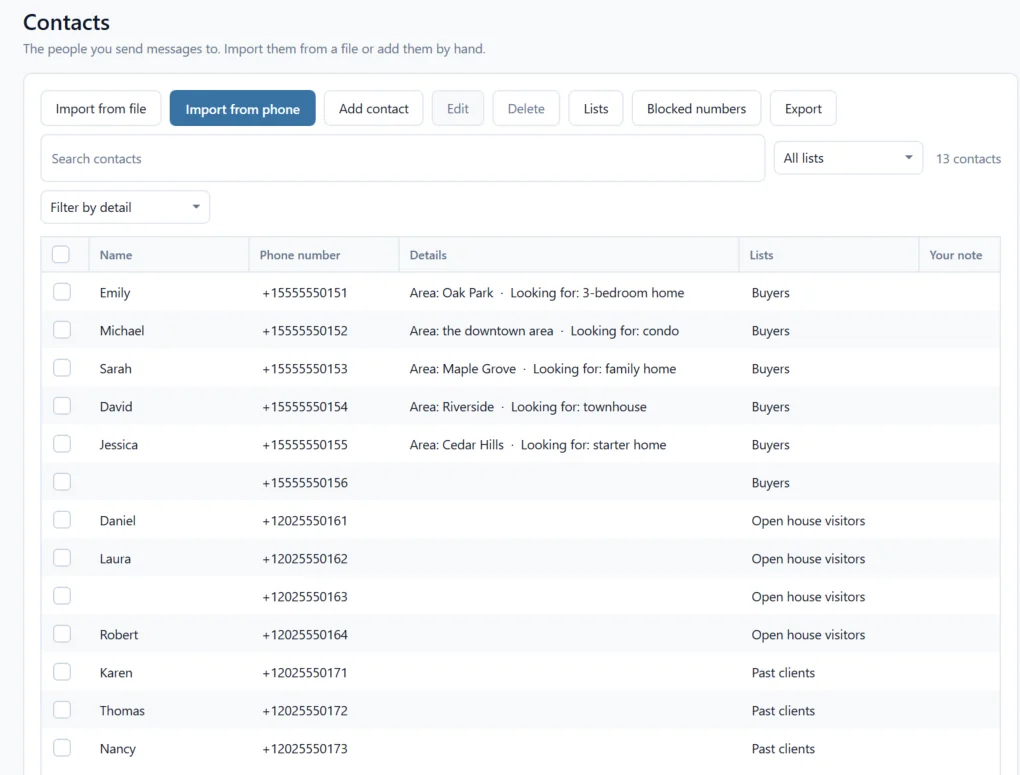
Keep one list per kind of lead: buyers, open house visitors and past clients. Each group gets a different message. For buyers, add two columns that make a listing text personal: what they are looking for and the area they want.
Most agents can export leads from their CRM or a spreadsheet. All QuickText really needs is a column with phone numbers. Everything else is optional, but the extra columns are what turn a blast into a personal text:
| List | Useful columns | Typical texts |
|---|---|---|
| Buyers | First name, Looking for (condo, 3-bedroom home), Area | New listings, price changes, showings |
| Open house visitors | First name, Property they visited | Thank-you and follow-up, next open house |
| Past clients | First name, Their home | Check-ins, referrals, market updates |
Write the values the way they read in a sentence. “the downtown area” fits into “a new condo just came on the market in the downtown area”. A code like DT-02 does not. Leave a value empty if you do not know it; a fallback covers that later.
Real estate leads texting template
Three lead sheets (Buyers, Open house visitors, Past clients) with the phone column set to Text, a consent column, and six copy-ready message templates with placeholders.
In QuickText, import each sheet on the Contacts page with Import from file, pick the phone column and the country, tick the extra columns and add the people to a list. My post on sending bulk SMS from an Excel list walks through the import wizard. Contacts, lists and replies stay on your PC and are not uploaded anywhere.
Text a new listing to all your buyers
Open Compose, pick the Buyers list, and write one message with the first name, the kind of home and the area as placeholders, each with a fallback. Add a variation for the question and an opt-out line, check the preview, then click Review and send. Every buyer gets their own version.
-
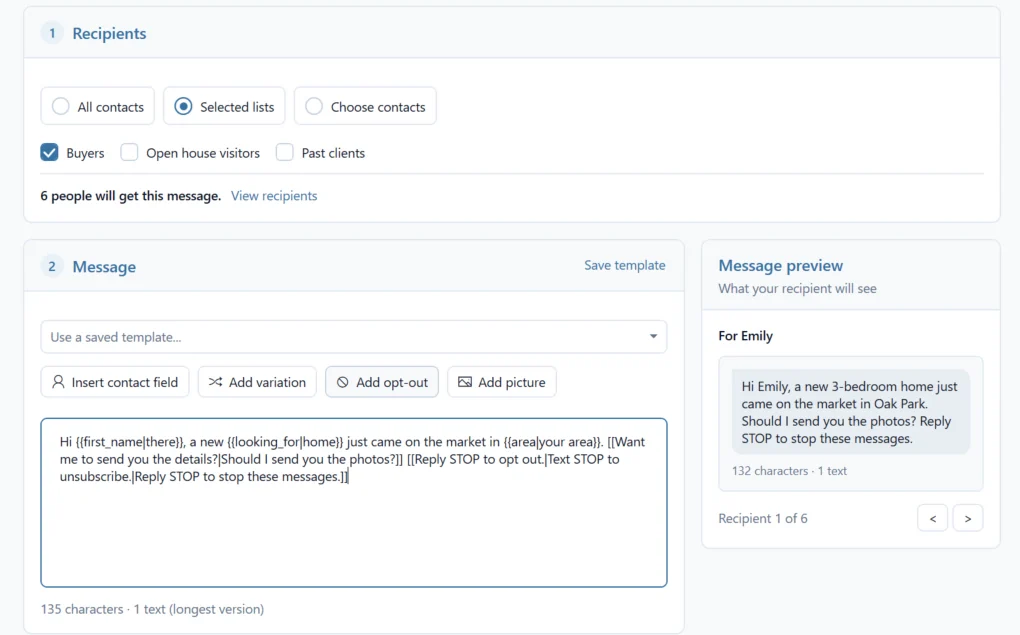
Pick the list. Under Recipients, choose Selected lists and tick Buyers. QuickText shows how many people will get the text.
-
Write the message with placeholders. Type “Hi “, then Insert contact field, First name, with “there” as the fallback. Do the same for Looking for (fallback “home”) and Area (fallback “your area”).
-
Vary the question. Add variation, Make your own, and enter two versions: “Want me to send you the details?” and “Should I send you the photos?”. QuickText picks one per buyer.
-
Add the opt-out. Add opt-out appends a short line telling people how to stop your texts. For a marketing text like a new listing, that is good practice.
-
Check the preview. Step through the buyers. Emily gets a 3-bedroom home in Oak Park, Michael a condo in the downtown area, and the buyer with no details gets “Hi there, a new home just came on the market in your area”.
-
Save it as a template. Click Save template and call it New listing. For the next listing you pick it from the template list and change nothing but the details.
-
Review and send. Under Sending options, give it a campaign name like “New listing Oak Park” so you find it in Results later. You can also spread the send over a time window, say the next hour, so the texts go out slowly, like texting by hand. Then click Review and send, check the summary, and send.
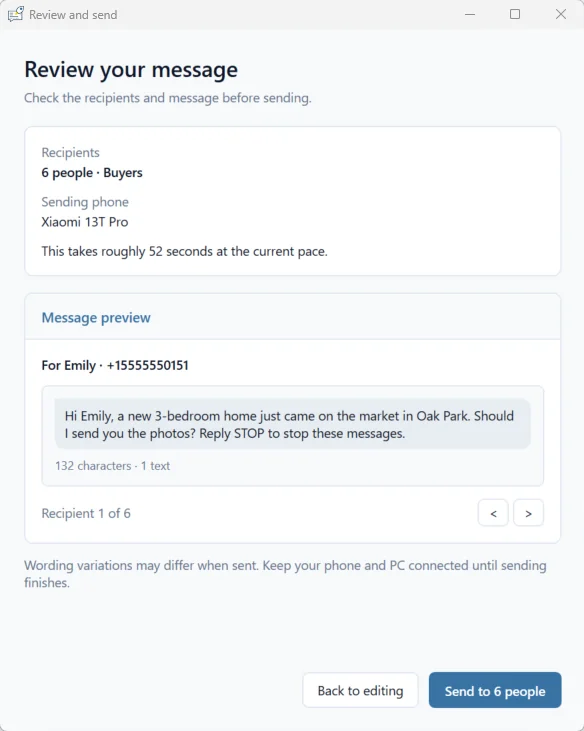
The finished message looks like this. Copy it and swap in your own wording:
Hi {{first_name|there}}, a new {{looking_for|home}} just came on the market in {{area|your area}}. [[Want me to send you the details?|Should I send you the photos?]] Reply STOP to opt out.
Personal texts also protect your number. When every text looks a little different, your carrier is much less likely to flag your number than when it sees the same text fifty times in a row. QuickText also runs a message check while you type and points out shortened links, capitals and other things carriers dislike.
Replies, photos and STOP
Replies come back to your phone as normal texts, and QuickText shows them on the Messages page, one conversation per buyer. You answer from your keyboard, optionally with a picture like a listing flyer. A STOP reply puts that number on your block list automatically.
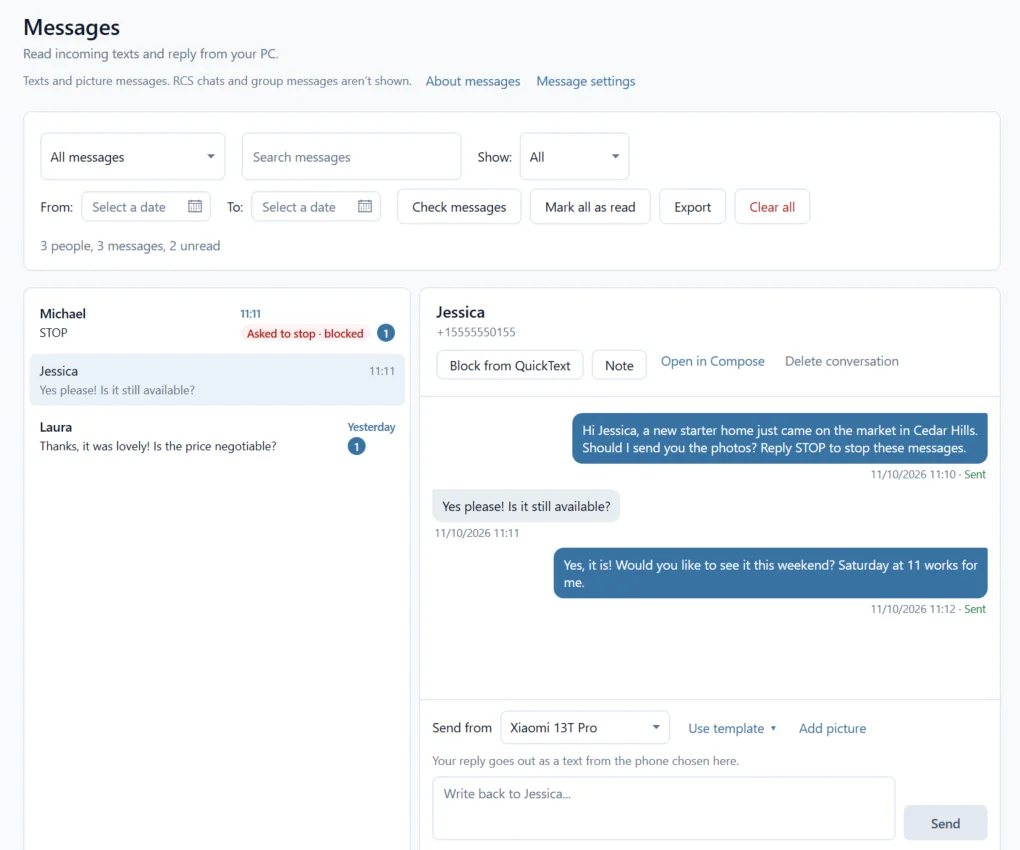
In my example, Jessica asks whether the home is still available. I answer “Yes, it is! Would you like to see it this weekend? Saturday at 11 works for me.” and she gets it as a normal text from my number. If a buyer asks for photos, Add picture attaches the flyer as a picture message (MMS). That needs mobile data on the phone and a plan with MMS, and some plans charge per picture, so I send pictures to people who ask rather than to the whole list.
Michael replied STOP. QuickText added him to the blocked numbers, so he gets no more texts from me, even though he is still in my Buyers list. You should only keep texting people who expect to hear from you. Softer answers like “not interested” are flagged for you to decide. The opt-outs guide lists which replies count.
Follow up with leads who did not reply
Open Results, find the campaign, and click Follow up, Text people who didn’t reply. QuickText opens Compose with exactly the leads who have not answered, leaving out anyone who replied or opted out. Write a short follow-up and send it.
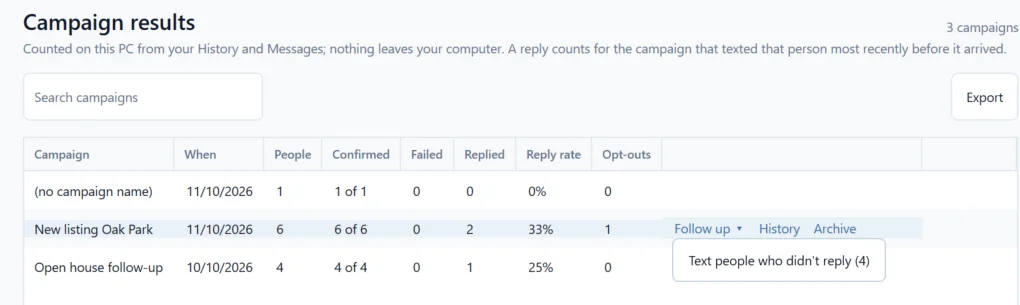
For the Oak Park listing, two of six buyers replied and one opted out, so four had not answered yet. Instead of checking who that was, I clicked Follow up and QuickText picked those four. My follow-up:
Hi {{first_name|there}}, just checking if you saw the new listing I sent you. [[Happy to send you the photos!|Would you like to see it this weekend?]]
One follow-up is useful. Three is pestering. If someone does not answer the second text, leave them for the next listing that fits.
10 real estate text templates
A good real estate text says who you are, gives one concrete reason for the text, and asks one easy question. Keep it under 160 plain characters when you can, so it arrives as one text. Here are ten templates for the moments agents text most.
New listing for a buyer:
Hi {{first_name|there}}, a {{looking_for|home}} in {{area|your area}} just listed this morning. It fits what you described. Want me to send you the details?
Open house invite:
Hi {{first_name|there}}, it’s Sarah from Oak Realty. I’m hosting an open house at 412 Maple St this Sunday from 1 to 3 pm. Want me to save you a spot? Reply STOP to opt out.
Open house thank-you, same day:
[[Hi|Hello]] {{first_name|there}}, thanks for stopping by the open house on Maple St today. Any questions about the home I can answer?
Price change:
Hi {{first_name|there}}, the {{looking_for|home}} in {{area|your area}} I sent you just had a price change. Want the new details?
Showing confirmation:
Hi {{first_name|there}}, confirming our showing at 88 Cedar Ave on Saturday at 11 am. Reply C to confirm or let me know if another time works better.
Just sold, for nearby homeowners who opted in to market updates:
Hi {{first_name|there}}, a home on your street just sold after 9 days on the market. Curious what yours might be worth? Happy to send a quick estimate. Reply STOP to opt out.
Under contract update for a seller:
Hi {{first_name|there}}, good news: we are under contract on your home. I’ll call you this afternoon to walk through the next steps.
Past client check-in:
Hi {{first_name|there}}, it’s Sarah from Oak Realty. How are you settling into {{home|your home}}? If a friend is thinking of moving, I’m happy to help.
Old lead re-engagement:
Hi {{first_name|there}}, are you still looking for a {{looking_for|home}} in {{area|your area}}? A few new ones came up this week. Reply STOP to opt out.
No-reply follow-up:
Hi {{first_name|there}}, just checking if you saw the listing I sent. Happy to set up a showing if the timing works.
Replace the name, brokerage and addresses with your own. For more wording ideas, my free SMS template generator writes texts with placeholders and variations, and the SMS spam checker scores a draft and counts its segments before you send. Showing reminders follow the same pattern as the texts in my appointment reminder templates.
Rules for texting leads
Text only people who gave you their number and agreed to hear from you, say who you are, offer a way to opt out, and stop when asked. Respect quiet hours. These rules apply whether you text from your own phone or a platform. This is a summary of the basics, not legal advice.
- Consent. In the US, the TCPA requires prior express written consent for marketing texts, and fines run per message. A lead who filled in your website form or signed in at an open house and agreed to texts is on much firmer ground than a number from a list.
- Never text bought or scraped lists. Those people did not agree to hear from you, and complaints land on your personal number.
- Identify yourself. Name and brokerage in the first text. Many people have not saved your number. Check whether your brokerage or state has rules on how marketing messages must name the brokerage.
- Opt-out. Add a “Reply STOP to opt out” line to marketing texts, and honor every STOP. QuickText blocks STOP replies automatically.
- Quiet hours. Do not send marketing texts before 8 am or after 9 pm in the recipient’s time zone. Some states are stricter.
Replies to a client’s own question, a showing confirmation or a closing update are conversations, not marketing, and carry much less risk. Keep a record of where each number came from; the template above has a Consent column for that. The legal section of my guide to sending a mass text covers the UK and Australia too.
Sending limits
Your carrier decides, and no carrier publishes an exact number. Most QuickText users send 100 to 500 texts a day to people who know them without trouble. For an agent texting a few dozen buyers about a listing, the limit rarely matters. Pacing and personal wording matter more.
QuickText sends one text at a time with 7 to 9 seconds between them by default, and it can spread a send over a time window. If your lists grow, you can pair a second Android phone with its own SIM, and QuickText rotates the send across both. Keep in mind that clients may then see a text from a number they do not know, so I would keep past clients on your main number.
The honest limits: QuickText needs a Windows PC and an Android phone, not an iPhone, and the PC stays on while a send runs. It sends SMS and picture messages, not RCS or WhatsApp. And it is built for people who expect to hear from you. If you want to cold-text thousands of numbers a day, it is the wrong tool, and so is your personal number.
Text your buyers, open house visitors and past clients from your PC through your own Android number. Personal texts from one message, replies on your keyboard, follow-ups in two clicks. Try it with 20 real texts first.