
Giving people a way out is good practice, expected in most places, and required in some. QuickText does both halves for you: it puts the opt-out line in your message, and it acts on the replies that come back.
Add the opt-out line to your message #
Write your message on the Compose page as usual, then click Add opt-out above the message box. The line is appended at the end, with the punctuation tidied up, and it goes in only once: if your message already mentions STOP, the button leaves it alone.
Because the line is part of your message, every send carries it, including each run of a campaign you send in batches.
The first time you use it, QuickText explains in one window what happens when somebody replies STOP. Tick the box to stop seeing that note.
It is three wordings, not one #
What the button inserts is not a fixed sentence. It is this:
[[Reply STOP to opt out.|Text STOP to unsubscribe.|Reply STOP to stop these messages.]]
These are optional wording choices. The same option may appear for several people; variation is not required for an opt-out to work and does not guarantee delivery.
You can vary the rest of the message the same way. Next to the button there is a Add variation list with ready-made sets:
- Greeting:
[[Hi|Hello|Hey]] - Thank you:
[[Thanks|Thank you|Many thanks]] - Sign off:
[[Best regards|All the best|See you soon]] - Ask for a reply:
[[Just reply to this message|Let me know|Send me a quick reply]] - Closing question:
[[What do you think?|Does that sound good?|Shall I put one aside for you?]] - Make your own: an empty
[[first option|second option|third option]]to fill in
Pick one and click Add variation to drop it in at the cursor, or type the brackets yourself anywhere in the message. The preview on the right shows one rolled result at a time, and the counter tells you how many texts the longest version will cost.
What happens when someone replies STOP #
Automatic handling applies to incoming messages from numbers this PC previously texted through QuickText, including quick replies, subject to the timestamp check and your reply settings. QuickText cannot determine which specific earlier message the person is answering. An unrelated STOP imported through optional phone-message syncing does not automatically block anyone or become a campaign opt-out. Use Block from QuickText manually if needed; this does not block the sender on your phone.
You do not have to watch for it. A reply that clearly asks you to stop puts that number on your block list by itself, and blocked numbers are skipped in every send from that moment on, including a send that is already running: the next message in the queue is the one that skips them.
QuickText tells two kinds of answer apart:
- A clear opt-out blocks the number automatically. That means a stop word on its own or in a short reply, in nine languages: STOP, END, QUIT, CANCEL, UNSUBSCRIBE, REMOVE and their relatives in German, French, Spanish, Portuguese, Italian, Dutch, Swedish and Finnish.
- A possible opt-out is only flagged for you, never blocked: softer answers like “not interested”, “wrong number” or “take me off”, and a stop word buried in a longer sentence.
Everyday wording is not mistaken for an opt-out. “Stop by anytime”, “cancel my appointment” and “see you at the end of the week” all count as nothing, because the stop word is plainly being used in its ordinary sense.
Change the words, or switch the blocking off #
Open Settings > Messages > Stop words. Every built-in word is listed by language with its own switch, so you can turn one off if it keeps arriving innocently in your line of work, and you can add your own words or short phrases, which then count exactly like the built-in ones.
The automatic blocking itself is a tick box on the same Settings card. It is on by default, and worth leaving on: honouring an opt-out is expected everywhere, and any block can be undone in one click.
See and undo what happened #
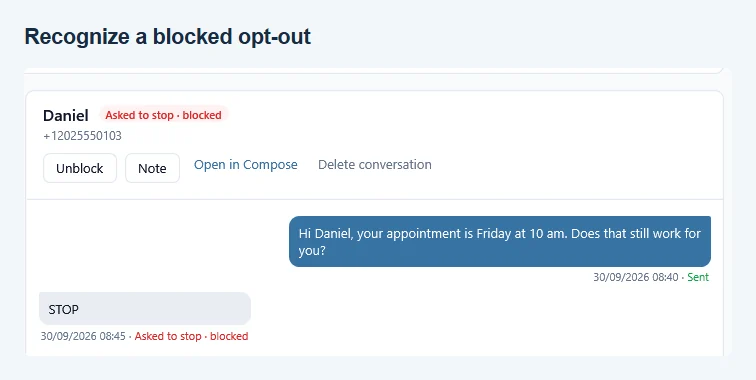
- On the Messages page, set Show to Opt-outs to see just these conversations. Each one says why the number was blocked.
- Read it the wrong way? Not an opt-out clears the flag, and Unblock lifts the block.
- The full list lives under Contacts > Blocked numbers, with the reason next to each entry, an Unblock button, and a box to block a number by hand.
- Before a send, the recipients line on the Compose page tells you how many of the people you picked are on the block list and will get nothing.
- Saved the same person twice, for example as 0171 2345678 and +49 171 2345678? A STOP from them blocks both entries. With your Default country set under Settings > Phone numbers, they also get just one text per send, and the recipients line says “1 duplicate number skipped”.
Replies can only be acted on while QuickText is running and your phone is connected. It catches up when the phone reconnects, so a STOP that arrived overnight is handled the next time the two see each other, but a phone that never reconnects means a reply nobody sees. If you switch reply collection off under Settings > Messages, the QuickText reply recorder stops and nothing is blocked automatically. Optional phone-message syncing is controlled separately.
What QuickText reads to make this work, and what it ignores, is spelled out in Privacy and your phone.
QuickText checks for a new block again before retrying after a reconnect. If the live block list cannot be read, that attempt fails without sending, with an explanation in the results. A STOP reply and its automatic block are saved together so a failed local write can be retried.