
WhatsApp Link Generator: Make a Chat Link With a Message
A WhatsApp link is https://wa.me/ followed by the full phone number in international format, digits only, such as https://wa.me/15125550143. Add ?text= and a URL-encoded message to pre-fill the chat. The generator below builds the link for one number or a whole pasted list, right in your browser. Whoever taps the link gets a chat with that number and your message ready to send.
Table of contents
Generate a WhatsApp link
Pick the country of the number, type the number the way you have it, and add a message if you want one. The generator turns it into the international digits WhatsApp expects and builds the wa.me link. Copy it, or open the chat to test it.
WhatsApp link generator
A WhatsApp link is https://wa.me/ followed by the number in international format: country code, then the number without its leading 0, with no plus, spaces, dashes or brackets. Some examples:
| Number as written | Country | Click-to-chat link |
|---|---|---|
| (512) 555-0143 | United States | https://wa.me/15125550143 |
| 07700 900456 | United Kingdom | https://wa.me/447700900456 |
| +44 (0)7700 900456 | United Kingdom | https://wa.me/447700900456 |
| 098765 43210 | India | https://wa.me/919876543210 |
| 0151 12345678 | Germany | https://wa.me/4915112345678 |
| 011 15 2345-6789 (mobile) | Argentina | https://wa.me/5491123456789 |
To pre-fill a message, add ?text= and the message with spaces written as %20, for example https://wa.me/15125550143?text=Hi%20Sarah%2C%20your%20order%20is%20ready.
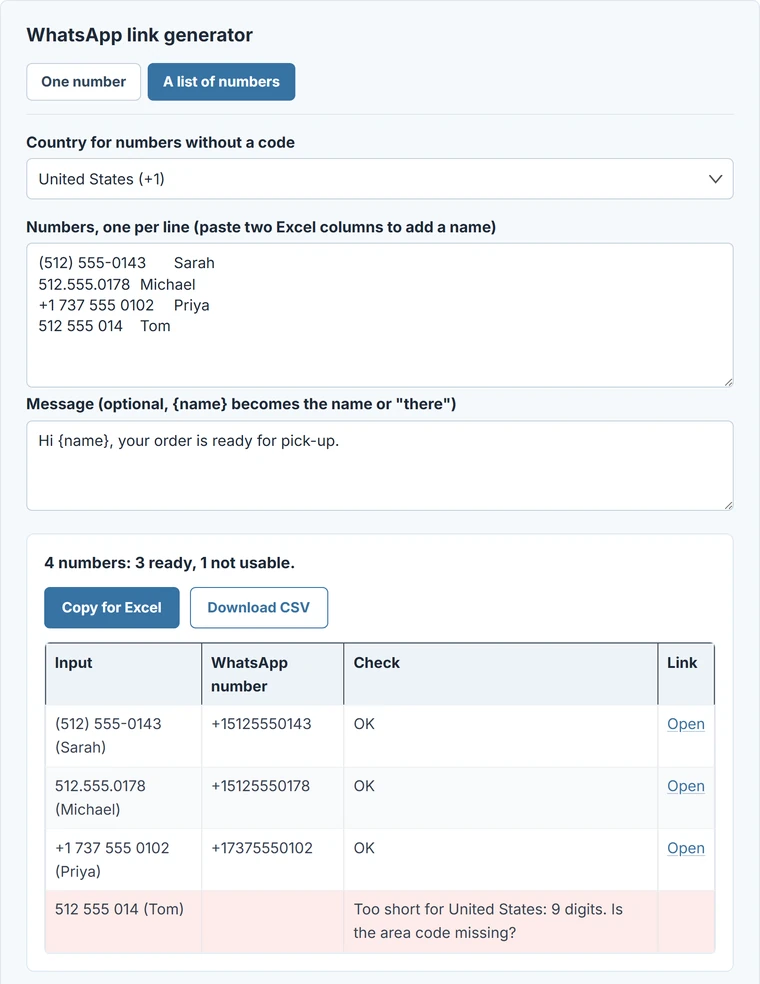
The tool has two tabs. One number gives you a single link with Copy link and Open chat buttons. A list of numbers takes a column pasted from Excel, optionally with a second column of names, and builds a link for every row. Type {name} in the message and each link gets that person’s name, or “there” when the name is empty.
The tool checks the format and the length, so it catches a missing area code or an extra digit. It cannot tell you whether a number has WhatsApp. Only WhatsApp knows that, and my post on the WhatsApp number checker shows how to test one number or a whole list. Argentina is not in the country list on purpose, because its mobile numbers need an extra 9 (more on that below).
What a wa.me link does
A wa.me link is WhatsApp’s own click-to-chat feature. It opens a chat with a phone number without saving that number as a contact first. It works on a phone and on a computer, for personal and business accounts, and it can carry a message that is typed in for you.
People put these links on websites, in email signatures, in social media bios, on invoices and in customer emails. A visitor taps “Chat with us”, WhatsApp opens, and the first message is already there. They only press send.
On a phone, the link opens the WhatsApp app straight away. On a computer, it opens a WhatsApp page in the browser that shows the number and the message, with an Open app button for WhatsApp Desktop and a Continue to WhatsApp Web link. Nothing is sent until the person presses send in the chat.
WhatsApp also accepts the longer address https://api.whatsapp.com/send?phone=15125550143. A wa.me link redirects there anyway, so use the short one.
The link format
The format is https://wa.me/ then the number, then optionally ?text= and the message. The number is the full international number with only digits. The message must be URL-encoded, which means spaces, line breaks and some symbols are written as codes that start with a percent sign.
https://wa.me/<number>
https://wa.me/<number>?text=<URL-encoded message>

https://wa.me/15125550143
https://wa.me/15125550143?text=Hi%20Sarah%2C%20your%20order%20is%20ready.
WhatsApp’s help center describes the number part like this: use the full phone number in international format, and leave out any zeros, brackets or dashes. In practice that means the country code first, then the number without the 0 that people dial inside many countries, and no plus sign.
For the message, these are the characters that matter most:
| In your message | Write it as | What happens if you do not |
|---|---|---|
| Space | %20 | The link usually breaks at the first space |
| Line break | %0A | The line break is lost |
| & | %26 | The message stops before the & |
| # | %23 | The message stops before the # |
| + | %2B | The plus sign turns into a space |
| ? | %3F | Usually works, but encode it to be safe |
| % | %25 | WhatsApp reads it as the start of a code |
Accented letters and emoji are encoded as several codes each. The generator above and the ENCODEURL function in Excel handle all of that for you, so you rarely need to write the codes by hand.
Make a link by hand
Write the number in international format, put it after https://wa.me/, then add ?text= and your encoded message. Test the link on your own phone before you share it. It takes a minute for one number, and the mistakes are easy to spot once you know them.
-
Start with the country code. For example 1 for the US and Canada, 44 for the UK, 91 for India, 49 for Germany.
-
Add the number without its trunk prefix. UK 07700 900456 becomes 7700 900456. US numbers have no trunk prefix, so (512) 555-0143 stays 512 555 0143.
-
Remove everything that is not a digit. No plus, spaces, dashes, dots or brackets. You now have 447700900456 or 15125550143.
-
Put it after https://wa.me/. The link https://wa.me/447700900456 opens a chat with that number.
-
Add a message if you want one. Type ?text= and the message, with every space written as %20: https://wa.me/447700900456?text=Hi%20Sarah.
-
Test it. Open the link on your phone. If the chat opens with the right name and your message, it works. If WhatsApp says the number is not on WhatsApp, check the number before you blame the link.
Common mistakes
Almost every broken WhatsApp link has a formatting problem in the number: a leading 0 that should have been dropped, a missing country code, or a kept (0). The second most common cause is a message that was not encoded, so it gets cut off.
| Mistake | Wrong link | Right link |
|---|---|---|
| Country code missing | wa.me/5125550143 (WhatsApp reads 51 as Peru) | wa.me/15125550143 |
| Leading 0 kept after the country code | wa.me/4407700900456 | wa.me/447700900456 |
| The (0) from +44 (0)7700 kept | wa.me/4407700900456 | wa.me/447700900456 |
| International prefix 00 kept | wa.me/00447700900456 | wa.me/447700900456 |
| Plus sign or spaces in the number | wa.me/+44 7700 900456 | wa.me/447700900456 |
| Argentina mobile without the 9 | wa.me/541123456789 | wa.me/5491123456789 |
| Message not encoded | wa.me/15125550143?text=Fish & chips | wa.me/15125550143?text=Fish%20%26%20chips |
Argentina is the quirk that trips up even good generators. For a mobile number, WhatsApp needs a 9 right after the country code 54, then the area code, and the local 15 prefix goes away. A Buenos Aires mobile written as 011 15 2345-6789 becomes 5491123456789.
Two more causes have nothing to do with the format. The number may simply not have a WhatsApp account, or it may be a landline. My free carrier lookup tells you whether a US number is mobile or landline. And if a list was saved in Excel as numbers instead of text, every leading 0 is already gone, which the next section deals with.
Links for a whole list in Excel
Use one formula to strip the number down to digits, one to add the country code, and one to join the number and the encoded message into a link. ENCODEURL encodes the message in Excel for Windows. On a Mac or in Excel on the web, a SUBSTITUTE formula does the same job for ordinary text.
I tested every formula here in Excel for Microsoft 365 on Windows. The example sheet has the name in column A and the phone number in column B. Format column B as Text before you paste numbers, or Excel drops the leading 0 of every local number.
1. Digits only (column C). This works in every Excel version. It removes the (0), spaces, dashes, brackets, dots and the plus sign:
=SUBSTITUTE(SUBSTITUTE(SUBSTITUTE(SUBSTITUTE(SUBSTITUTE(SUBSTITUTE(SUBSTITUTE(B2,"(0)","")," ",""),"-",""),"(",""),")",""),".",""),"+","")In Excel 365 or 2021 this shorter version keeps every digit and drops everything else, whatever the separators are:
=LET(t,SUBSTITUTE(B2,"(0)",""),TEXTJOIN("",TRUE,IFERROR(--MID(t,SEQUENCE(LEN(t)),1),"")))2. Add the country code (column D). This example is for a UK list. It removes a leading 00, replaces a single leading 0 with 44, and leaves numbers that already start with 44 alone:
=IF(LEFT(C2,2)="00",MID(C2,3,20),IF(LEFT(C2,1)="0","44"&MID(C2,2,20),C2))For a US list, where numbers have no leading 0, add the 1 to every 10-digit number instead: =IF(LEN(C2)=10,"1"&C2,C2).
3. Write the message (column E). Build it from the columns, so every person gets their own name: ="Hi "&A2&", your order is ready for pick-up."
4. Build the link (column F). In Excel for Windows, ENCODEURL does the encoding:
=HYPERLINK("https://wa.me/"&D2&"?text="&ENCODEURL(E2),"Open chat")Microsoft’s page for ENCODEURL says it is not available in Excel for the web or Excel for Mac. On a Mac it may appear in the function list, but it relies on Windows and returns no result. For those versions, use this SUBSTITUTE chain instead. It encodes %, &, #, ?, +, line breaks and spaces, which covers ordinary messages:
=HYPERLINK("https://wa.me/"&D2&"?text="&SUBSTITUTE(SUBSTITUTE(SUBSTITUTE(SUBSTITUTE(SUBSTITUTE(SUBSTITUTE(SUBSTITUTE(E2,"%","%25"),"&","%26"),"#","%23"),"?","%3F"),"+","%2B"),CHAR(10),"%0A")," ","%20"),"Open chat")Keep the % replacement innermost, as above. If it ran last, it would also change the % of every code the other replacements just wrote. The SUBSTITUTE version leaves accented letters and emoji as they are. Browsers normally encode those when they open the link, but test one link from your sheet before you share a whole column.
Watch out: HYPERLINK only accepts a link of up to 255 characters. A long message, once encoded, passes that quickly, and the cell shows #VALUE!. In my test, 255 characters worked and 256 did not. For long messages, build the plain link without HYPERLINK, for example ="https://wa.me/"&D2&"?text="&ENCODEURL(E2), and copy it from the cell.
If you would rather not build formulas, switch the generator above to A list of numbers. Paste the phone and name columns straight from Excel, write the message with {name}, and use Copy for Excel or Download CSV to bring the numbers, checks and links back into your sheet.
My WhatsApp number cleanup workbook does the number part with visible formulas for many countries and builds a link per row. To check a pasted list for invalid numbers without Excel, my free bulk phone number validator does that too.
Turn a link into a QR code
Paste the finished wa.me link into any QR code generator that makes a static code from a plain URL, then download the image. Scanning it opens the chat with your message. Test the printed code with two phones before you put it on a flyer, a shop window or a table card.
A few things make the difference between a code that works for years and one that does not:
- Prefer a static code. A static QR code contains the wa.me link itself, so it keeps working without any account. A dynamic code contains the address of the QR service, which then forwards to your link. It lets you change the target later, but it depends on that service and can stop working when the service or your plan ends.
- Keep the message short. A longer link makes a denser code, which is harder to scan when it is printed small.
- Leave the code plain. Dark squares on a light background, with a white margin around it. Heavy colors and logos make some phones fail to read it.
If you have Python, two lines make the code on your own computer, so the link never goes to a website. Install the library with pip install "qrcode[pil]", then run:
import qrcode

qrcode.make("https://wa.me/15125550143?text=Hi%2C%20I%20saw%20your%20flyer.").save("whatsapp-qr.png")
WhatsApp also has QR codes of its own. In the WhatsApp Business app, the short link screen shows a QR code for your business. In personal WhatsApp, the QR code next to your name in Settings lets people add you as a contact. Neither one pre-fills a message for a number you choose, which is what a wa.me code does.
Business short link vs wa.me link
A WhatsApp Business short link is created for you by the WhatsApp Business app and always points to your own business number. A wa.me link can point to any number, carries its message inside the link, and needs no Business account. The short link keeps its message in the app, where you can change it.
| wa.me link | WhatsApp Business short link | |
|---|---|---|
| Who makes it | You, from any number | The WhatsApp Business app, for your business number |
| Where to find it | Built by hand, in Excel or with a generator | In the app under Tools (on Android: Tools, then More, then Short link) |
| Shows the phone number | Yes, in the link | No, it uses a code: https://wa.me/message/ followed by letters and digits |
| Pre-filled message | Inside the link, fixed once shared | Optional default message, edited in the app at any time |
| QR code | Make one with any QR generator | Shown in the app, valid until you reset it or delete the account |
| Works for any number | Yes | No, only your own business |
According to WhatsApp’s help center, the short link is generated automatically when you create a WhatsApp Business account, and anyone who has it can message you. If the person has WhatsApp installed, the chat opens directly. In a browser, they see a page with your business information first.
For a business that only ever needs one “message us” link, the short link is the simpler choice. For links to different numbers, personal messages per customer, or a column of links in Excel, wa.me is the only option. If you are still deciding which kind of WhatsApp account you need, my comparison of WhatsApp personal, Business and the API walks through it.
A link without a phone number
To make a link without a number, leave the number out and keep the message: https://wa.me/?text= followed by the encoded text. Whoever taps it picks a chat or contact themselves, and your message is filled in. It is a share link for a message, not a link to you.
That is useful for a “Share on WhatsApp” button under an article or an event invitation people forward to friends. For example, https://wa.me/?text=Join%20us%20on%20Saturday opens WhatsApp with that text and asks who to send it to. In the generator above, this case is not covered, because it always needs a number. Write the link by hand using the encoding table.
Privacy
The generator on this page runs entirely in your browser. The numbers and messages you type are not sent anywhere and not stored. The link itself is not private, though: anyone who sees it can read the phone number and the message in it.
That last point matters more than which tool you use. A wa.me link on a website shows your number to every visitor and to anyone collecting numbers from websites. If you want a public link that does not spell out your number, the WhatsApp Business short link is the better fit. And never put anything confidential in the ?text= part, such as an account number, a password reset code or health details. Links end up in browser histories, screenshots and forwarded emails.
Opening a link sends nothing. The other person gets no notification until you press send in the chat. Online generators that ask you to sign up, or that route your link through their own short domain, also see every number and message you put in. A plain wa.me link needs neither.
Messaging many people
A wa.me link cannot message a whole list. Each link opens one chat with one number, and you still press send yourself. A column of links in Excel saves typing, but for 200 customers that is still 200 chats to open, check and send by hand.
That works for a handful of people. For a whole list, I built SendCommander, a Windows app that sends each person their own WhatsApp message from your own account. You import the Excel list, write one message with names and details from your columns, and it sends at a slow, steady pace while you do something else. My guide on sending personalized WhatsApp messages from an Excel list shows the full process, and you can also schedule the messages for a later time. If your list starts as a WhatsApp group, you can export the group contacts to Excel first.
Whatever tool you use, send only to people who know you and expect your messages, such as customers, members or patients. Messages to a bought or scraped list are the quickest way to get a WhatsApp number restricted.
Send a personal WhatsApp message to everyone on your Excel list from your Windows PC, from your own number, with names and details filled in from your columns.