
How to Export WhatsApp Group Contacts to Excel or CSV
WhatsApp has no button to export the members of a group, and Export chat only saves the messages. To get the member list into Excel or CSV, link your WhatsApp to a PC app such as SendCommander, import the group’s members, then export the contacts. Members whose number WhatsApp hides are skipped, and the app tells you how many.
Table of contents
What WhatsApp offers
WhatsApp shows the members in the group info screen but has no export button for them. Export chat, the option many people try first, saves the conversation as a text file with the messages and media, not a list of members with their numbers.
The manual way is to open the group info, tap each member and copy the number by hand. That is fine for five people. For a club or class with 80 members it takes an hour and invites typos.
The member list does exist on every device linked to your WhatsApp, including WhatsApp Web on your computer. A desktop app that runs your WhatsApp Web session can read it from there and turn it into rows, which is what I do below.
Ways to get the list
You can copy members by hand, use a browser extension that reads WhatsApp Web, or use a desktop app that imports the group and exports it. Export chat does not work for this. The right pick depends on group size and on who gets to see your contacts.
| Method | Names and numbers | Effort for 80 members | Where your contacts go |
|---|---|---|---|
| Copy from group info by hand | Yes | An hour or more | Nowhere |
| Export chat | No member list, only messages | Not usable | Wherever you send the file |
| Browser extension on WhatsApp Web | Usually | Minutes | Depends on the extension |
| SendCommander on your PC | Yes, when WhatsApp shares the number | A few clicks | Stays on your PC |
An extension that can read your WhatsApp Web tab can read every chat in it, so check who makes it and what its privacy policy says. SendCommander is the Windows app I built for WhatsApp messaging. It logs in on the official WhatsApp Web page inside the app, with no server of mine in between, and your contacts are saved only on your PC.
Export the members
In SendCommander, open Contacts, click Import from WhatsApp, choose Members of a group and pick the group. Check who comes in, start the import, and click Export to save an Excel or CSV file. Importing is free on every plan, and nobody is messaged.
-
Install and connect. Install SendCommander from the Microsoft Store and open it. On your phone, open WhatsApp, go to Linked devices and scan the QR code on the WhatsApp screen. Wait until the status says Connected. Personal WhatsApp and WhatsApp Business both work.
-
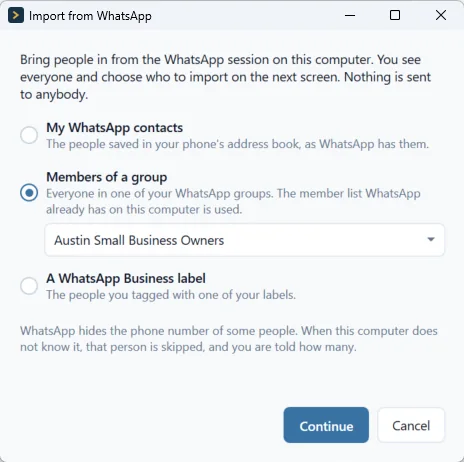
Choose the group. Open Contacts and click Import from WhatsApp. You can bring in your saved WhatsApp contacts, the members of a group, or, with a WhatsApp Business account, everyone with a certain label. Pick Members of a group, choose the group from the list and click Continue.
-
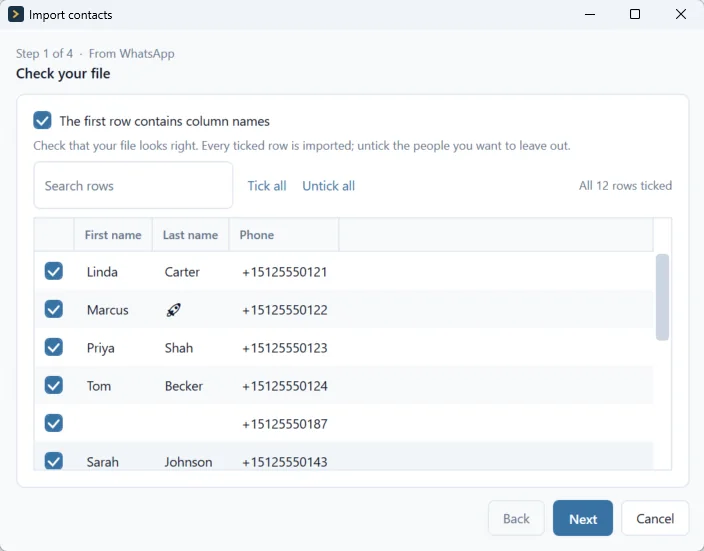
Check who comes in. The usual import window opens with every member whose number is known. Your own number is already left out. Untick anyone you do not want in your list.
-
Finish the import. The next step can format and validate numbers, but numbers from WhatsApp are already international, so click Next. Keep the first and last name if WhatsApp has them. SendCommander puts everyone in a new list named after the group. Click Start import.
-
Export to Excel or CSV. Every member is now on the Contacts page, with the group’s name in the Lists column. Click Export, choose an Excel file or a CSV file, and save it.
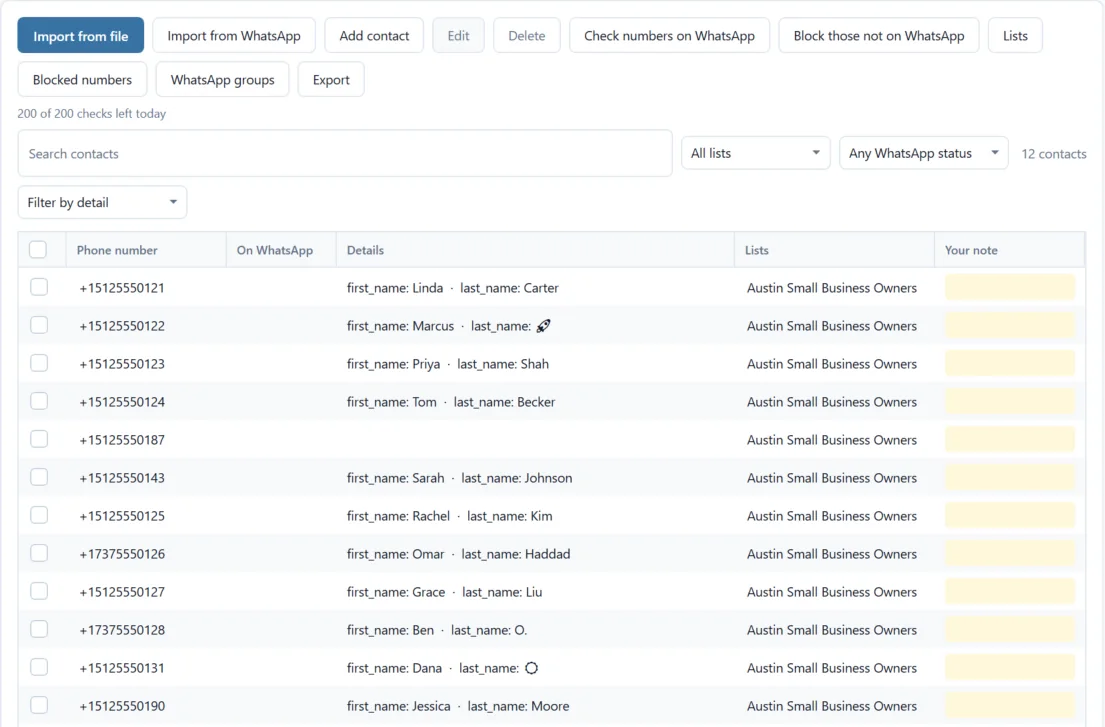
The export always includes all your SendCommander contacts. If you already had other people in the app, filter the Lists column in Excel to the group’s name, and only its members remain.
The exported file
One row per member with the phone number in international format, the first name, the list the person is in, and the last name when WhatsApp has one. The Excel file keeps the plus sign in front of each number. Pick CSV to load the list into another program.
| Phone Number | First Name | Lists | last_name |
|---|---|---|---|
| +15125550121 | Linda | Austin Small Business Owners | Carter |
| +15125550123 | Priya | Austin Small Business Owners | Shah |
| +15125550124 | Tom | Austin Small Business Owners | Becker |
| +15125550187 | Austin Small Business Owners | ||
| +17375550126 | Omar | Austin Small Business Owners | Haddad |
The name is the one saved in your phone, or the name the person set in WhatsApp when you have not saved them. A name with several words is split into first and last name. Expect some cleanup: people use nicknames, emoji or a single letter as their WhatsApp name, and some have none, like the fourth row above.
Excel can still mangle numbers you edit later. Format the phone column as Text before you type into it, or the plus sign disappears and long numbers turn into scientific notation.
Missing members
To protect privacy, WhatsApp now shows some group members with a private ID instead of a phone number. When your computer does not know a member’s number, SendCommander skips that person and tells you how many were skipped. No tool can export a number WhatsApp does not share.
You see this before anything is imported: the Import from WhatsApp window says that WhatsApp hides the phone number of some people, and the result message after the import gives the count. If nobody in the group has a known number, the window says so instead of importing an empty list.
If a whole group is missing from the list, it is not in the WhatsApp account you linked to SendCommander. If you see “Your groups could not be read from WhatsApp”, reload the WhatsApp screen and try again. Your saved contacts can still be imported in the meantime. The Import from WhatsApp guide lists the messages you may see and what to do.
Other contacts
The same Import from WhatsApp window brings in My WhatsApp contacts, the people saved in your phone’s address book as WhatsApp has them, or everyone with a WhatsApp Business label. Import them, then click Export the same way.
If you only want your phone’s address book in Excel, you do not need WhatsApp at all. Export your contacts from the phone or Google Contacts as a .vcf file and convert it with my free VCF to Excel converter. It runs in your browser and never uploads the file.
Using the list
Use it as a member directory, merge it into your CRM, or message the members one by one from your own WhatsApp. Because the group is already a list in SendCommander, you can pick it in Compose, write one message with each person’s first name, and send it as separate one-to-one chats.
In Compose, choose Selected lists, tick the group’s list and write the message. Many people use a nickname on WhatsApp, so add a fallback: {{first_name|there}} turns into “Hi there” when a name is missing. For each person, SendCommander looks for the number in your saved contacts first. If it is not saved, it checks that the number is on WhatsApp and starts a new chat, so you can reach members you never saved on your phone.
Sending runs at a slow, cautious pace on purpose. The full workflow, with attachments and sending limits, is in my guide to sending WhatsApp messages from an Excel list. To time a send, such as a reminder the evening before a club event, see how to schedule WhatsApp messages. If the list mixes members with people from other sources, the WhatsApp number checker finds the numbers without an account first.
To reach people by plain SMS instead, see how to send a mass text without a group chat.
Privacy
Exporting a group you belong to is usually fine for your own records, but the numbers are personal data and the members never agreed to get private messages from you. Only message people who know you and expect it, such as your team, your club or the parents of your class.
Being in the same group does not mean someone wants a private message. If many people report or block you, WhatsApp will most likely ban your number, and no app can undo that. Keep the exported file safe, delete it when you no longer need it, and do not hand it to anyone else. Data protection rules such as the GDPR apply to member lists too. This is general information, not legal advice.
Limits
SendCommander runs on Windows 10 and 11 only, and members whose number WhatsApp hides cannot be exported. Importing from WhatsApp is free on every plan.
- Windows only. On a Mac it works only in a Windows virtual machine.
- Hidden numbers stay hidden. Members with a private ID are skipped.
- Free plan. The free download includes 100 messages, once per computer. A paid plan removes that limit.
- Read the rules first. The guide to sending safely explains pacing and wording before you message anyone.
Import the members of a WhatsApp group, export them to Excel or CSV, and send each one a personal message from your own number, from your Windows PC.