
You do not need a spreadsheet to get started. Import from WhatsApp reads the people already in your linked WhatsApp account and brings them into your contacts. It is free on every plan, and nothing is sent to anybody.
What you can import #
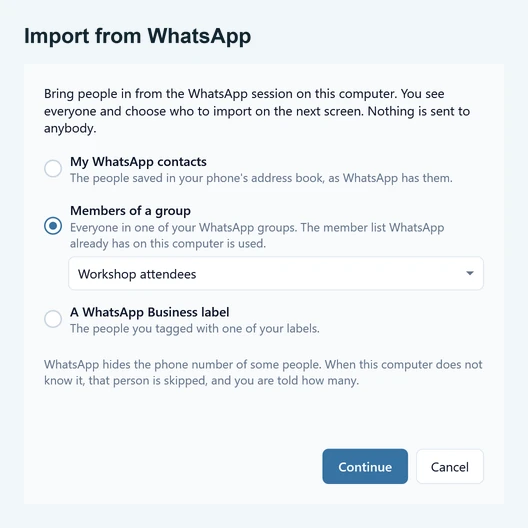
- My WhatsApp contacts: the people saved in your phone’s address book, as WhatsApp has them.
- Members of a group: everyone in one of your WhatsApp groups. The member list WhatsApp already has on this computer is used.
- A WhatsApp Business label: the people you tagged with one of your labels. This option only appears when your account has labels.
Before you start #
The WhatsApp screen in SendCommander must say Connected. Until it does, the import button is switched off and a short line under it tells you why. Right after you log in it can take a few seconds to turn on.
Import your people #
- Open Contacts and click Import from WhatsApp. If you have no contacts yet, the page offers Or import your WhatsApp contacts instead.
- Choose My WhatsApp contacts, Members of a group or A WhatsApp Business label. For a group or a label, pick it from the list.
- Click Continue. SendCommander reads the people from WhatsApp.
- Check the list in the usual import window. Untick anyone you want to leave out, choose what happens to numbers you already have (Update, Skip or add them anyway), and pick the lists they should join.
- Click Start import. A message tells you how many people were imported.
The people are added to a list for you. Saved contacts go on a list called WhatsApp contacts. A group or label uses its own name. You can change or remove the list in the import window before you start.
What comes in #
Each person arrives with a name and a phone number. The name is the one you saved, or the name the person set in WhatsApp when you have not saved one. A name with several words is split into first and last name, so {{first_name}} works in your messages right away. Numbers are international and kept exactly as WhatsApp has them, so you are not asked for a country.
People without a phone number #
WhatsApp hides the phone number of some people. When your computer does not know a number, that person is skipped and the result message says how many. If nobody in your choice has a known number, the window tells you so instead of importing an empty list.
The import only reads what WhatsApp already has on this computer. It does not upload your contacts anywhere. After importing, you send the same way as with any other contact list. Read sending safely first, because the people in your address book may not expect a bulk message.
If something does not work #
- The button is greyed out. Open the WhatsApp screen and wait until it says Connected. See Login issues if it does not connect.
- A group is missing from the list. It has to be in the WhatsApp account linked to SendCommander. If you see “That group is not in this WhatsApp session any more”, pick it again from the list.
- “Your groups could not be read from WhatsApp”. You can still import your saved contacts. Reload the WhatsApp screen and try again for groups and labels.