
Cautious sending helps you control the pace. It does not make a campaign safe from WhatsApp restrictions. Message people who expect to hear from you, send relevant content and respect their replies.
Choose your sending pace #
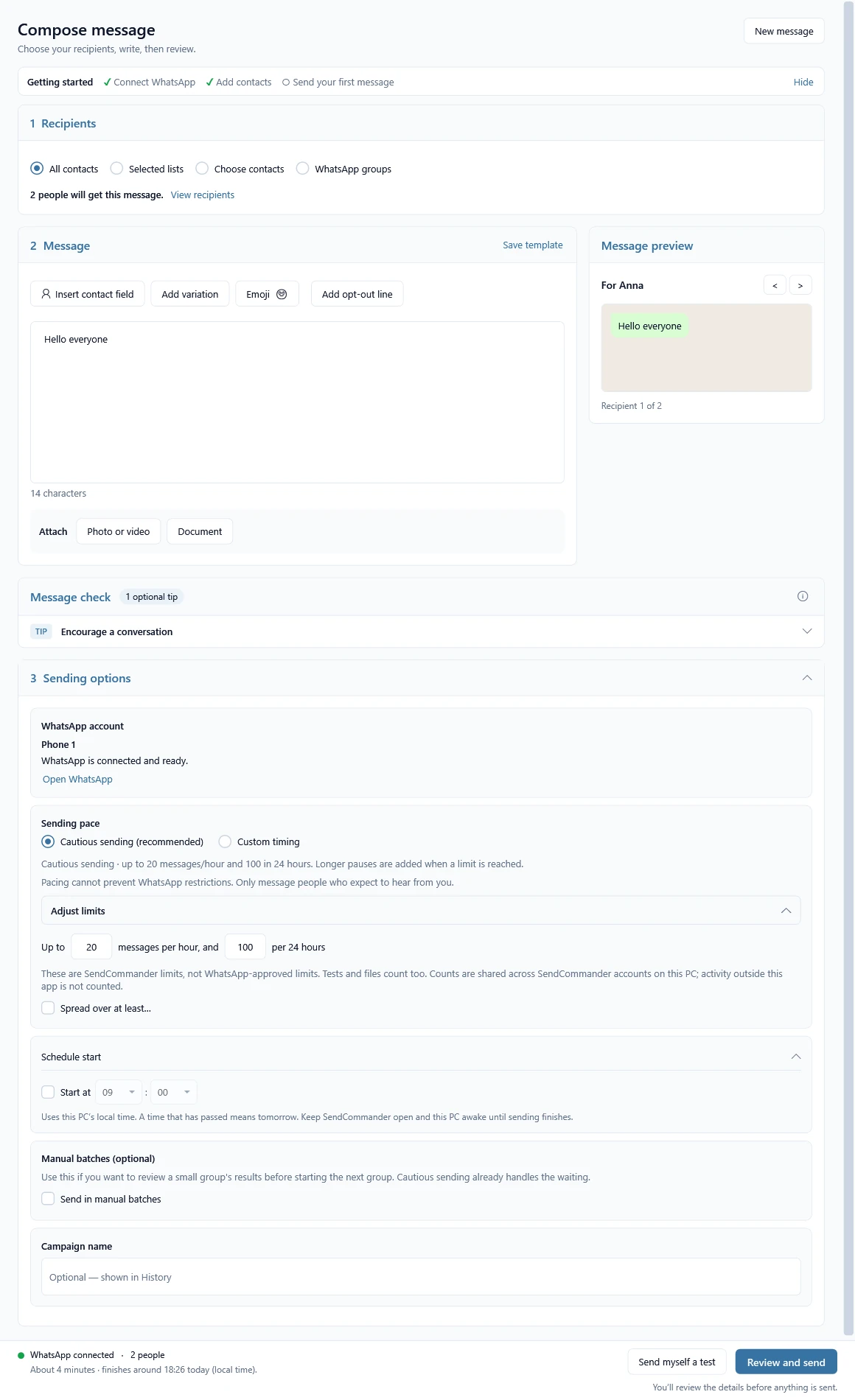
On Compose > Sending options > Sending pace, cautious sending is on by default. It spaces outgoing messages at least three minutes apart, with up to 20 per rolling hour and 100 per rolling 24 hours. These are SendCommander defaults, not WhatsApp-approved safe rates.
- Adjust limits lets you lower the hourly and daily limits. You can also choose Spread over at least… to take longer.
- Custom timing turns off the cautious limits. Choose a pause between messages, with an optional random extra, or spread the send over a duration. The confirmation has a Don’t show this confirmation again checkbox. Returning to cautious sending restores its limits.
- Manual batches are optional and off by default. Use them to review a small group’s results before starting the next group. Cautious sending already handles waiting between messages.
Each separate text and file counts towards cautious limits, including tests to yourself. Counts are shared across SendCommander accounts on this PC. Messages sent from your phone, another PC or another app are not counted. The 24-hour limit does not reset at midnight.
Check when the send will finish #
Compose and the review window show an estimated duration and finish time in your PC’s local time, including today, tomorrow or a date. Earlier sends and attachments affect the estimate. Uploads, connection problems and pauses can make it take longer.
Schedule start is separate from pacing and requires Pro. Keep SendCommander open and your PC awake until sending finishes; minimizing is fine. There are no fixed sending-hour restrictions.
Make room for a conversation #
Use contact fields such as {{first_name|there}} when they make a message useful. Wording variations such as [[Hi|Hello]] choose one option per message; different people can still receive the same wording. Both features are available on the free plan.
Ask a relevant question when an answer would help, then check the Replies page and respond in WhatsApp. Skip the question for purely informational messages. Neither replies, personalization nor having your number saved guarantees delivery or prevents restrictions.
Natural typing now lives in Settings > Sending. It types messages letter by letter and adds a few seconds; it is not protection against restrictions.
Respect opt-outs #
SendCommander reads replies while WhatsApp is open on your PC and shows them on the Replies page. When someone’s whole reply is a stop word such as STOP, their number goes on your block list automatically and every later send skips them. You can edit the stop words, or turn the automatic blocking off, in Settings > Replies.
This only catches clear replies. Someone who asks to stop in other words, such as “please remove me”, still needs you. Check the Replies page and WhatsApp, and add those people to your block list before sending again. A reply that arrived while SendCommander was closed may not show up, so look in WhatsApp too. A block applies to direct messages to that number; it does not remove someone from a WhatsApp group. See Read replies and handle STOP.
Groups and interruptions #
A group message reaches everyone in that group. Personal contact fields such as {{first_name}} do not apply. Only message groups that expect your message.
After an interrupted campaign, SendCommander can restore people who were not attempted, for you to review. It does not resume automatically. Check History and WhatsApp for messages with an uncertain result before trying them again.
Read WhatsApp’s guidance on automated and bulk messaging. If your account is restricted, follow the notice in WhatsApp and see restriction help.