
How to Check If a Number Is on WhatsApp (One Number or a Whole List)
To check one number, open a wa.me link with it: if the number has WhatsApp, a chat opens, otherwise WhatsApp shows an error. To check a whole list, import it into SendCommander on your PC and click Check numbers on WhatsApp. It asks WhatsApp about each number through your own account, sends nothing, and marks every number with a tick or a cross.
Table of contents
Check one number
Open the link https://wa.me/ followed by the number with its country code and no plus or spaces. If the number has a WhatsApp account, WhatsApp opens a chat with it. If not, WhatsApp shows an error instead of a chat. You do not have to save the number or send anything.
The classic phone method also works: save the number as a contact, open WhatsApp and start a new chat. If the person shows up in your WhatsApp contact list, they have an account. It is slow, it fills your address book with strangers, and you have to do it number by number.
The link method has one trap: the number must be in international format. A US number written as (512) 555-0143 becomes 15125550143, and a UK mobile 07700 900456 becomes 447700900456, without the leading 0. The generator below does that conversion for you.
Make a wa.me link for any number
Write the country code, then the number without the trunk prefix (the leading 0 used for calls inside many countries), and remove every space, dash, bracket and plus. Put that after https://wa.me/ and, if you like, add ?text= with a message. The tool below does it for one number or a pasted list.
WhatsApp link generator and number formatter
How a phone number becomes the WhatsApp number in a click-to-chat link. The link is https://wa.me/ followed by that number, such as https://wa.me/447700900456.
| Number as typed | Country | WhatsApp number |
|---|---|---|
| (512) 555-0143 | United States | 15125550143 |
| 07700 900456 | United Kingdom | 447700900456 |
| +44 (0)7700 900456 | United Kingdom | 447700900456 |
| 098765 43210 | India | 919876543210 |
| 0151 12345678 | Germany | 4915112345678 |
To pre-fill a message, add ?text= and the message with spaces written as %20, for example https://wa.me/15125550143?text=Hi%20Sarah. In Excel 2013 or later on Windows, =HYPERLINK(“https://wa.me/”&A2&”?text=”&ENCODEURL(B2)) builds the link from a number in A2 and a message in B2.
Everything runs in your browser, and nothing you type is sent anywhere. The tool checks the format and the length, so it catches a missing area code or an extra digit. It cannot tell you whether a number has WhatsApp: only WhatsApp knows that, which is why the link opens WhatsApp. For QR codes, a column of links in Excel and the mistakes that break a link, see my guide to WhatsApp click-to-chat links. For a whole list, opening links one by one is the slow way. The next section shows the fast one.
One country note: in Argentina, WhatsApp mobile numbers need a 9 after the country code 54, so I left Argentina out of the list rather than produce wrong links.
Check a whole list
Import the list into SendCommander, a Windows app that connects to your own WhatsApp account, and click Check numbers on WhatsApp. It asks WhatsApp about one number at a time with a short pause, shows a tick or a cross for each, and lets you block or export the ones without WhatsApp.
I built SendCommander for sending WhatsApp messages from a PC, and the number check is part of it. On a phone you can only check numbers one at a time. Here the whole list is checked while you do something else.
-
Install and connect. Install SendCommander from the Microsoft Store. Open WhatsApp on your phone, go to Linked devices and scan the QR code. SendCommander logs in on the official WhatsApp Web page inside the app, so there is no extra server in between, and your contacts stay on your PC.
-
Bring in your numbers. Drag your Excel or CSV file onto the Contacts page. The numbers can be in all kinds of formats, and some rows may have no name. That is fine.
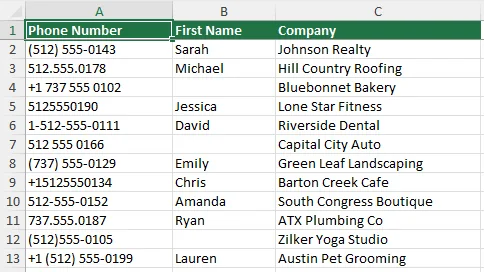
-
Pick the country and import. The import window asks for the country so it can format local numbers. Keep the columns you want, such as First Name and Company, put everyone in a list, for example Customers, and click Start import. The import only checks that numbers look right. It does not check WhatsApp yet.
-
Start the check. On Contacts, click Check numbers on WhatsApp. Tick a few people to check only them, or tick nobody to check everyone shown. The question says how many numbers will be checked and how many checks are left today. Click Start checking.
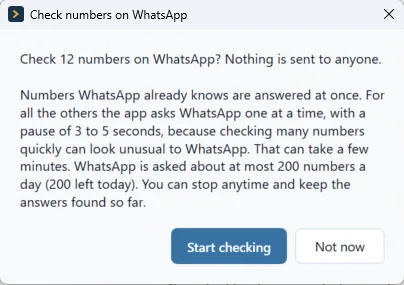
-
Keep working. The results fill in as the answers arrive, with progress and the time left. You can close the window. The check keeps going, and a small box in the left sidebar shows it on every page. Stop ends it and keeps the answers so far.
-
Read the results. The On WhatsApp column shows a tick for numbers with an account and a cross for numbers without one. An empty cell means not checked yet. Hover over a cell to see when it was checked.
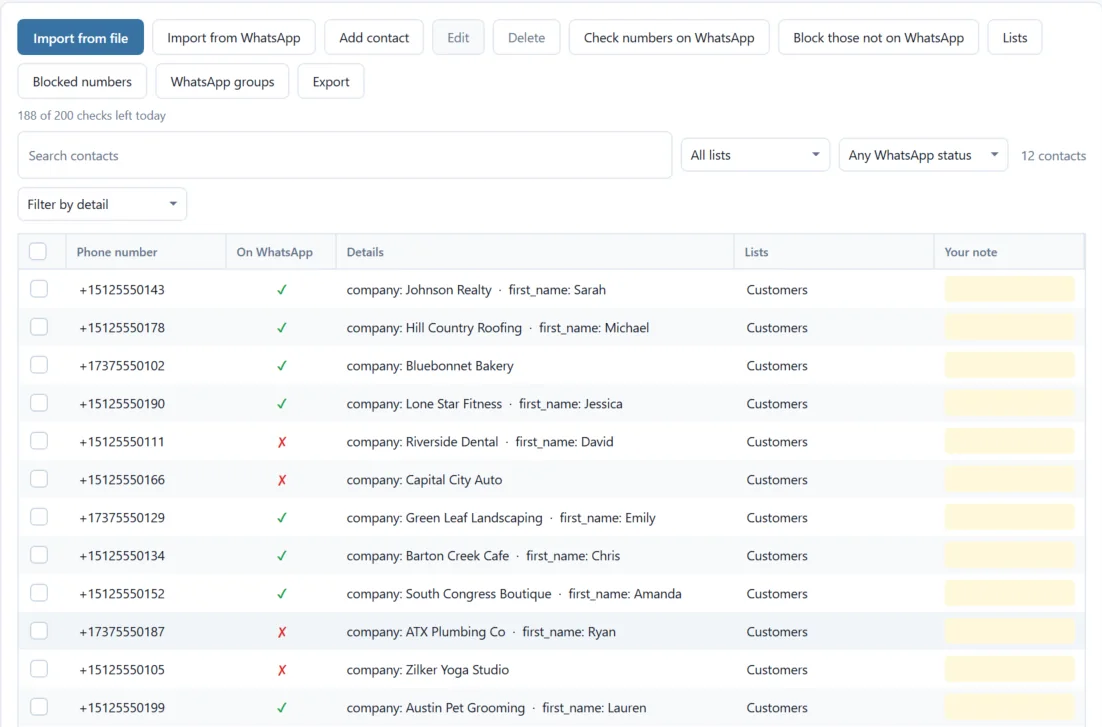
You can run the same check from Compose before a send. Under the recipient count, click Check numbers on WhatsApp. When it finishes, a line sums it up, such as “12 checked: 9 on WhatsApp, 3 not”, and offers to skip those numbers for this send or block them for good. The number check guide covers every button.
Numbers that are not on WhatsApp
Block them so every future WhatsApp send skips them, export them to reach those people another way, or both. In the results window, pick Not on WhatsApp in the filter, then click Add to blocked numbers or Export.
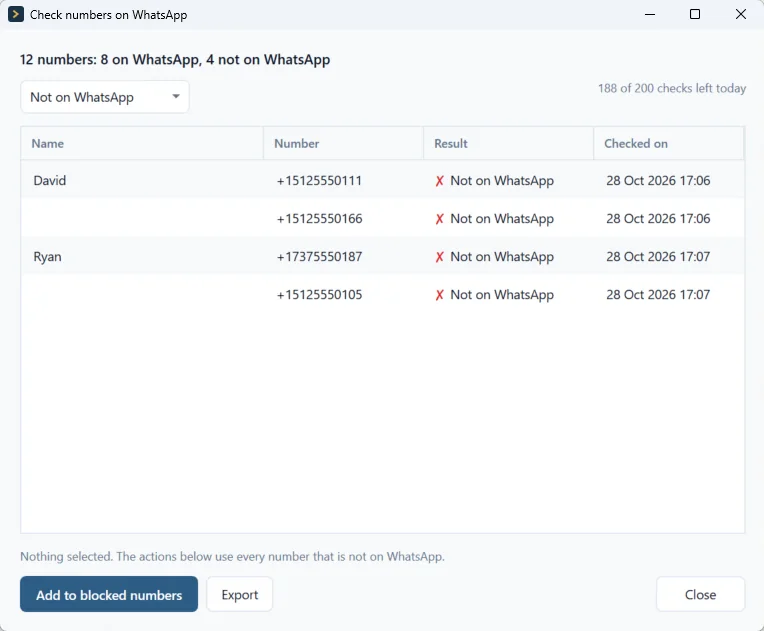
Blocked numbers stay in your contacts and are skipped on every send. If one of them joins WhatsApp later, remove it under Contacts and Blocked numbers. Export saves the rows you see, so filter first. The Excel file keeps the plus sign of every number and has the columns Name, Number, Result and Checked on.
The exported file is a clean list of everyone to reach by email or text message instead. For texts from your own number, see my guide to sending texts from your computer with your Android phone, which uses my QuickText SMS app. A cross can also mean a landline. My free carrier lookup tells you whether a US number is mobile or landline.
How many numbers, how fast
The free plan includes 100 checks, once per computer. With a license you can check up to 200 new numbers a day. Each check takes a few seconds, because SendCommander pauses 3 to 5 seconds between numbers on purpose, so 100 unknown numbers take several minutes.
- Only real lookups count. Answers from the last 30 days are reused and do not count again. Numbers WhatsApp already knows on this computer are answered at once and do not count either.
- Re-checking is quick. Add new contacts later, run the check again, and only the new numbers are looked up.
- Impossible numbers are caught for free. A number with too many digits is recognised without asking WhatsApp.
- The daily limit resets. When it is used up, the rest are marked as not checked, and Check the rest continues the next day.
What the other person sees
The other person sees nothing. The check only asks WhatsApp whether a number has an account. Nothing is sent to anyone, no chat is opened, and the person gets no notification.
The same is true for the wa.me link, as long as you do not press send in the chat that opens. Saving a number in your phone is different: if that person also has your number saved, your profile photo and status may become visible to them, depending on your privacy settings.
Account safety
Checking too many numbers too fast can get an account restricted. Asking WhatsApp about many numbers quickly does not look natural, which is why SendCommander checks one number at a time, pauses in between and caps the checks at 200 a day. No limit can guarantee your account will not be restricted.
The bigger risk comes after the check. A tick means a number has WhatsApp, not that its owner wants to hear from you. Messaging a bought or scraped list is the fastest way to lose a number, whatever pace you use. Check lists of people who already know you, such as customers, members or patients, and read the guide to sending safely before you message them.
Clean up the numbers first
The workbook below turns numbers typed in any format into the international digits WhatsApp uses, with formulas you can see, and builds a wa.me link for each row. Set your country on the Settings sheet, paste your numbers, and rows that do not fit are flagged.
WhatsApp number cleanup workbook
Paste messy phone numbers, get clean international numbers and a click-to-chat link per row, with a flag on numbers that need a second look.
Clean numbers also help the bulk check, because a wrongly formatted number is looked up as a different number. For a quick format check without Excel, my free bulk phone number validator works on a pasted list.
What a check cannot tell you
A tick tells you a WhatsApp account exists for that number today. It does not tell you who uses it, whether they read messages, or whether they want yours. Numbers get recycled, so an old customer’s number may now belong to someone else.
- Error results. When WhatsApp does not answer for a number, it is shown as an error, never as “not on WhatsApp”, and it is never offered for blocking. Run the check again later.
- Answers age. After 30 days an answer counts as unknown again.
- Not for groups. The check is not offered when you send to WhatsApp groups.
- Not during a send. Checking is off while a message is being sent or waits for its start time.
- Windows only. SendCommander runs on Windows 10 and 11.
Once you know who is on WhatsApp, you can message them straight from the same list. My guides cover sending WhatsApp messages from an Excel list and scheduling them for later. If your contacts are in a WhatsApp group, start with exporting the group’s members.
Check a whole list of numbers on WhatsApp from your Windows PC, block the ones without an account, and send personal messages to the rest from your own number.