
When you work through a long list over several sessions, you need to know where you stopped. Chat Merge writes a note into your table for every chat you open, and Open next chat uses those notes to continue with the next person.
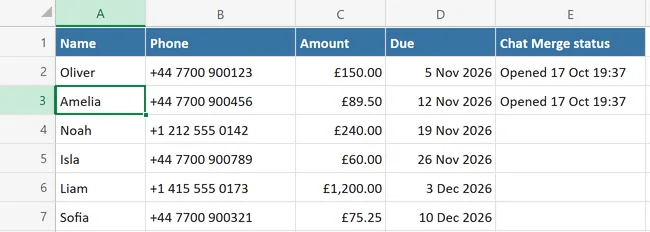
The status column #
The first time you open a chat, Chat Merge adds a column headed Chat Merge status at the right edge of your table, and the pane explains this once. After each chat you open, that row gets Opened with the day and time, for example Opened 17 Oct 19:37. The pane also counts the rows, for example Opened 2 of 6 chats.
The status means you opened the chat. It does not say whether you pressed Send in WhatsApp, because Chat Merge cannot see that.
Open next chat #
Open next chat moves to the next row that has a valid number and no status, and opens that chat. Rows you opened before are skipped. When no row is left, the pane says Every row has been opened. If some rows were skipped because of a number problem, it says Every row with a valid number has been opened. and points you to the numbers listed under 1. Choose contacts.
Settings for the status column #
Open the menu at the top left, choose Settings and look at the two checkboxes:
- Mark opened rows in a status column: turn it off if you do not want Chat Merge to add a column or write anything into your sheet.
- Skip rows that already have a status: turn it off if Open next chat should also visit rows you have opened before.
Start over #
To message the same list again, for example next month, clear the notes:
- Open the menu at the top left and choose Clear status column.
- Confirm with Clear status. Chat Merge asks first because Excel cannot undo this. The pane then says how many rows were cleared.
The column itself stays in your table, with empty cells. You can delete it like any other column.
If the status cannot be written #
- This sheet is protected: unprotect the sheet (Review tab, Unprotect Sheet) or turn the status column off in Settings. The chat still opens.
- The table has 100 or more columns: there is no room for the status column. Use fewer columns or turn the status column off.