To send SMS from multiple cell phones using the SMS Blaster, follow these steps:
- Install Pushbullet on Each Phone:
- For each phone you’re using, install the Pushbullet app and log in with the same Pushbullet account.
- Set Up in Pushbullet:
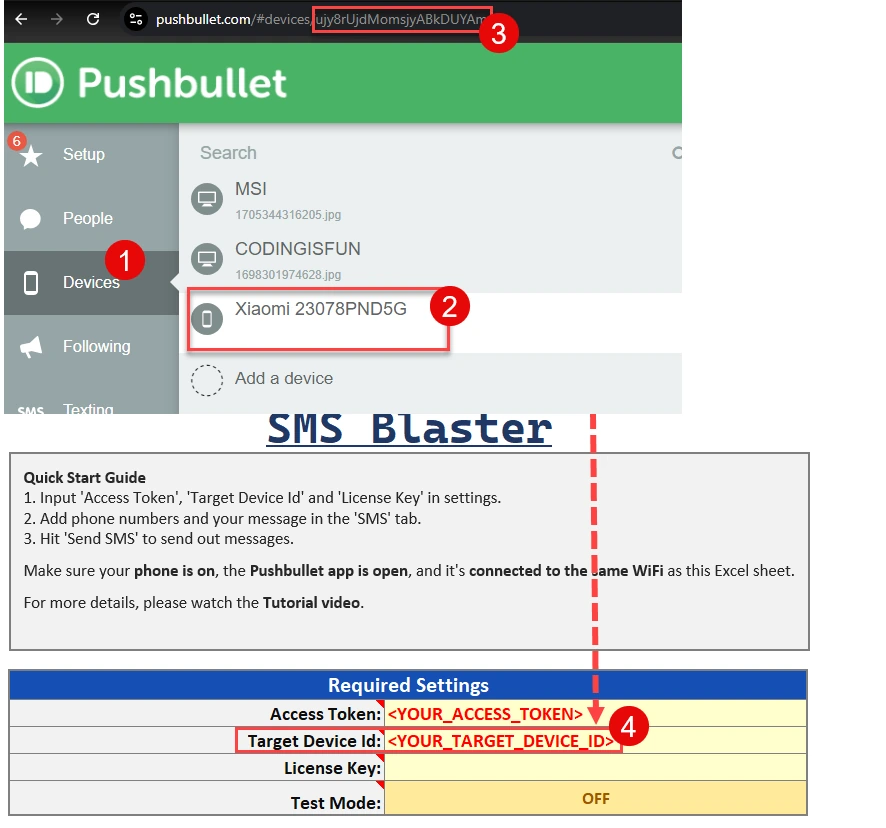
- Once set up, each phone should appear in your online Pushbullet account. From there, you can find the device ID for each phone.
- Insert Device IDs in SMS Blaster:
- Copy the device ID from your Pushbullet account and insert it into the SMS Blaster tool for each phone.
Optional: Create a Dropdown Menu:
To easily switch between different devices, you can create a dropdown menu in the “Target Device ID” field. This allows you to select which phone to use when sending messages. For a tutorial on how to insert a dropdown menu, watch this video: