
What is an alphanumeric sender ID? #
An Alphanumeric Sender ID lets you send SMS messages using your brand name or company name as the sender instead of a phone number.
The example below shows how an Alphanumeric Sender ID (AUTHMSG) would look in place of the standard number.

Key Benefits:
- Recognizable branding for supported destinations. Alphanumeric sender IDs are one-way: recipients cannot reply, including with STOP. Provide another usable opt-out method.
- Easy to recognize by your recipients.
For details, see Twilio’s official guide:
Getting started with Alphanumeric-Sender-ID
How to use an alphanumeric sender ID in Twilio Blaster? #
1. Check support for your country #
Not all countries allow Alphanumeric Sender IDs. Some require registration.
Check the list of supported countries here:
Twilio Supported Countries.
2. Enable or register your sender ID in Twilio (if required) #
- Go to the Twilio Console.
- Navigate to Phone Numbers > Alphanumeric Sender ID and register your ID if required.
- For help, follow Twilio’s guide:
How to Register an Alphanumeric Sender ID.
3. Input the sender ID in Twilio Blaster #
-
In the From Number cell, enter your Alphanumeric Sender ID.
(Example:MyBrandorCompany123)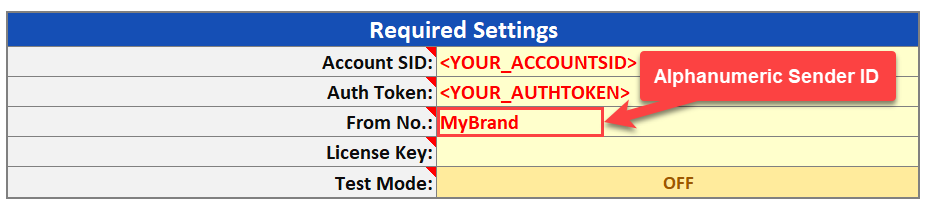
Key Requirements for your Alphanumeric Sender ID.:
- 3 to 11 characters long.
- Must include at least one letter.
- Cannot include special characters (e.g., #, @, %, etc.).
Frequently asked questions (FAQ) #
Q: Does this work with MMS?
A: Alphanumeric Sender IDs are supported for SMS only, not MMS. If you need to send MMS, you must use a phone number instead.
Q: I inputted my Sender ID, but I see “Invalid ‘From’ Number” in the status column when sending. Why?
A: Ensure your Sender ID follows the requirements:
- It must be 3 to 11 characters long.
- It must include at least one letter.
- It cannot include special characters.