
There’s no official limit set by WhatsApp, but sending too many messages too quickly can flag your account as spam and lead to restrictions.
To stay safe, follow these practical guidelines:
Daily Limit
A good rule of thumb is to stay around 100-200 messages per day.
You can send more, but keeping it below this number is usually safer.
Sending Rate
Try to send only 5 to 10 messages per minute.
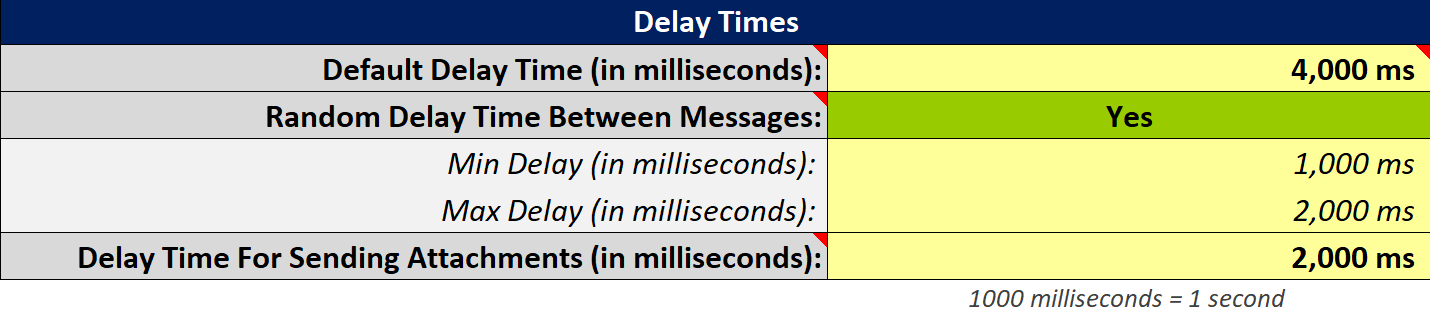
WhatsApp Blaster uses these default delay settings:
- Default delay: 4 seconds (4,000 ms)
- Random delay: 1 to 2 seconds (1,000 to 2,000 ms)
To be even safer, increase the delays, for example, to 20 to 30 seconds.
This reduces the risk of triggering spam detection.
Here’s what the delay settings look like in WhatsApp Blaster:
Warm Up Your Number
If your number is new to bulk messaging, start slowly instead of sending hundreds of messages right away:
- Day 1: Up to 50 messages
- Increase by 40 to 50 messages per day until you reach around 200 per day
Warming up your number helps it appear more trustworthy.
Split Large Campaigns
If you need to send more than 200 messages, spread them across multiple days:
- Day 1: First batch (for example, 200 messages)
- Day 2: Next batch
- Continue until finished
Note: These are general safety guidelines, not hard rules.
Always start slow and stay cautious to avoid triggering WhatsApp’s spam detection.
