
Run-time error ‘-2146232576 (80131700)’ means .NET Framework is missing or switched off on your machine. Follow the steps below to resolve this issue:
Steps to fix the automation error #
-
Open Windows Features:
- Search for “Turn Windows features on or off” in the Start Menu and select it.
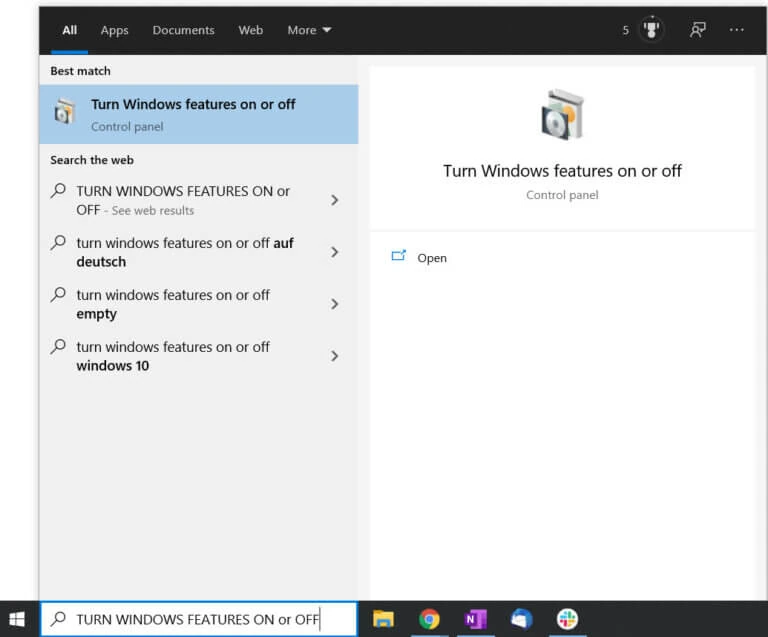
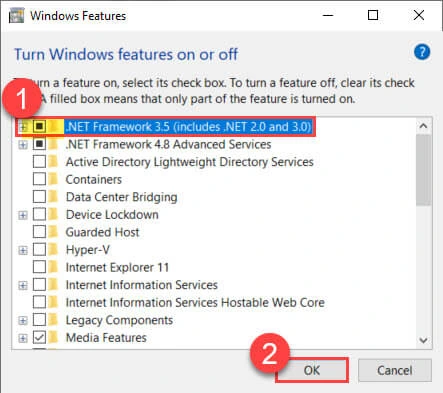
2. Activate .NET Framework:- For Windows 7: Look for MICROSOFT .NET FRAMEWORK 3.5.1.
- For Windows 10: Look for .NET FRAMEWORK 3.5 (includes .NET 2.0 and 3.0).
- Check the box next to the .NET Framework and click OK.
3. Download the Update:- Windows will prompt you to download the required files for the .NET Framework. Allow the download to proceed.
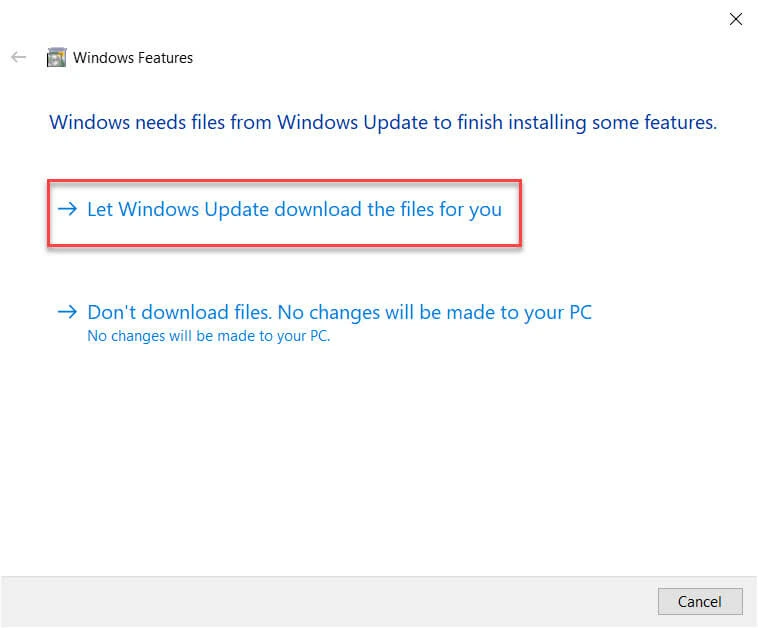
4. Restart Your Computer:- Once the download and installation are complete, restart your computer. This should resolve the Run-time error ‘-2146232576 (80131700)’.
Optional: Manual installation #
If the issue persists or if you prefer a manual installation, you can download the Microsoft .NET Framework 3.5 Service Pack 1 (Full Package) directly from the link below:
Download .NET Framework 3.5 SP1
After following these steps, the Run-time error should be resolved, allowing you to continue using the WhatsApp Blaster without issues.