
When you click Run WhatsApp BOT, you might see this message:
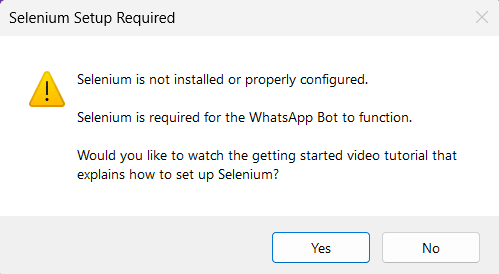
This means Excel cannot find VBA Selenium. In almost every case it is because the Selenium setup was not fully completed.
First, do this: Go back through the setup tutorial from start to finish and make sure you did not miss a step.
Full guide: pythonandvba.com/whatsapp-pro-tutorial
Already set up VBA Selenium but still get the error? #
Work through the steps below in order. Stop as soon as the error is gone.
Step 1: Reinstall SeleniumBasic as administrator
Installing it normally is often not enough. It needs to be installed as administrator.
- Close Excel completely.
- Download SeleniumBasic again here: SeleniumBasic v2.0.9.0.
- Right-click the downloaded installer and choose “Run as administrator”. Let it finish.
- Open the WhatsApp Blaster file again and click Run WhatsApp BOT.
If the error is gone, you are done. If not, go to Step 2.
Step 2: Register Selenium manually
If reinstalling did not help, you can register the Selenium file by hand.
- Press the Windows key, type cmd, then right-click Command Prompt and choose “Run as administrator”.
- Copy the line below, paste it into the black window, and press Enter:
C:\Windows\Microsoft.NET\Framework64\v4.0.30319\regasm.exe /codebase "C:\Users\YOUR_USERNAME\AppData\Local\SeleniumBasic\Selenium.dll"Important: Replace YOUR_USERNAME with your real Windows username.
Everything else stays exactly the same.
Choose the registration tool for your Excel bitness: use Framework for 32-bit Excel, including on 64-bit Windows; use Framework64 for 64-bit Excel. Check File > Account > About Excel. A command existing on disk does not prove it matches your Excel installation.
When it works you will see “Types registered successfully”:
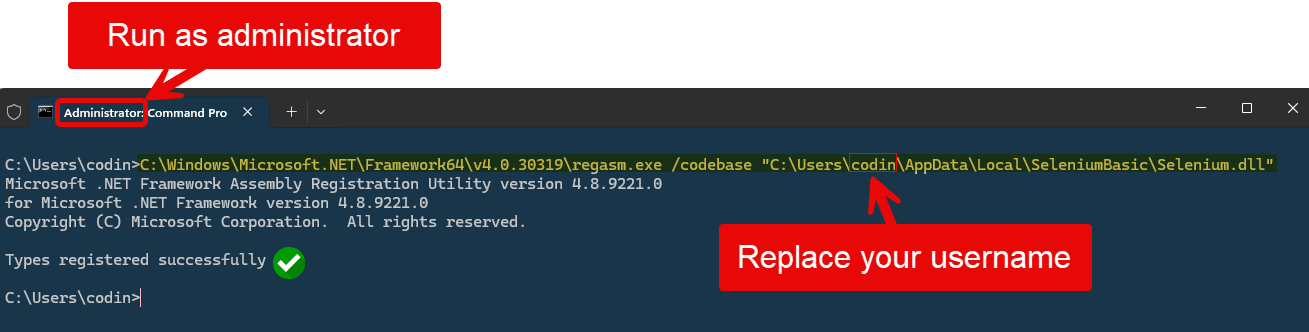
Now open WhatsApp Blaster and try again. Still no luck? Go to Step 3.
Step 3: Turn on .NET framework 3.5
On Windows 11 the .NET Framework 3.5 is often switched off by default, and Selenium needs it to run.
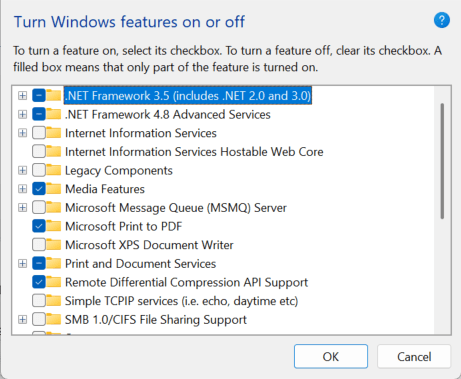
- Press the Windows key and type Turn Windows features on or off, then open it.
- Tick the box for “.NET Framework 3.5 (includes .NET 2.0 and 3.0)”.
- Click OK and let Windows install it. Restart your PC if it asks you to.
- Open WhatsApp Blaster and click Run WhatsApp BOT. The error should now be gone.
Once the error is gone, you are ready to start sending.