
If you encounter the error 1000: SeleniumError – disconnected: Unable to receive message from renderer, it is usually caused by an outdated Chrome test browser or ChromeDriver.
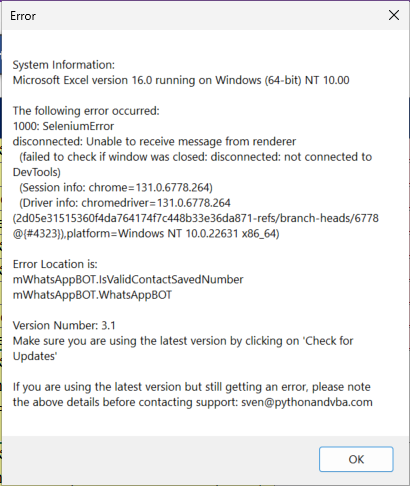
Step 1: Update Chrome Test Browser and ChromeDriver #
Download the latest versions ⤵️:
Version: 147.0.7727.50, Last updated: April 03, 2026
- Extract the downloaded ZIP files.
Step 2: Replace Outdated Files in SeleniumBasic Folder #
- Open File Explorer and go to:
C:\Users\<YourUserName>\AppData\Local\SeleniumBasic - Delete the existing
chrome-win64folder if it exists. - Copy the newly downloaded
chrome-win64folder and paste it insideSeleniumBasic. - Copy the new
chromedriver.exefile and paste it intoSeleniumBasic. When prompted, replace the existing file.
Step 3: Update Chrome Path in WhatsApp Blaster #
- Open WhatsApp Blaster.
- Find the setting “Use Default Chrome Installation” and set it to No.
- Paste the path to your custom Chrome installation. It should look like one of the following:
C:\Users\<YourUserName>\AppData\Local\SeleniumBasic\chrome-win64\chrome-win64\chrome.exeor
C:\Users\<YourUserName>\AppData\Local\SeleniumBasic\chrome-win64\chrome.exe(This depends on how you extracted the folder.)
