
Example input #
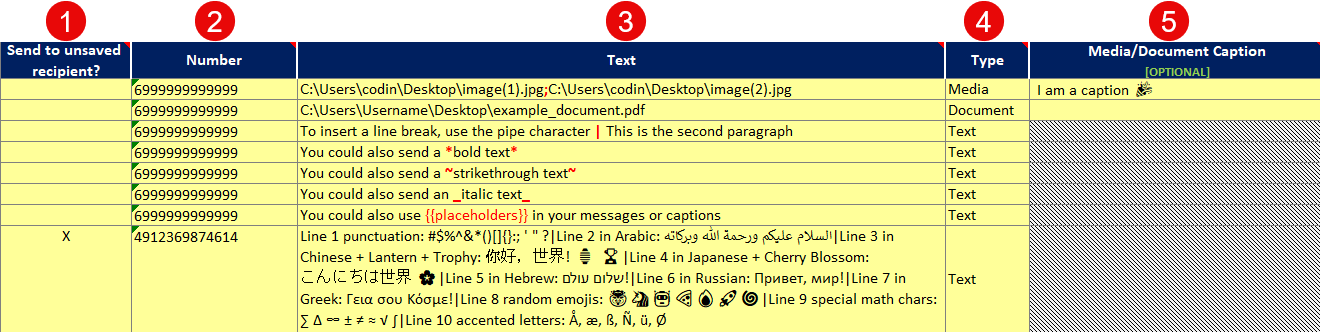
Table columns #
- Send to Unsaved Recipient?
- Mark with an X if the recipient is not saved in your WhatsApp contacts.
- Leave blank if the recipient is saved.
- Number
- Enter the recipient’s phone number, including the country code (e.g.,
4912369874614). - Do not include special characters like
+or spaces.
- Enter the recipient’s phone number, including the country code (e.g.,
-
Text
- For Text messages:
- Write your message here. Use formatting options like:
*bold text*→ bold text_italic text_→ italic text~strikethrough text~→strikethrough text
- For line breaks, use the pipe character
|(e.g.,Line 1 | Line 2). - You can also use
{{placeholders}}in your messages.
Learn more: How to Use Placeholders
-
Type
- Specify the type of message:
- Media: For images or videos.
- Enter the file path(s) in the Text field (e.g.,
C:\path\image.jpg). - For multiple files, separate paths with a semicolon (e.g.,
C:\path\image1.jpg;C:\path\image2.jpg). - Optionally, add a caption in the Media/Document Caption field.
- Enter the file path(s) in the Text field (e.g.,
- Document: For PDFs or Word documents.
- Enter the file path(s) in the Text field (e.g.,
C:\path\document.pdf). - For multiple documents, separate paths with a semicolon.
- Enter the file path(s) in the Text field (e.g.,
- Text: For plain text messages.
Learn more: How to Send Media Files and Documents
- Media/Document Caption (Optional)
- Add a caption for your media or document.
- Leave it blank if not needed.