
How to update ChromeDriver #
If you encounter the following error message when running the WhatsApp Blaster, it indicates a version mismatch between your Chrome browser and the ChromeDriver used by VBA Selenium:
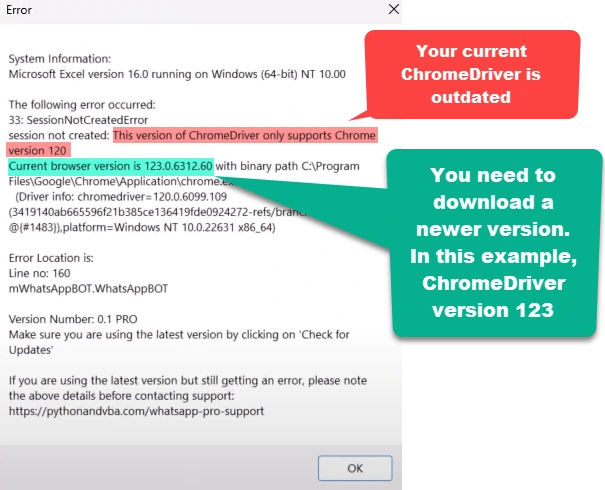
What does this mean?
Chrome updates itself, and ChromeDriver does not. Once the two are on different versions, Selenium cannot drive the browser. To fix this, you’ll need to update your ChromeDriver to match your current browser version.
Below is a step-by-step guide on how to update the ChromeDriver:
Steps to update ChromeDriver
- Identify the Issue:
- Check the error message to confirm the version numbers of your current Chrome browser and ChromeDriver.
- Download the Correct ChromeDriver:
- Go directly to the ChromeDriver download page.
- Download the ChromeDriver that corresponds to your browser’s major version (e.g., version 123).
- Choose the correct driver for your operating system (win32 or win64).
- Replace the Old ChromeDriver:
- Extract the downloaded ZIP file.
- Copy the
chromedriver.exefile. - Navigate to
C:\Users\<USERNAME>\AppData\Local\SeleniumBasic. - Paste the new file into this folder, replacing the existing
chromedriver.exe.
- Test the WhatsApp Blaster:
- Return to the WhatsApp Blaster Excel file and run the bot again to ensure everything is working correctly.