
Table Compare is free to use, with every feature. The free version has:
- Tables of up to 200 rows each. Rows are the data rows without the header.
- The result in the pane: the tiles Changed, New, Missing and Same, the changes per column, the filterable list with old and new values and numeric changes, and a click on an item that selects the cell.
- The report sheet, Highlight in my sheets, Copy these rows to a new sheet, Compare again and Keep a copy in this workbook.
- Automatic ID matching and every option: spaces, case, leading zeros, tolerance, columns to compare, column pairs and the choice of the match.
- Sources from tables, sheets, a selection or a file from your computer.
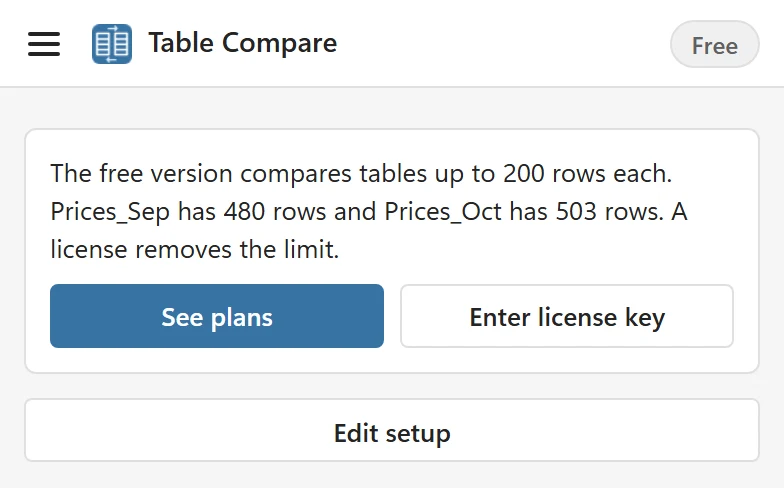
With a table over 200 rows, Compare first looks at the table sizes and says which table is too big. With one table over the limit: The free version compares tables up to 200 rows each. Prices_Oct has 503 rows. A license removes the limit. With both over it, as in the picture, both are named: The free version compares tables up to 200 rows each. Prices_Sep has 480 rows and Prices_Oct has 503 rows. A license removes the limit. It shows See plans and Enter license key, and no partial result.
A license removes the limit: tables of up to 100,000 rows and 200 columns per side, with the same features. See Plans and licensing.
What Table Compare does not do #
- It matches IDs exactly. Similar spellings, such as ACME Corp. and Acme Corporation, are not paired. AI Fuzzy Match is built for that job.
- It compares values, or formula text if you choose, and not formatting such as fonts and fills.
- It does not merge changes back. It shows, reports and highlights them.
Only comparing two columns of values? #
For two simple lists, such as two columns of emails or SKUs, the free Compare Two Lists tool in your browser shows what is only in the first list, only in the second and in both. For two whole Excel files in the browser there is the free Excel compare tool.