
A comparison that lists nearly every row as changed, or as new and missing at the same time, means Table Compare is pairing the wrong rows or seeing differences that are not real. Start with the line above the tiles and work down this list.
1. The rows are matched by row order #
Look at the line above the tiles. If it reads matched by row order and one table is sorted differently from the other, rows in the same position are compared, so everything differs. The tiles then show many New and Missing rows and few Changed ones.
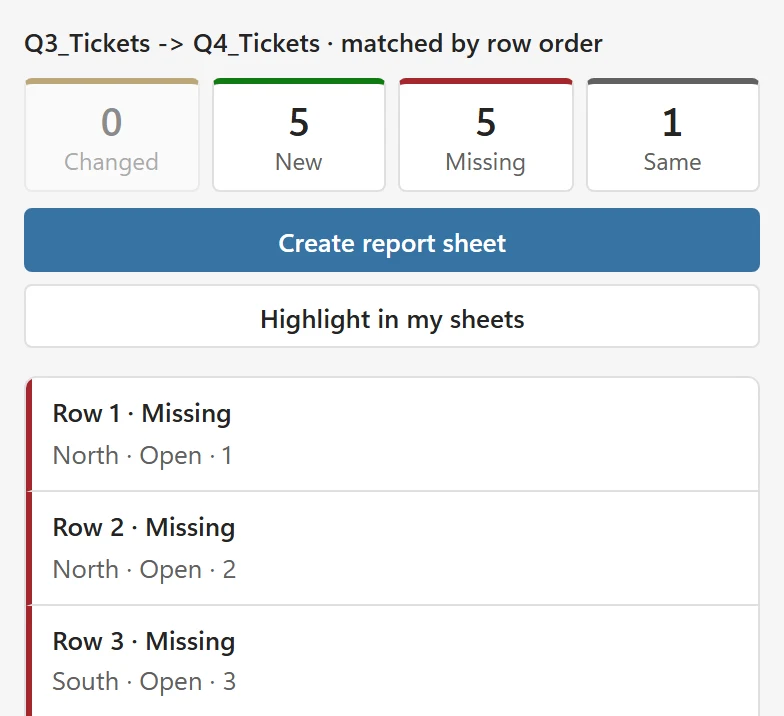
Table Compare falls back to row order when no column can serve as an ID. Click Edit setup, open Options and read the sentence under Match rows by:
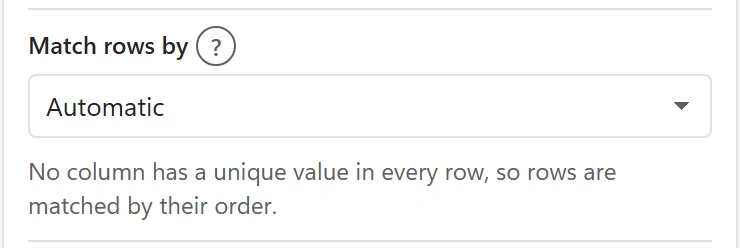
- If one column does identify a row, for example an order number, choose it in Match rows by. The list offers every column that is in both tables.
- If two columns together identify a row, choose the first and add the second in the list that appears.
- If there is no ID at all, sort both tables the same way first, or add an ID column.
2. IDs are repeated or blank #
A column with repeated values cannot be the ID automatically. Look for the purple Check line under the tiles, for example SKU D-4400 appears twice in New (rows 210, 377), and fix the duplicates or choose another column. See How rows are matched.
3. The first row is read wrongly #
If a header row is compared as data, or the first data row is taken as the header, set First row has column names to Yes or No in Options.
4. The values differ in small ways #
- Extra spaces: Ignore extra spaces is on by default. If you turned it off, turn it on.
- Upper and lower case: turn on Ignore upper and lower case.
- Leading zeros, such as 00123 against 123: use Treat 00123 and 123 as the same and, for columns other than the ID, In every column, not only ID columns.
- Rounding, for example prices that differ in the fifth decimal: set Numbers: allow a difference of to 0.01 or similar.
- A date typed as text in one table and a real date in the other: Table Compare does not convert text to dates, so they differ. Convert the text dates to real dates, in Excel, before you compare.
- Formulas such as NOW() or RAND() give a new value on every calculation. Copy the cells and paste them as values before you compare.
5. Columns are not paired #
A column that is named differently in the two tables is not compared, and the pane says so once, for example Column Discount is only in New. If it is the same data under a new name, pair the columns in Options under Columns to compare. Table Compare also pairs columns that hold the same values on its own and tells you when it did.
6. The IDs are spelled differently #
IDs are matched exactly, apart from spaces, case and leading zeros. When the same customer is written differently in each table, the rows cannot be paired and show as New and Missing. AI Fuzzy Match matches similar spellings.
Still unsure? Contact support and paste the diagnostic info from About.