
Start in History. Every failed message says what went wrong in plain words, and that tells you more than retrying the whole campaign. If many numbers in one send failed, read Handle failed numbers first: TextBay sorts them into groups, skips the numbers that can’t get texts and can send again to the people who couldn’t be reached.
Find the reason in TextBay #
- Open History and pick the campaign in the campaign filter (or click See it in History on the Send page after a send, which picks it for you). Then choose Failed in the filter next to it, or search for the person’s number or name. With a campaign picked, the What happened card above the list sums up the whole campaign; Hide summary folds it to one line, as in the picture below.
- Read the What went wrong column. Point at it to see a one-sentence explanation and what to do next.
- Double-click the row for the message details, including Twilio’s own words, the Twilio code and the message ID.
- For Twilio’s page about the code, right-click the row and choose Read Twilio’s page on this code.
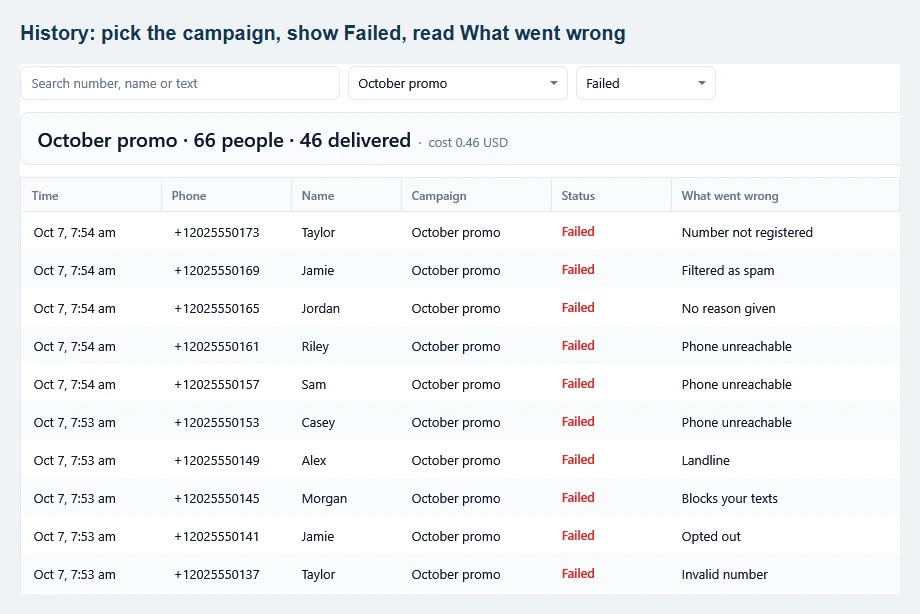
You don’t need to refresh by hand. After a send, TextBay keeps checking delivery in the background for up to 12 hours while it is open, so failures that carriers report late still show up. Refresh statuses asks Twilio right away when you want the latest result now.
What the status tells you #
- Test: this was a simulation. Nothing was handed to Twilio. Turn off test mode in Settings before a real send.
- Sending: the message is still on its way through Twilio. Check again later.
- Scheduled: waiting at Twilio until the scheduled time.
- Sent: Twilio handed the message to the carrier; delivery is not confirmed yet.
- Delivered: the carrier confirmed that the message reached the phone. It does not mean the person read it.
- Failed: the message didn’t arrive, and What went wrong says why. TextBay also uses this word when Twilio reports a message as undelivered.
- Not sure: the connection dropped while sending, so the message may or may not have arrived. Check again later before you send it again.
- Skipped: TextBay didn’t send it, for example because the number is on your skipped numbers list or was already in the same send.
- Canceled: a scheduled message that was canceled before Twilio sent it.
Some carriers never return a delivery receipt. A row staying Sent is not, by itself, proof of failure; after two hours TextBay stops waiting for a receipt and notes that this is normal for some carriers. See Twilio’s status definitions.
Landline, Number not in service, Phone unreachable #
These are about the person’s number, not your setup. TextBay skips numbers that can’t get texts from now on, and can send again to phones that were off: Handle failed numbers.
Trial account limit (Twilio code 21608) #
On a trial account, verify the recipient in the Twilio console before testing. Twilio’s current guidance also requires an approved primary compliance profile to remove the verified-recipient restriction after upgrading. Check the account requirements shown in your console; paying for the account alone may not resolve this error. Twilio’s 21608 guidance.
Number not registered (Twilio code 30034) #
For US A2P 10DLC traffic, check that your sending number is associated with an approved campaign. Review the US A2P row on TextBay’s Twilio page and complete the registration in Twilio. See A2P and 10DLC and error 30034.
Filtered as spam (Twilio code 30007) #
The carrier blocked the message, not the person. Review recipient consent, your wording and the destination’s sender requirements, and avoid shortened links. If you believe the messages comply, collect at least three affected message IDs and contact Twilio support. Twilio’s filtering guidance.
Country turned off (Twilio code 21408) #
Check the recipient’s country code. In the Twilio console, open Messaging → Settings → Geo Permissions and enable the intended destination if supported. A permissions toggle cannot enable a country or channel that Twilio does not support. Twilio’s 21408 guidance.
Opted out (Twilio code 21610) #
Twilio refuses further messages after an opt-out, and TextBay puts the number on your skipped numbers list so later sends leave it out. Do not switch senders to work around their choice. Follow Handle opt-outs if the person chooses to subscribe again.
Sender can’t send this (Twilio code 21212 or 21606) #
On TextBay’s Twilio page, confirm that the sender belongs to the connected account and supports the selected channel and destination. A voice-only number, or a sender name used in an unsupported country, will not work for that send.
Test credentials (Twilio code 20008) #
Twilio’s test credentials can’t send real texts. On TextBay’s Twilio page, paste the live Account SID and Auth Token from the Twilio console home page instead: Getting started.
Invalid number (Twilio code 21211) #
Check for typos and use international format: +, country code, then the subscriber number. Set your default country under Settings for local numbers, or use the number converter on Contacts to update a column. Formatting does not prove that a number is active or can receive SMS. Twilio’s number checks.
Still stuck? #
Send support the exact wording from What went wrong, the Twilio code and message ID if available, the channel, the destination country and the step that failed. Leave your Auth Token out of screenshots and logs you share.