
You can cancel your SendCommander subscription yourself, either in the app or in your account in the browser.
In the app #
- Open SendCommander and go to the Account page in the left sidebar.
- In the Subscription section, review your plan and renewal date.
- Click Cancel subscription, review the details and enter a short reason, then confirm. A reason is required.
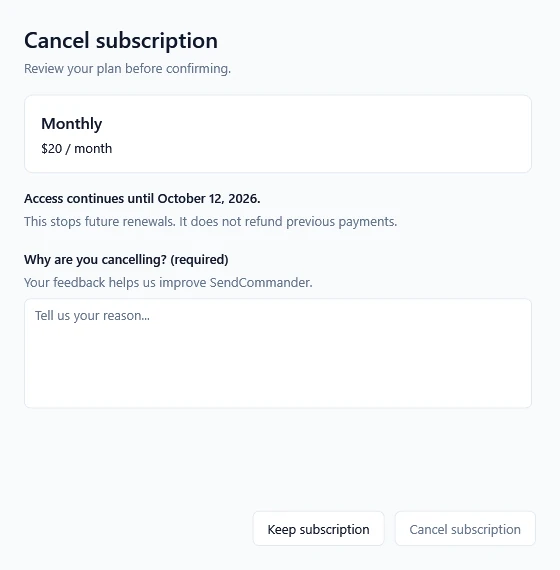
Cancellation appears for a cancellable subscription. Free users and lifetime license holders do not have a subscription to cancel. Once cancelled, the page shows that the plan will not renew and when access ends.
In your account #
Same result, and it works even if SendCommander is no longer installed.
- Open account.pythonandvba.com and sign in with the email address you bought with, or with your product and license key.
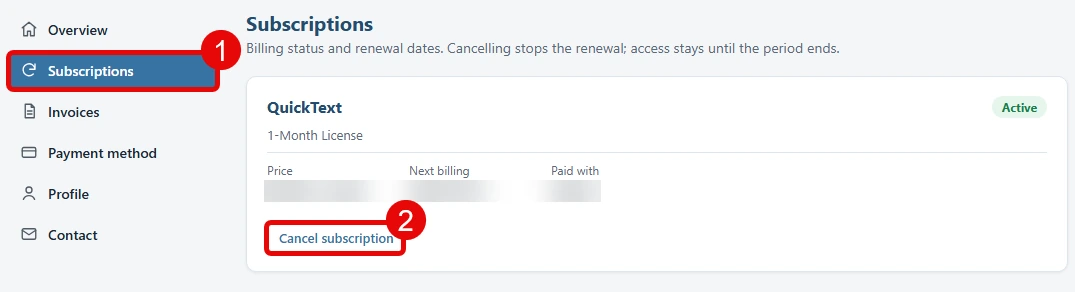
- Click Subscriptions in the left menu. Every plan you have is listed with its price and its next billing date.
- Click Cancel subscription under the plan you want to stop (2), then confirm.
That is it. You keep full access until the end of your current paid period, and you are not charged again. Cancellation does not itself request a refund. See refund requests for that. After that, SendCommander drops back to the free plan, with whatever is left of the 100 free messages included per computer.