
When you click Send Messages, QuickText lets you choose which messages to send using the Send Scope option. This gives you full control over your sending, whether you want to send everything at once, only new messages, or a specific batch.
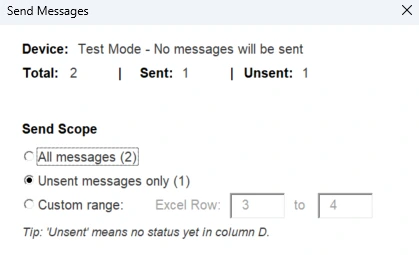
Send scope options #
| Option | What it does | When to use it |
|---|---|---|
| All Messages | Sends every message in your list, including ones that were already sent before. Clears all previous status data and starts fresh. | You want to resend your entire list from scratch. |
| Unsent Messages | Only sends messages that don’t have a status yet. Skips any row that was already sent, failed, or skipped. | You stopped a previous send and want to continue where you left off. |
| Custom Range | Sends only the messages in the row range you define, from the From row to the To row. | You want to send in small batches, e.g. 100 messages per day. |
Tip: If you have a large contact list and want to spread your sends across multiple days (e.g. 100 messages per day), use Custom Range. Simply set the row range for each batch. For example, rows 2 to 101 on day one, rows 102 to 201 on day two, and so on.
If QuickText detects that some messages were already sent, it will automatically pre-select Unsent Messages so you don’t accidentally resend them.