
Every computer you activate your license key on takes one of your device slots. You can see all of them, and free one up, from your account.
- Open account.pythonandvba.com and sign in with the email address you bought with, or with your product and license key.
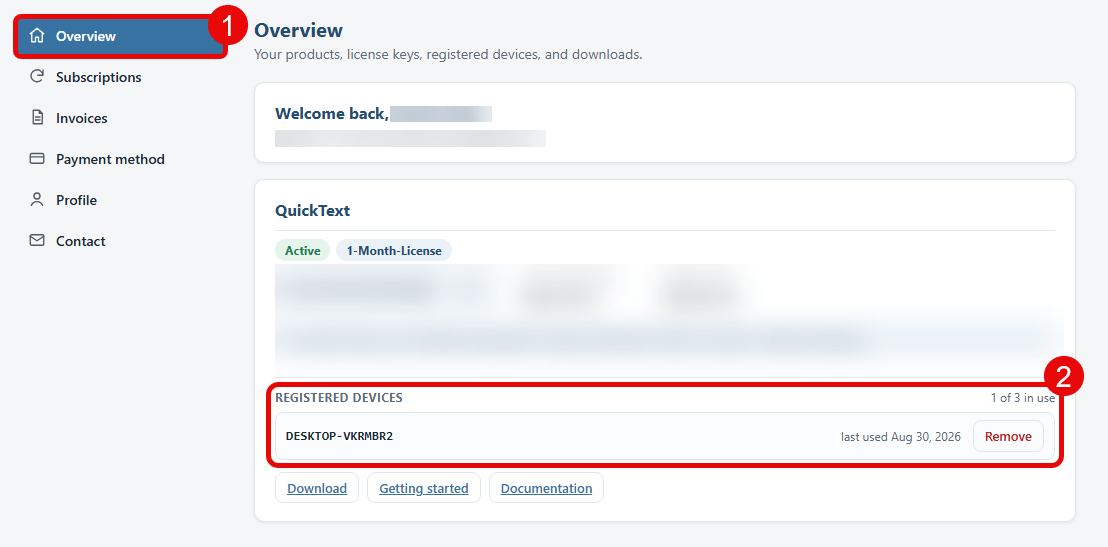
- Stay on the Overview page (1). Each product you own has its own card.
- Find Registered devices on the QuickText card (2). It lists every computer using the key, when each one was last used, and how many slots are in use.
- Click Remove next to a computer you no longer use.
Removing a device changes nothing about your subscription or your license key. The freed slot goes to the next computer you activate, and the computer you removed simply asks for the key again the next time you start QuickText there.
If a computer still reports the device limit right after you freed a slot, close QuickText and open it again so it checks the license once more.