
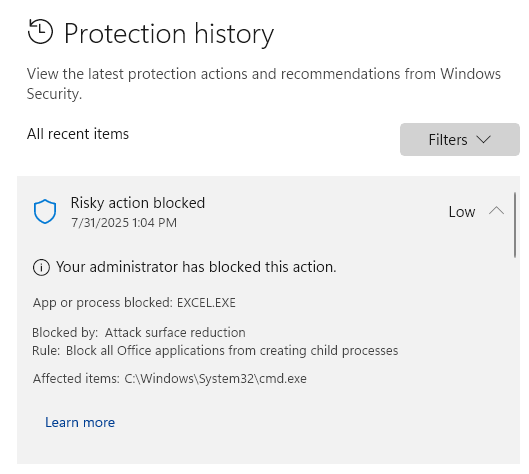
If you see this message from Windows Security:
What’s going on?
Windows Defender has a security rule (“Attack surface reduction”) that blocks Excel from running background commands. This stops QuickText from sending SMS.
How to fix it:
You have two options:
Option 1: Enable “Bypass ASR” in QuickText (quick fix)
- Open QuickText
- Go to Settings > Advanced Settings
- Set “Bypass ASR” to Enabled
- Save the settings
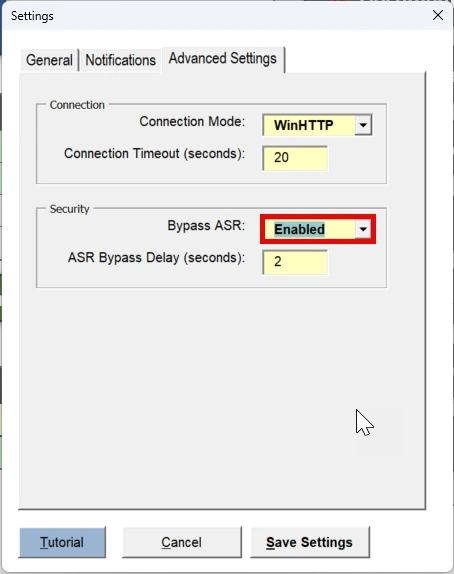
Note: This option is the quickest and doesn’t require changing your Windows security settings. However, it may add a small delay (a few seconds) each time you send an SMS.
On a managed PC #
Ask IT to review the exact protection event and whether QuickText is permitted. Do not disable the Office child-process rule across the PC just to test a send. The rule ID in the event is D4F940AB-401B-4EFC-AADC-AD5F3C50688A.
If the app compatibility setting does not resolve it, send support the exact event and QuickText version. Keep the security policy enabled while the specific operation is investigated.