
Send Bulk SMS, MMS and WhatsApp with Twilio Without Code
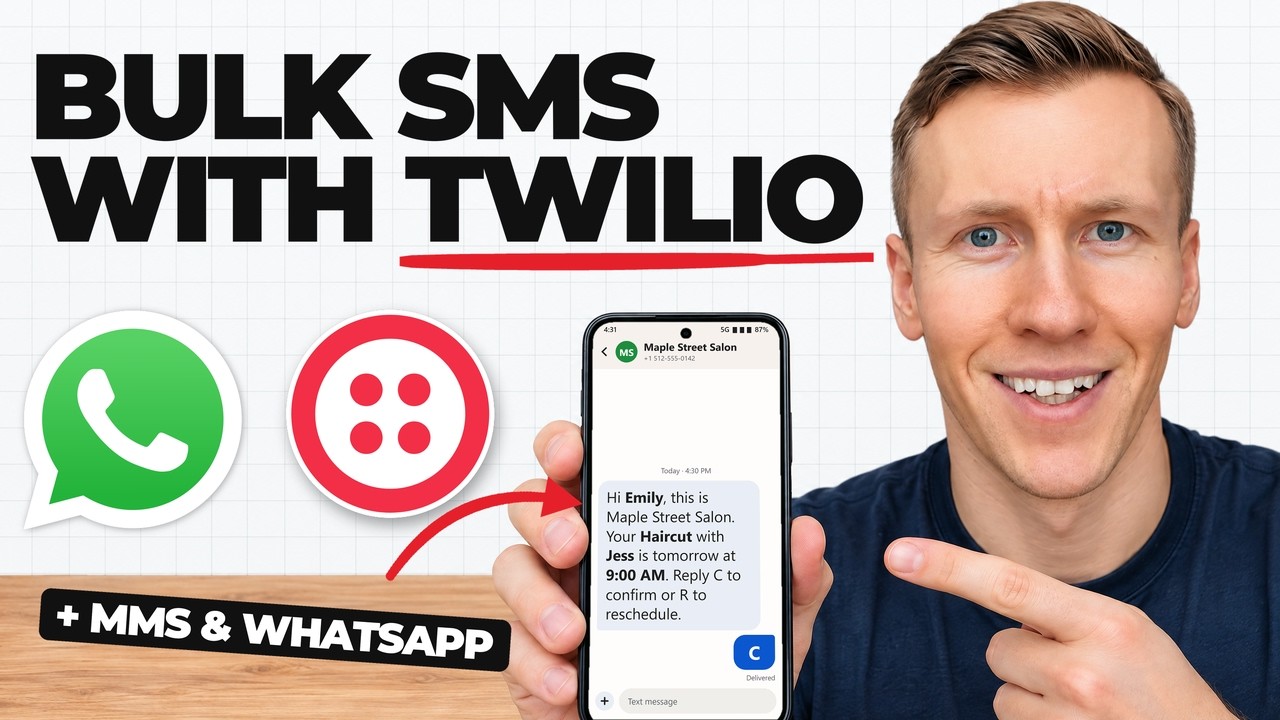
Twilio has no button to text a whole list. To send bulk SMS through Twilio without code, connect a desktop app to your Twilio account with the Account SID and Auth Token, import your contacts from Excel, write one message with placeholders and send. TextBay, the Windows app I built for this, also sends MMS and WhatsApp, shows the segment count and cost estimate first, and collects replies in an inbox.
Table of contents
Twilio and bulk SMS
Not from the Twilio console itself. Twilio is a toolbox for developers: it sends one message per API call, and sending to a list normally means writing a script. A desktop app can make those calls for you, so you pick people, write one message and press Send.
Twilio gives you your own number, delivery reports, MMS and WhatsApp, and you pay per message instead of a monthly plan. What it lacks is a user interface for lists: without code you can send one test message from the console and that is it.
TextBay fills that gap. It is a Windows app that connects directly to your Twilio account. There is no server of mine in the middle: messages go from your PC straight to Twilio, and your contacts stay on your PC. In my example I run a hair salon and send tomorrow’s appointment reminders, but the same steps work for a sale, an event or new opening hours.
TextBay replaces my older Excel tool Twilio Blaster, which is no longer sold. Replies, lists, opt-outs and delivery status now live in an app instead of a workbook.
Before you start
A Windows 10 or 11 PC, a Twilio account and a Twilio phone number that can send SMS. For texting US numbers you also need a registered sender (10DLC or a verified toll-free number), and for WhatsApp a WhatsApp sender registered with Twilio.
- A Twilio account. Sign-up takes a few minutes. A new account starts as a trial with some free credit, but a trial only texts numbers you have verified with Twilio and adds a trial note to every message. Upgrade it before a real campaign.
- A number. Buy an SMS-capable number in the Twilio console for the country you text.
- US recipients: register a local number for 10DLC or verify a toll-free number first. More on that below.
- WhatsApp: a WhatsApp sender registered in your Twilio console, or Twilio’s sandbox for testing.
Twilio bills every message you send. TextBay is a one-time purchase, and the free download sends 20 real messages so you can try it first.
Connect TextBay to Twilio
Install TextBay from the Microsoft Store, open the Twilio page, and paste your Account SID and Auth Token from the Twilio console home page. Click Connect. TextBay loads your numbers, your balance and your senders, and checks your US registration status.
-
Install TextBay. Search for TextBay in the Microsoft Store, click Install and open it. The first-run wizard asks for the two Twilio values and, optionally, your license key.
-
Copy two values from Twilio. On the Twilio console home page, under Account Info, copy the Account SID (34 characters, starting with AC) and the Auth Token with the copy buttons.
-
Paste and connect. Paste both into TextBay and click Connect. Use the live credentials: Twilio’s test credentials cannot send real texts, and TextBay says so if you paste them by mistake.
-
Pick the sender. Choose which of your numbers (or which Messaging Service) the texts come from. The channel card shows what the account is ready for: SMS, MMS, WhatsApp and your US A2P registration.
Your Auth Token is stored encrypted on your PC and only ever sent to Twilio. The getting started guide shows every click, including the Twilio side.
Import your contacts
On the Contacts page, click Import from file and choose your Excel, CSV or vCard file. TextBay finds the phone column, asks for the country of local numbers, lets you keep extra columns as placeholders and adds everyone to a list. Numbers already in your contacts are updated instead of duplicated.
My booking system exports tomorrow’s appointments as an Excel file with first name, mobile number, service, stylist and time. The numbers are typed in every possible format, which does not matter: once you pick the country, TextBay converts every number into the international format Twilio needs.
Then I tick the extra columns I want in the text, Service, Stylist and Time, and add everyone to a new list named after the day, such as Appointments Tue Nov 3. Tomorrow I import the next file into the next list.
Appointment reminder list for Twilio
The salon list from my video, with messy mobile numbers, service, stylist and time columns, plus a How to use sheet with the import steps and the reminder text.
Write the message
On the Compose page, choose Selected lists and pick the list. Pick the channel (SMS, MMS or WhatsApp), then write the message and insert placeholders for each column, with a fallback for missing values. The preview shows the exact text for every person, one at a time.
Placeholders are written like {{service}}. A fallback goes after a bar: {{first_name|there}} gives “Hi Emily” to Emily and “Hi there” to anyone without a first name. Variations are written like [[Hi|Hello]], and TextBay picks one per person. My salon reminder:
Hi {{first_name|there}}, this is the Maple Street Salon. Your {{service}} with {{stylist}} is tomorrow at {{time}}. Reply C to confirm or R to reschedule.
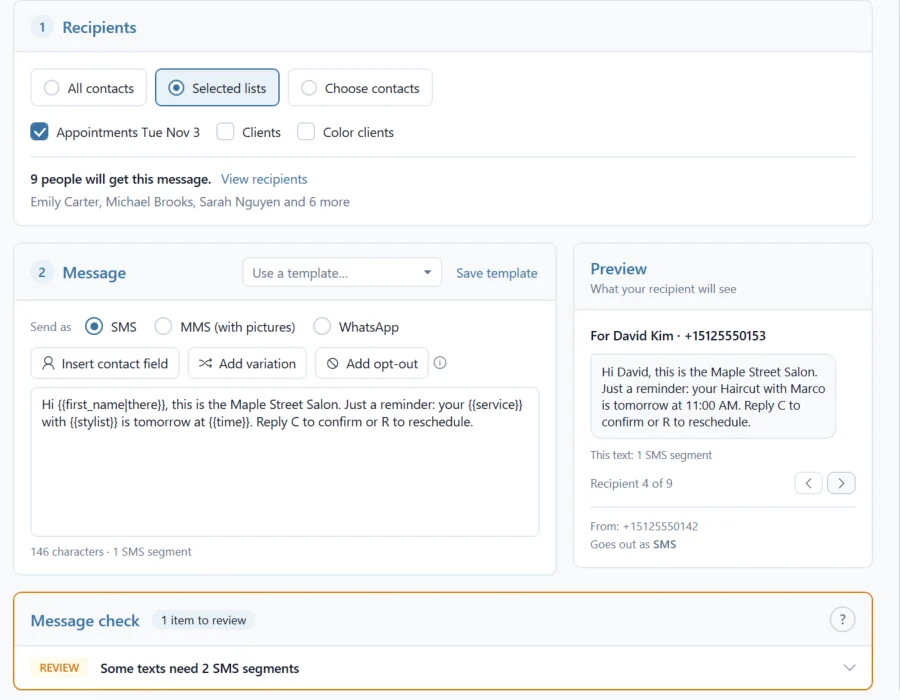
Since I send this every day, I click Save template and call it Appointment reminder. Next time I import the new file, pick the template and send. Use Add opt-out for marketing texts to the US or Canada. If you are starting from nothing, my SMS template generator writes a first draft with variations.
SMS segments
Twilio bills every SMS segment as a separate text. A plain message up to 160 characters is one segment. A longer one is split into parts of 153 characters, and a single emoji or curly quote switches the whole message to Unicode, where a segment holds only 70 characters.
| Message uses | One segment holds | Each part of a longer message holds |
|---|---|---|
| Plain characters (GSM-7) | 160 characters | 153 characters |
| Any emoji, curly quote or non-Latin letter (UCS-2) | 70 characters | 67 characters |
With placeholders, the length changes per person. In my video, the message check warned that one of nine texts needed two segments, because Jessica’s service had a long name. Cutting two words brought every text back to one segment, which halves the cost of that one message. The preview shows the segment count per person, and the bar at the bottom shows the total for the send. To count a draft before you even open TextBay, paste it into my free SMS spam checker, which counts segments live.
After you click Send
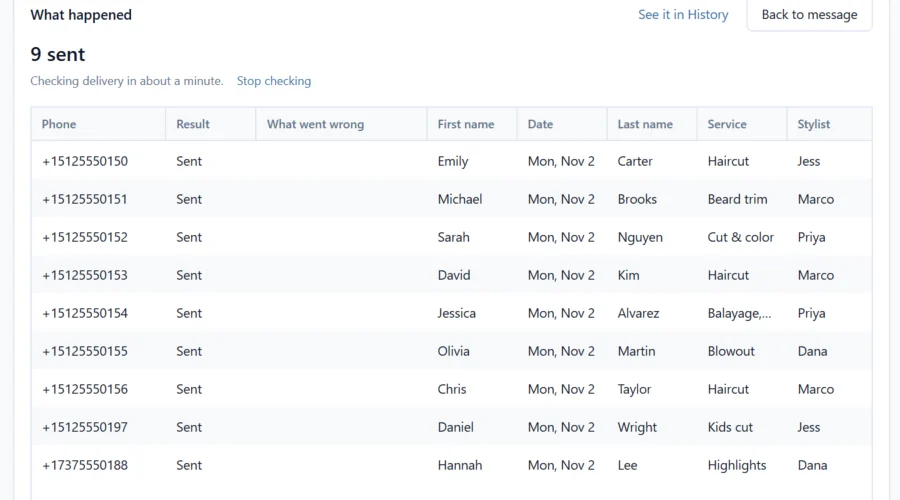
Review and send shows one last summary: how many people get the message, who is skipped and why, about how many segments that is, and your Twilio balance. After you confirm, TextBay hands the messages to Twilio, shows each person’s status live and sums up what happened.
If it is night where some people live (after 9 pm or before 8 am their time), the summary warns you first, because US rules limit marketing texts at night.
When a text fails, TextBay says why in plain English, and History keeps Twilio’s error code if you need it. In my example Daniel’s text failed because his number is a landline. TextBay puts numbers like that on the skipped numbers list automatically, so you do not pay for a text nobody can receive next time. Send again retries people whose phone was simply off. Delivery keeps updating for hours after a big send.
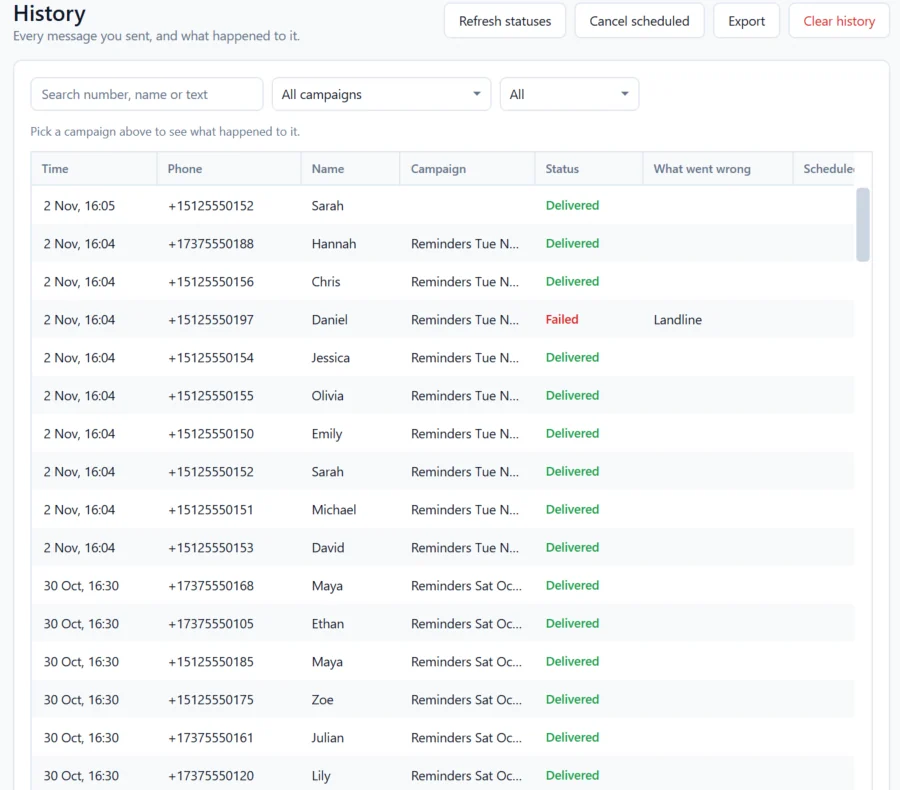
History lists every message with its campaign, status and what went wrong, and exports to Excel. The failed numbers guide covers each failure type.
Replies
Replies land in the Inbox, one conversation per person, with SMS and WhatsApp side by side. You answer right there, and the person gets your reply from the same Twilio number. There are no webhooks or servers to set up: TextBay checks Twilio for new messages on its own.
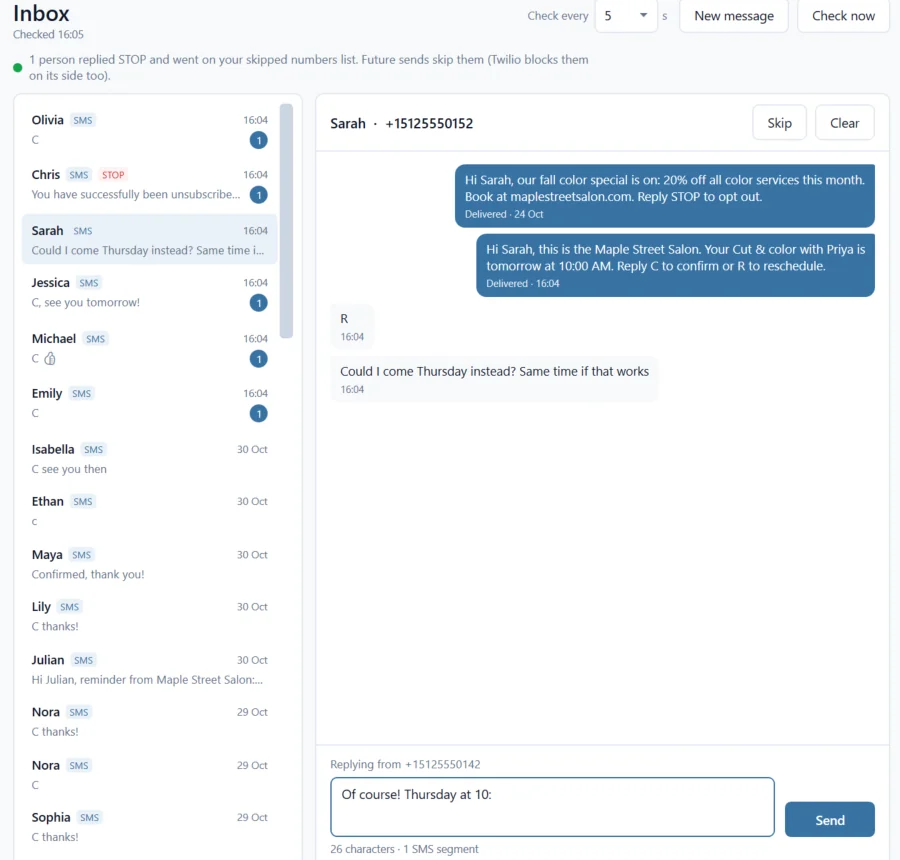
In my salon example, Emily, Michael and Jessica confirmed with C, and Sarah asked whether she could come on Thursday instead, so I answered her directly. Chris replied STOP. TextBay added him to the skipped numbers list, so he gets no more texts even though he is still on my list, and Twilio blocks him on its side as well. The opt-out guide explains how both layers work.
MMS and WhatsApp
Pick MMS (with pictures) or WhatsApp as the channel on the Compose page. For MMS you add a link to the picture, and the preview shows it before anything goes out. WhatsApp needs a registered WhatsApp sender in Twilio and follows Meta’s rules on templates.
MMS. Good for a photo of a new hairstyle or a flyer for an event. Twilio fetches the picture from the link, so it has to be a public link that opens the image directly. Google Drive and Dropbox share links open a viewer page instead, and TextBay has a button that converts them to direct links. A contact detail named media_url gives one person their own picture, such as a personal coupon. Twilio bills MMS at its own rate, and your number and destination must support MMS, which the Twilio page shows. The MMS guide covers sizes and links.
WhatsApp. You can write freely to someone within 24 hours of their last message to you. Outside that window, WhatsApp only delivers templates that Meta approved in advance. TextBay’s Templates page lists your account’s WhatsApp templates with their approval state, ready to fill and send. My guide to WhatsApp’s rules explains the window and templates.
To send WhatsApp from your personal WhatsApp account instead of through Twilio, use SendCommander. If you would rather write the code yourself, my VBA guide shows how to send WhatsApp messages from Excel through the Twilio API.
Scheduling
Yes. Under Sending options, choose At a set time instead of Right away, pick the date and time in your own time zone, and TextBay hands the whole campaign to Twilio immediately. Twilio holds the messages and releases them on time, even when your PC is off.
Two conditions come from Twilio. Scheduling only works through a Messaging Service, which takes a few clicks to create in the Twilio console. And the send time must be between 15 minutes and 35 days ahead. On Saturday I can import Monday’s appointments and schedule the reminders for Sunday afternoon. Scheduled messages show in History with their release time, and Cancel scheduled stops them. Details are in schedule a send.
10DLC registration
Only for US recipients. US carriers want every business that texts from a normal 10-digit number to register a brand and campaign, which Twilio calls 10DLC. A toll-free number needs one verification form instead. Texting outside the US, or on WhatsApp, skips this.
| US sender | What you do once | Good for |
|---|---|---|
| Local number (10DLC) | Register a brand and campaign in the Twilio console; small senders without a tax ID can register as a sole proprietor | Most businesses |
| Toll-free number | Fill in one toll-free verification form | Often the simplest route for a small business |
| Short code | Apply for a short code, with weeks of lead time | Very high volume only |
Unregistered US traffic can be blocked even during a small test, so check this before your first campaign. TextBay’s Twilio page tells you in plain words whether you are registered and approved. The A2P and 10DLC guide and the toll-free guide walk through both. If you are still deciding between a platform number and your own phone number, read my comparison of A2P vs P2P text messaging.
Troubleshooting
The usual causes are a Twilio trial account texting an unverified number, a US number without 10DLC or toll-free approval, a destination country that is switched off in Twilio’s geo permissions, or a landline. TextBay names the reason for each failed text, and History keeps Twilio’s error code.
| Problem | Cause | Fix |
|---|---|---|
| Only your own phone gets texts, with a trial note | Twilio trial account | Upgrade the Twilio account |
| US texts fail or get filtered | Sender not registered | Finish 10DLC or toll-free verification |
| Texts to one country fail | Geo permissions off for that country | Twilio console, Messaging Geographic Permissions |
| One number always fails | Landline or disconnected number | TextBay skips it from now on; Check numbers finds landlines before you send |
| WhatsApp message not delivered | Outside the 24-hour window | Send an approved template instead |
Two habits keep your Twilio number healthy: text only people who expect to hear from you, and keep the opt-out line in marketing texts. Twilio and the carriers do not allow cold outreach, and TextBay is not a tool for it. To clean a list before you pay to text it, my free bulk phone number validator checks the format and the carrier lookup tells mobiles from landlines.
Send bulk SMS, MMS and WhatsApp through your own Twilio account from a Windows app. Import from Excel, see segments and cost before you send, and answer replies in one inbox. No code, no servers.