
When you click Activate in More options > License, PinPop checks the key with the license server and shows one of these messages.
The license key is not your Google Maps key. The license key comes in your purchase email from pythonandvba.com and has 21 characters; the Google key starts with AIza and goes under More options > Google key.
A license key has 21 characters #
A license key has 21 characters. Check the key in your purchase email, then try again. The pasted text is too short or too long, often because a space or a line break came along. Copy the key again from your purchase email, without anything around it.
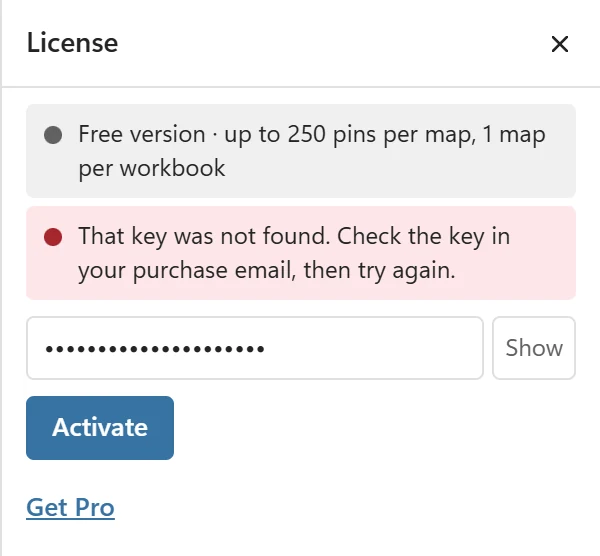
That key was not found #
That key was not found. Check the key in your purchase email, then try again. The key is mistyped, or it belongs to another product (a key for another add-in does not unlock PinPop). Paste it from the PinPop purchase email. Your keys are also listed in your account.
Already active on its maximum number of devices #
This license is already active on its maximum number of devices. Free a device in your account, then try again. A Single User license covers up to 3 devices and a Team license up to 15 devices in total. Each computer, and each browser for Excel on the web, counts as one device. Free one in your account, or on the old device open More options > License and click Remove license key from this device.
Not active, refunded or expired #
- This license is not active. If you think this is a mistake, contact support.
- This license was refunded, so it no longer unlocks Pro. Contact support if you think this is a mistake.
- This license has expired. Contact support to renew it.
PinPop licenses are lifetime licenses, so these mean something changed on the purchase. Contact support with the email address you bought with.
The license server did not answer #
The license server did not answer. Check your internet connection, then try again. or PinPop could not check this key right now. Try again later. The key could not be checked. Check the connection; on a company network, api.pythonandvba.com must be reachable. A key that was already active keeps Pro on for 7 days without a connection; the banner PinPop could not check your license. Pro stays on for 5 more days. counts them down.
The key worked before #
If a saved key stops working, the License panel says why, for example Your saved license key was not found, so the free version is on. or The license could not be checked for more than 7 days, so the free version is on. Connect to the internet, then open License again. Opening License checks the key again. Your maps and the coordinates in your tables stay either way, and maps you made with Pro keep their Pro features for everyone who opens them.