
QuickText supports multiple phones. You can choose which one to use before sending your messages.
✅ Steps to set it up:
- Install KDE Connect on each phone
Make sure all phones have the KDE Connect app installed from the Play Store. - Connect to the same Wi-Fi
Your computer and all phones must be on the same Wi-Fi network. - Open KDE Connect on your computer
All nearby phones will appear in the list. Pair them one by one, as shown in the getting started video. - Click “Connect Your Phone” in Excel
A list of all paired and reachable phones will appear. - Select the phone you want to use
Click on the phone you want to send messages from. This will become your default device.
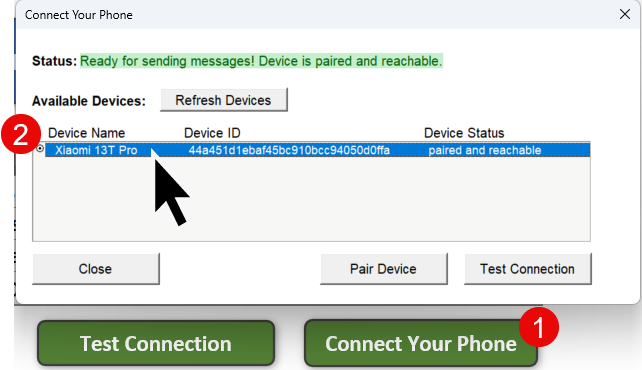
- Close the window
Once selected, just close the device manager window. Your selected phone will now be used to send SMS messages.
