
If you recently updated KDE Connect and your SMS messages are no longer being sent — even though QuickText shows “successfully transmitted” — this was a known issue with KDE Connect version 1.35.
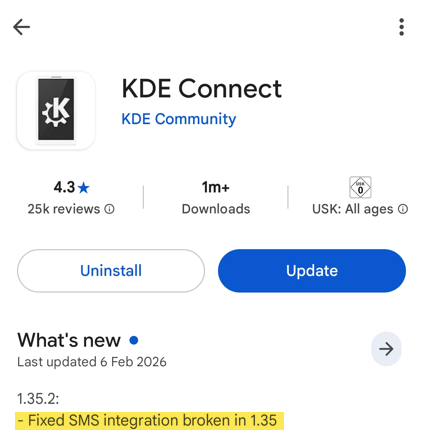
Good news! This bug has been fixed in KDE Connect version 1.35.2, now available in the Google Play Store.
How to Fix It #
Open the Google Play Store, search for KDE Connect, and tap Update to install version 1.35.2 or later.
How to Check Your KDE Connect Version #
Long-press the KDE Connect app icon on your phone, then tap the ⓘ icon. Your version number will be displayed.
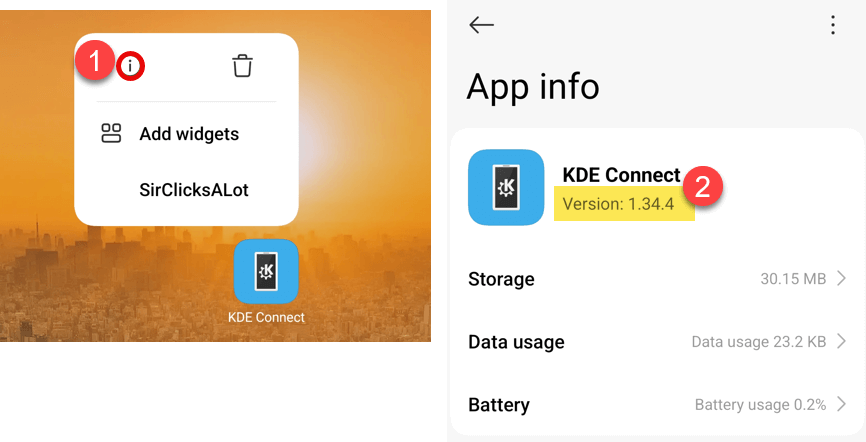
Version 1.35.2 or later: You have the fix. SMS sending should work normally.
Version 1.35.0 or 1.35.1: You are affected. Update to version 1.35.2 or later from the Play Store.
Version 1.34.x: You are not affected, but you can safely update to 1.35.2 now.
Previously Downgraded to v1.34.4 via F-Droid? #
If you followed the earlier workaround and installed v1.34.4 from F-Droid, you can now uninstall that version and install the fixed version (1.35.2) directly from the Google Play Store.
Optional: Disable Auto-Updates #
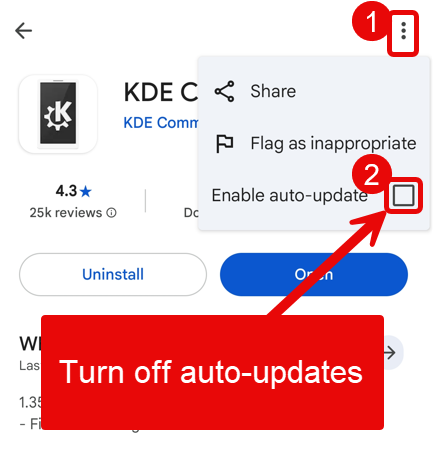
If you prefer to control when KDE Connect updates, you can disable auto-updates. Open the Google Play Store, search for KDE Connect, tap the three dots menu, and untick “Enable auto-update”.
Background #
This bug was introduced in KDE Connect version 1.35 and reported to the KDE Connect team: Bug Report #515507
