
If you see this message from Windows Security:
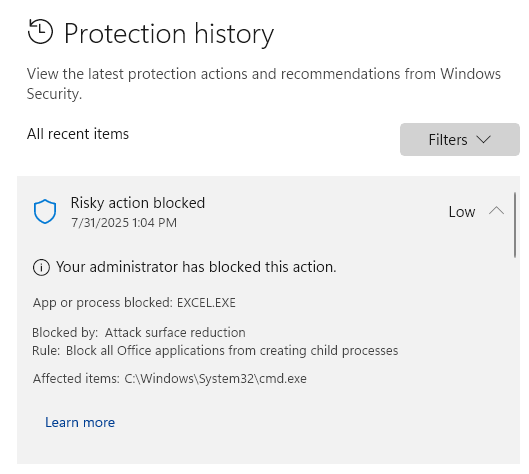
What’s going on?
Windows Defender has a security rule (“Attack surface reduction”) that blocks Excel from running background commands. This stops QuickText from sending SMS.
How to fix it:
You have two options:
Option 1: Enable “Bypass ASR” in QuickText (quick fix)
- Open QuickText
- Go to Settings > Advanced Settings
- Set “Bypass ASR” to Enabled
- Save the settings
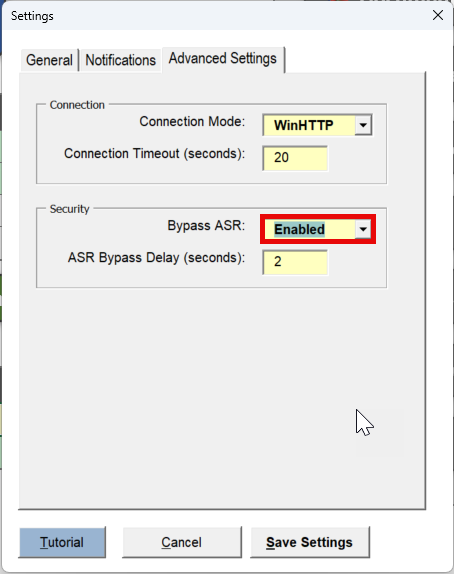
Note: This option is the quickest and doesn’t require changing your Windows security settings. However, it may add a small delay (a few seconds) each time you send an SMS.
Option 2: Disable the Defender Rule (permanent fix for admins)
If you have admin rights, you can turn off just this security rule:
- Open PowerShell as administrator
-
Run this command:
Set-MpPreference -AttackSurfaceReductionRules_Ids D4F940AB-401B-4EFC-AADC-AD5F3C50688A -AttackSurfaceReductionRules_Actions Disabled

This will remove the block and allow QuickText to send SMS without any added delay.
