
Every batch of rows carries your whole category list to the AI, so the list has limits. The pane checks them before anything is sent, and nothing is charged.
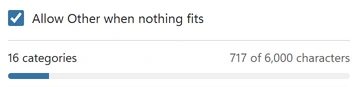
“Your categories use {chars} of {limit} characters” #
The full message is “Your categories use {chars} of {limit} characters. Shorten the descriptions or remove categories you do not need.” The count is every category name plus every description, added up; the limit is 6,000 characters. The question does not count. The pane shows the count while you set up the list, so you can see how close you are.
- Shorten the descriptions. Keep the words that tell close neighbours apart and drop the rest. “Restaurants, client meals, food delivery” does the job of a full sentence.
- Drop descriptions where the name is clear. “Rent and lease” or “Insurance” need none.
- Remove categories the rows cannot use. For bank lines, balance sheet accounts and income accounts you never book to from this export can often go.
- Split the job. Sort into a few broad groups first (for example income, cost of sales, overheads), then run each group’s rows against its own shorter list.
“AI Categorizer takes up to 100 categories per run” #
The full message is “AI Categorizer takes up to 100 categories per run. You have {n}.” Remove categories this list of rows will not use, or split the job as above. Duplicates that differ only in capital letters or spaces are merged automatically and count once.
A category name is longer than 60 characters #
Category names can be up to 60 characters. The pane names the row; shorten the name in the sheet (or in its row under Type them). Other columns, such as an account number, can still be copied next to each row without counting toward the name. Names are never cut silently.
Set up your categories lists every rule for the list, and Write categories that work shows how to keep it short and clear.