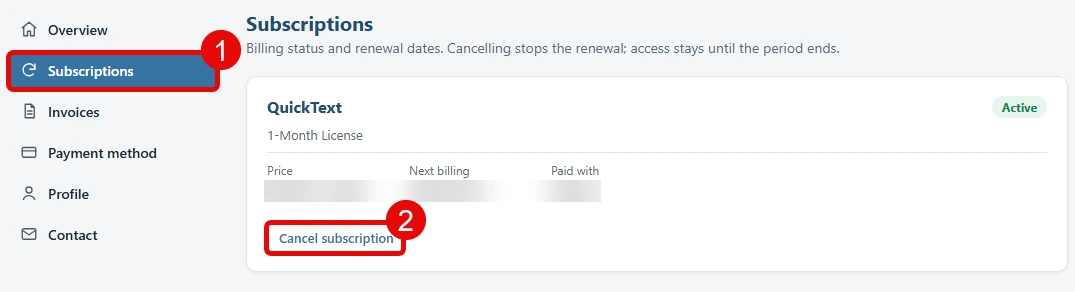
You can cancel a paid subscription directly in QuickText 1.5. Cancellation stops future renewals, and you keep access until the end of the period you paid for. It does not request a refund.
Cancel inside QuickText #
- Open Account and find your subscription. If the plan has not loaded, click Load my plan.
- Click Cancel subscription. Review the plan and access end date.
- Enter a short cancellation reason (required), then click Cancel subscription to confirm.
- Wait for the result. QuickText confirms when the cancellation succeeds. If it cannot confirm the result, try again or check your online account.
Opening the cancellation window does not cancel anything. Choose Keep subscription to leave without changing your plan.
Users on the free message allowance have no subscription to cancel. Lifetime licenses have no recurring payments. Cancellation actions are hidden for those plans and for subscriptions already set not to renew.
Use your online account instead #
Your online account remains available for subscriptions, licenses, registered computers, invoices and payment details.
- Open your account. Sign in with your purchase email and a six-digit code, or use your product and license key to request a sign-in link by email.
- Open Subscriptions and find your plan.
- Click Cancel subscription, enter a short cancellation reason and confirm.