
Return address labels are the same label many times. LabelPop fills a whole sheet with one label from a single row of your list, and because that is one sheet, it is free. Use it for envelope flaps, packages and invoices.
1. Put your address in a small list #
On any sheet, type a header row and one row with your address, for example Name, Address 1, City, State, ZIP. LabelPop recognizes the column names and suggests the lines; for return address sheets it leaves out the company and country lines, which you can add back. If your list has more rows, step 3 uses the first row with content.
2. Use the selection and pick a return address sheet #
Click a cell in the list and click Use selection. In the Label sheet card, open the Sheet list and choose one of the return address sheets, for example:
- Return address 80 per sheet, 1/2 x 1-3/4 in (same size as 5167) or Return address 60 per sheet, 2/3 x 1-3/4 in (same size as 5195) on US Letter.
- Mini 65 per sheet, 38.1 x 21.2 mm (same size as L7651, J8651) on A4.
- Any address label size works too, if you want a bigger label.
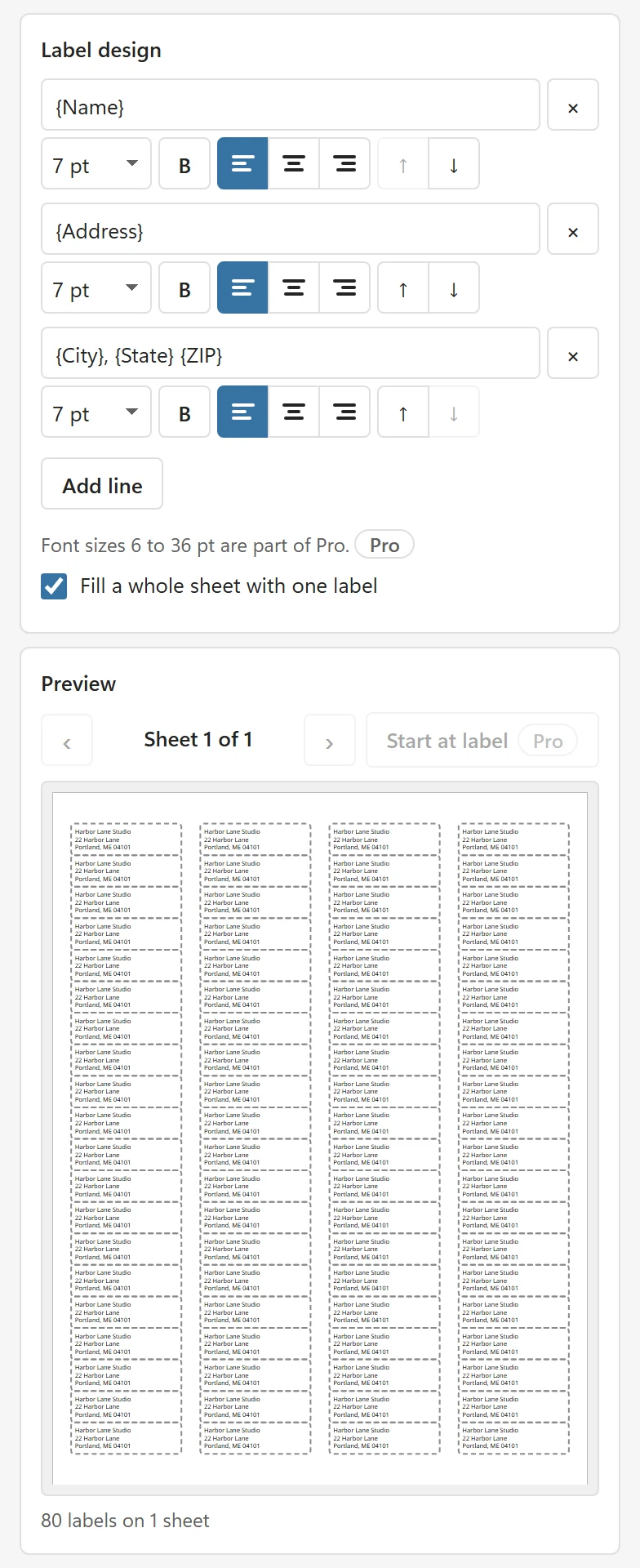
The labels are small, so the suggested font is small (7 pt on the 80 per sheet size). Keep to two or three short lines.
3. Tick Fill a whole sheet with one label #
In the Label design card, tick Fill a whole sheet with one label. The preview repeats your address on every label of the sheet. This uses the first row with content and ignores copies, sort and duplicates.
4. Click Create PDF and print #
Click Create PDF and print at Actual size, as described in Print address labels from Excel. Print one page on plain paper first: the small labels leave little room for a shifted page. If the text is off, use calibration.
Tips #
- Untick the box to go back to one label per row of your list.
- A logo on return address labels is a Pro option; see Add a logo.
- If a line is cut off, the notes under the preview say so. Shorten the line, lower the font size or pick a larger sheet.
- To use up a partly used sheet, Pro can start at any label; see Start on a used sheet.