
If your label sheet is not one of the 25 sizes in the list, a custom size describes it in numbers: how many labels across and down, how big each label is and where the first one starts. LabelPop draws it, checks that it fits the page and uses it for the preview, the PDF and Label sheet in Excel. This is a Pro feature; on the free version the entry is called Custom size (Pro) and its fields are dimmed.
Measure your sheet #
You need a ruler marked in millimetres. Measure these on the label sheet:
- How many labels there are across (Columns) and down (Rows).
- The size of one label: Label width and Label height.
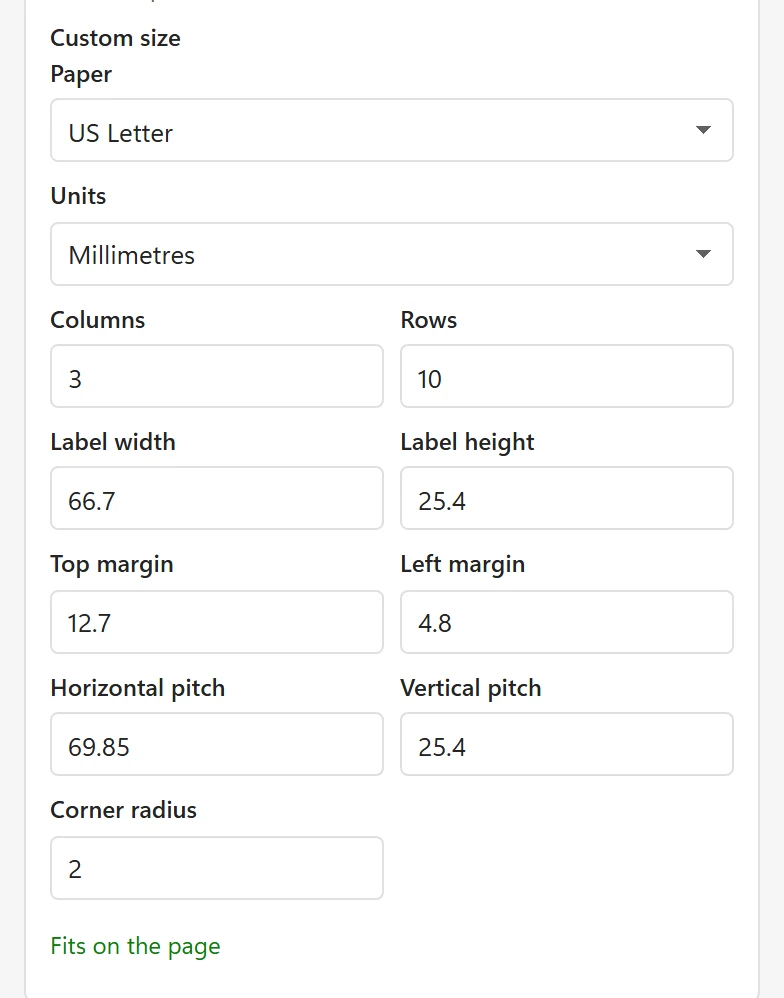
- The distance from the top edge of the sheet to the top of the first label (Top margin) and from the left edge to the left of the first label (Left margin).
- The distance from the left edge of one label to the left edge of the next one (Horizontal pitch): the label width plus the gap. The same down the page for Vertical pitch.
- For rounded corners, the radius of the corner (Corner radius). Use 0 for square corners.
The box of the labels often has a drawing with these numbers. If your labels touch each other, the pitch equals the label size.
Enter it #
- Choose your list in the pane.
- In the Label sheet card, open the Sheet list and choose Custom size at the end.
- Choose the Paper (US Letter or A4) and the Units (Millimetres or Inches). Changing the units converts the numbers.
- Fill the boxes. The panel starts with the numbers of the 30 per sheet address size, so you only change what is different. A decimal comma works.
LabelPop checks the numbers as you type. When they make a valid sheet, the panel says Fits on the page and the preview shows it. Leave Horizontal pitch and Vertical pitch empty (Same as label) when the labels touch.
If the numbers do not fit #
The panel shows the first problem in plain words, and the sheet is not changed until it is fixed:
- Horizontal pitch is smaller than the label width, so labels would overlap. (and the same for the vertical pitch) Check the pitch: it is the label size plus the gap, not the gap alone.
- Labels run past the right edge by 3.2 mm. or Labels run past the bottom edge by 1.5 mm. The margins, label size, pitch or count add up to more than the paper. Check them against the paper you chose.
- Columns must be a whole number from 1 to 100., Label width must be above 0. or Top margin cannot be negative. The Rows box gives the same message as Columns.
- Rows: enter a number. A box is empty or has letters in it.
Test before you print on labels #
Print the first page on plain paper at Actual size and hold it against the sheet in front of a window. If every label is off by the same amount, fix the margin or use calibration. If the error grows from the first label to the last, check the pitch.
Good to know #
- A custom size is a rectangle with optional rounded corners. For round labels use the built-in Round 2 in diameter, 12 per sheet.
- A custom size can be saved with a design: see Design your label.
- If you think a size belongs in the list for everybody, send it on the feature request page.