
LabelPop prints with built-in fonts that cover Latin letters (including accents such as é, ñ, ø and ł), Greek and Cyrillic, plus common punctuation, currency signs and symbols such as ™ and №. Characters outside that set cannot be printed. In version 1.0 that includes Chinese, Japanese and Korean characters, emoji, and right-to-left scripts such as Hebrew and Arabic.
How LabelPop tells you #
The notes under the preview name each row with such characters and show the characters: Row 12 has characters LabelPop cannot print: 你 好. Click the row number to select that row in Excel. When more than three rows are affected, the notes add a line such as 5 more rows have characters LabelPop cannot print.
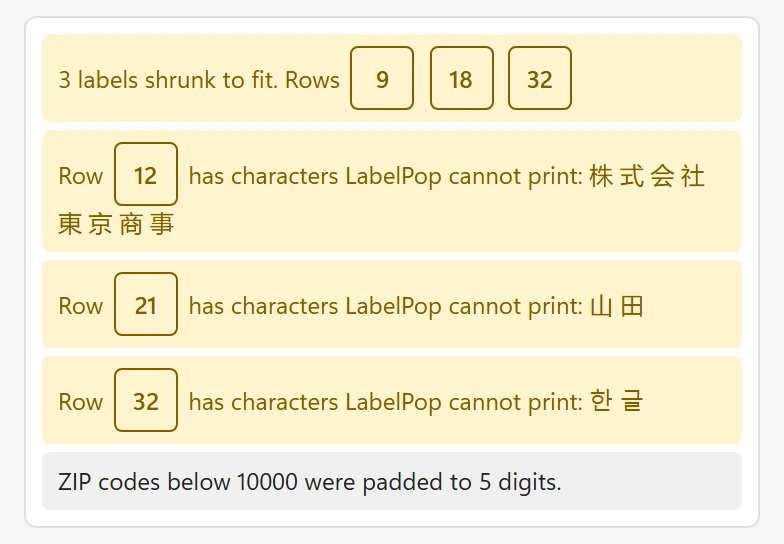
Right after the pane opens, the note Characters the font cannot print are checked once the label fonts have loaded. may show for a moment. If the fonts cannot load at all, the preview says The label fonts could not be loaded, so the preview is approximate and characters that cannot be printed are not checked yet. Check your internet connection, then change anything to try again.
What to do #
- Replace the characters in your list with letters from a supported alphabet, for example the Latin spelling of a name, or remove emoji.
- For a few labels, print the other labels with LabelPop and write the rest by hand.
- Try Label sheet in Excel. It writes the text into worksheet cells, so Excel’s own fonts draw it, and a character Excel can show may appear. It is less exact on die-cut sheets, so check the result before you print; see Print from an Excel sheet instead of a PDF.
Something else is missing #
- The end of a line is cut off. That is a fit problem, not a missing character. The preview marks it Text cut off and the notes say 2 labels are cut off. Shorten the text, lower the font size or choose a larger sheet; see Design your label.
- A whole line is missing. If every column of a line is empty for that row, the line is left out on purpose. If the line uses a column that is not in your list, the card says Not found in your list: {Name}. Use the column buttons to insert a column.
- A barcode is missing. Barcodes and QR codes need Pro; on the free version Pro options in your design (barcode) are left out of the free PDF.
- A row is missing. Empty rows (2 empty rows were skipped.), repeated addresses with One label per unique address (1 repeated address was left out.) and rows hidden by a filter are not printed.
Other alphabets are not part of version 1.0. If you need one, tell me on the feature request page.